• 中文版
  • BM
  • News
  • Deals
  • Reviews
    • First Impressions
    • Hands-on
    • Comparisons
  • Tech
    • Mobile
    • Computers
    • Cameras
    • Wearables
    • Audio
    • Drones
  • Telco
    • Celcom
    • Digi
    • Maxis
    • Time
    • Tune Talk
    • U Mobile
    • Unifi
    • Yes
  • Cars
  • Contribute
  • Jobs
Menu
  • 中文版
  • BM
  • News
  • Deals
  • Reviews
    • First Impressions
    • Hands-on
    • Comparisons
  • Tech
    • Mobile
    • Computers
    • Cameras
    • Wearables
    • Audio
    • Drones
  • Telco
    • Celcom
    • Digi
    • Maxis
    • Time
    • Tune Talk
    • U Mobile
    • Unifi
    • Yes
  • Cars
  • Contribute
  • Jobs
Search
  • Tech
    • News
    • Mobile
    • Computers
    • Cameras
    • Wearables
    • Audio
    • Drones
  • Telco
    • Celcom
    • Digi
    • Maxis
    • Time
    • U Mobile
    • Unifi
    • Yes
  • Reviews
    • First Impressions
    • Hands-on
    • Comparisons
  • Buyer’s Guide
  • Opinions
  • Digital Life
  • Video
  • Deals
  • How-To
  • Cars
  • Bahasa Melayu
  • EV
  • Contribute
  • Advertise
Menu
  • Tech
    • News
    • Mobile
    • Computers
    • Cameras
    • Wearables
    • Audio
    • Drones
  • Telco
    • Celcom
    • Digi
    • Maxis
    • Time
    • U Mobile
    • Unifi
    • Yes
  • Reviews
    • First Impressions
    • Hands-on
    • Comparisons
  • Buyer’s Guide
  • Opinions
  • Digital Life
  • Video
  • Deals
  • How-To
  • Cars
  • Bahasa Melayu
  • EV
  • Contribute
  • Advertise
Search
Close
Home News

Can’t check-in or view vaccination page on MySejahtera? Here’s how to fix it

  • BY Alexander Wong
  • 6 June 2021
  • 11:55 pm
  • Comment
Share on FacebookShare on Twitter

MySejahtera is Malaysia’s defacto app for contact tracing and managing your vaccination appointment. If you are facing problems checking in or can’t view your vaccination page, you’re not alone.

The recommended solution is to uninstall the app and reinstall again. The app is available on the Apple App Store, Google Play Store and the Huawei App Gallery.

Typically, the login id is your phone number but if you signed up using your email, you can login with your email address. If you forgot your password, you are able to reset the password from the login page.

For some of you, who face unresponsive 'Check-In' page, kindly uninstall and reinstall the MYSJ app.

Kindly note that 'Check-In' history in the app will be reset when reinstalled due to security reasons. MOH contact tracing database has a record of all your check-ins.

— MySejahtera (@my_sejahtera) June 5, 2021

Take note that you won’t be able to view your previous check-in history after you’ve uninstalled the app. According to MySejahtera, this was done intentionally due to security reasons and the Ministry of Health still has a record of your previous check-ins.

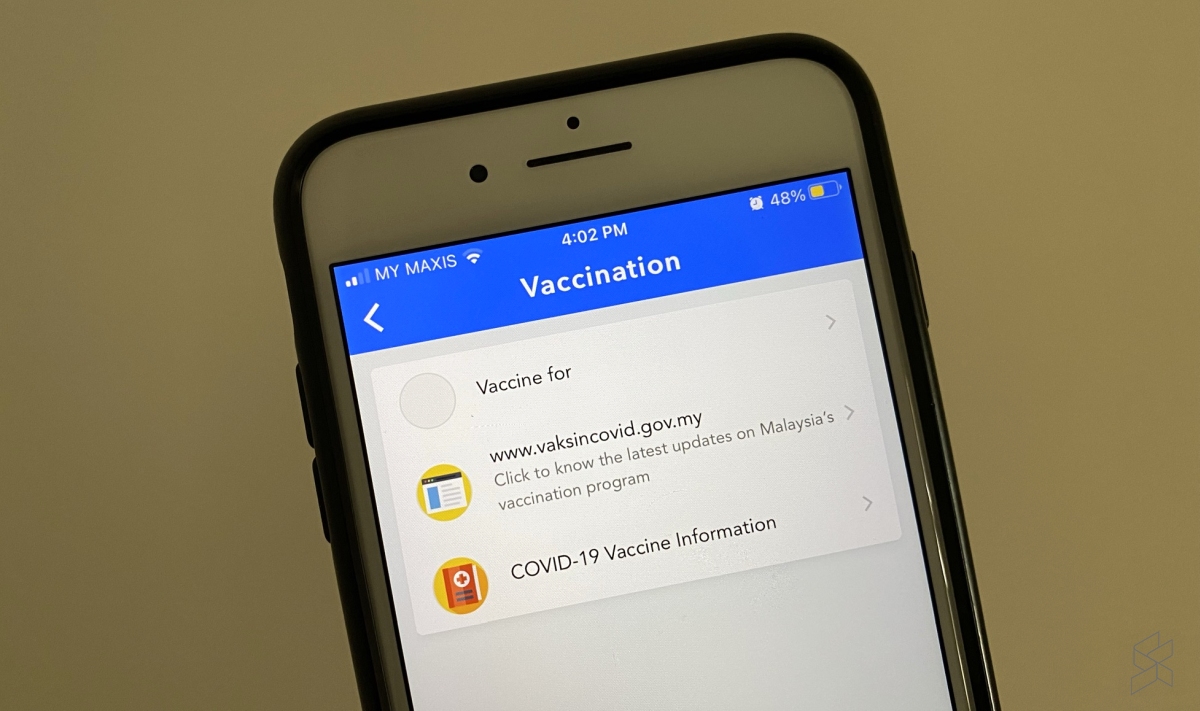
If you’ve previously registered for the vaccination or have received an appointment, you can still get the same information by going to the vaccination section from the home screen.

In case you missed it, MySejahtera has recently updated its helpdesk section which now allows you to troubleshoot vaccine-related issues. You can also request for appointment date change or cancellation from the helpdesk section. This feature can also be used if you’ve received an appointment at the wrong location.

For pregnant and breastfeeding mothers, you can now declare your current status on the MySejahtera app. This is to ensure that pregnant and breastfeeding mothers are given a suitable vaccine.

In case you didn’t know, MySejahtera works without an internet connection. If you’re in an area with poor data connectivity, you can check in faster by turning on airplane mode.


Related reading

Having issues with your vaccine appointment? You can now get help via MySejahtera
Khairy: Wrong vaccination appointment location due to confusion with Google API suggestions
[UPDATE] Can you enter malls and premises if your MySejahtera app shows Casual Contact status?
Tags: covid-19Covid-19 vaccineMySejahtera
Alexander Wong

Alexander Wong

POPULAR

Can’t check-in or view vaccination page on MySejahtera? Here’s how to fix it

June 6, 2021

SoyaCincau x Dongfeng Pop Up EV Clinic: Track Edition 2026: Chase a podium or cruise with friends; we’re opening the grid to everyone

May 13, 2026
Rear view of the OPPO Find X9 Ultra in Tundra Umber standing vertically on a stone surface with a lush green bokeh background. The device features an eco-friendly vegan leather back with a classic stitching design , vertically oriented Hasselblad and OPPO logos , and a large circular Master Lens camera module with a bronze-toned knurled ring.

Clearing Every Expectation: How the OPPO Find X9 Ultra Redefines the Modern Flagship Experience

April 16, 2026
BYD Inokom Visit - May 2026

BYD is here to stay in Malaysia: CKD with Sime Motors set to happen soon?

May 18, 2026

Volvo EX30 owners affected by recall told not to charge above 70% following two fire incidents in Thailand

May 19, 2026

Prasarana to introduce tap-in and tap-out with credit cards and QR payments for MRT, LRT and Bus Rides

May 22, 2026

Copyright © 2025 · SoyaCincau.com
Mind Blow Sdn Bhd (1076827-P)

  • ADVERTISE
  • DISCLAIMER

Copyright © 2026 · SoyaCincau.com – Mind Blow Sdn Bhd (1076827-P)

  • ADVERTISE
  • DISCLAIMER