• 中文版
  • BM
  • News
  • Deals
  • Reviews
    • First Impressions
    • Hands-on
    • Comparisons
  • Tech
    • Mobile
    • Computers
    • Cameras
    • Wearables
    • Audio
    • Drones
  • Telco
    • Celcom
    • Digi
    • Maxis
    • Time
    • Tune Talk
    • U Mobile
    • Unifi
    • Yes
  • Cars
  • Contribute
  • Jobs
Menu
  • 中文版
  • BM
  • News
  • Deals
  • Reviews
    • First Impressions
    • Hands-on
    • Comparisons
  • Tech
    • Mobile
    • Computers
    • Cameras
    • Wearables
    • Audio
    • Drones
  • Telco
    • Celcom
    • Digi
    • Maxis
    • Time
    • Tune Talk
    • U Mobile
    • Unifi
    • Yes
  • Cars
  • Contribute
  • Jobs
Search
  • Tech
    • News
    • Mobile
    • Computers
    • Cameras
    • Wearables
    • Audio
    • Drones
  • Telco
    • Celcom
    • Digi
    • Maxis
    • Time
    • U Mobile
    • Unifi
    • Yes
  • Reviews
    • First Impressions
    • Hands-on
    • Comparisons
  • Buyer’s Guide
  • Opinions
  • Digital Life
  • Video
  • Deals
  • How-To
  • Cars
  • Bahasa Melayu
  • EV
  • Contribute
  • Advertise
Menu
  • Tech
    • News
    • Mobile
    • Computers
    • Cameras
    • Wearables
    • Audio
    • Drones
  • Telco
    • Celcom
    • Digi
    • Maxis
    • Time
    • U Mobile
    • Unifi
    • Yes
  • Reviews
    • First Impressions
    • Hands-on
    • Comparisons
  • Buyer’s Guide
  • Opinions
  • Digital Life
  • Video
  • Deals
  • How-To
  • Cars
  • Bahasa Melayu
  • EV
  • Contribute
  • Advertise
Search
Close
Home Digital Life

Here’s how to stream Disney+ Hotstar on TV using your Astro Ultra Box

  • BY Raymond Saw
  • 28 April 2022
  • 2:41 pm
  • Comment
Share on FacebookShare on Twitter

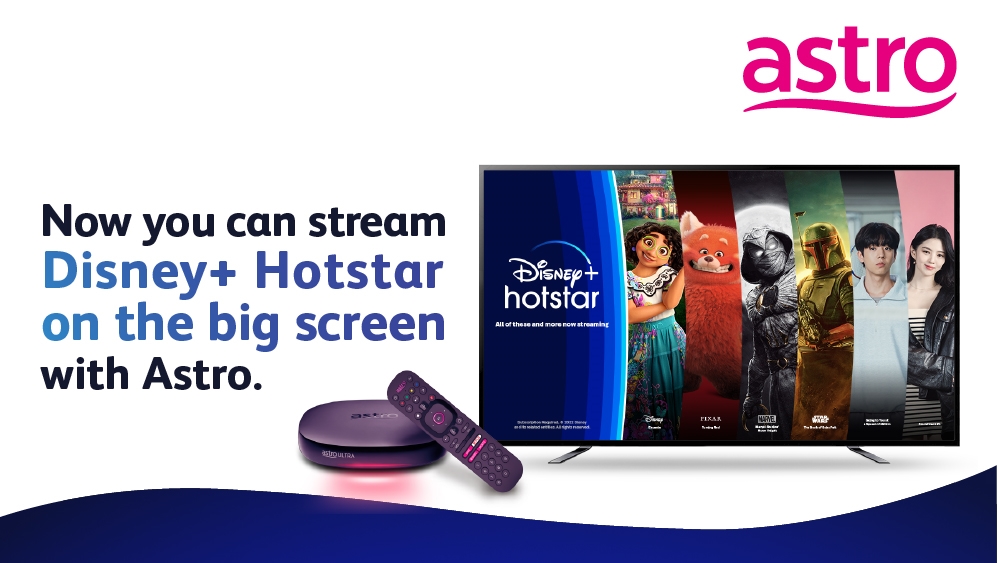
With Netflix now available for streaming on the Astro set top boxes, the pay TV operator has now announced that Disney+ Hotstar is also available for Astro Ultra Box users. Astro customers subscribed to their TV and streaming apps bundle as well as customers subscribed to Movies, Premium 1, Premium 3 and Platinum Packs will have access to the service via the Astro Ultra Box.

Here’s how to access Disney+ Hotstar on your Astro Ultra Box

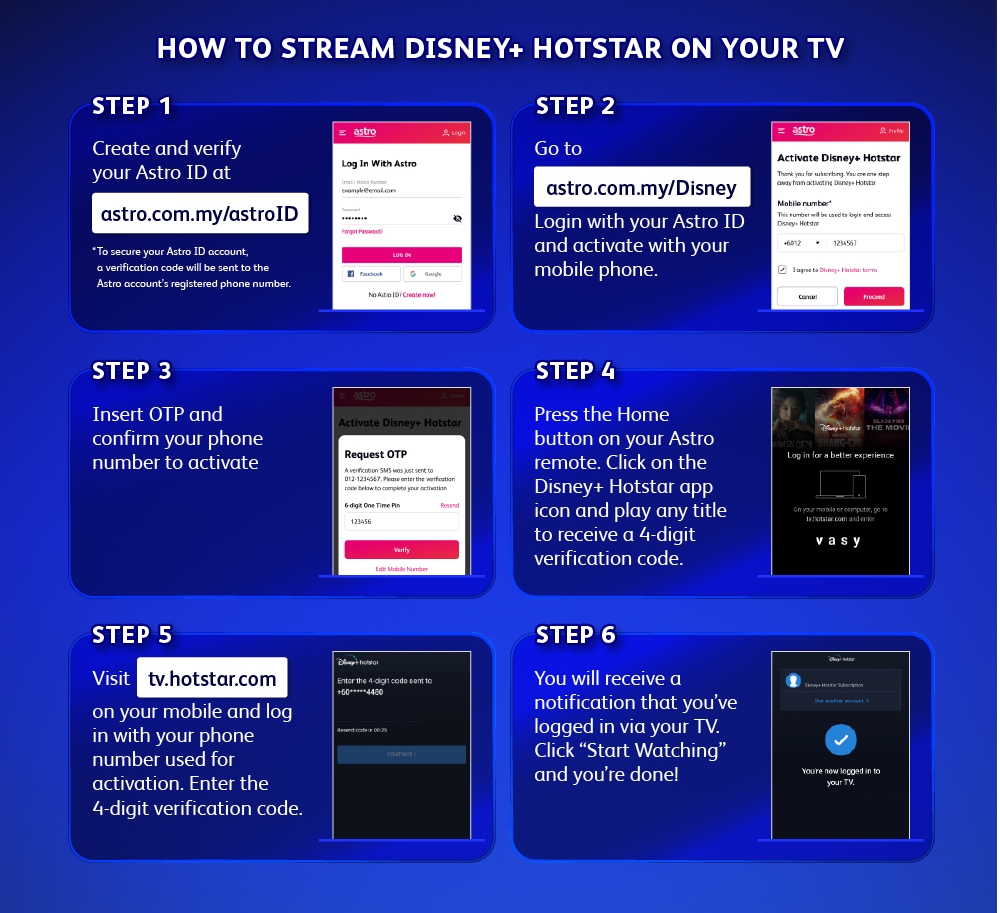
If you’re an Astro user that meets those requirements, here’s how to access Disney+ Hotstar on your Astro Ultra Box. For starters, you’ll first need to head over to astro.com.my/astroID on your browser to create and verify your Astro ID. You’ll want to make sure that you have access to the registered phone number of the Astro account holder here for verification purposes. Once that’s done, or maybe you already have an Astro ID, you can then head to astro.com.my/Disney to login with your Astro ID and activate the Disney+ Hotstar for your Astro account. You’ll again need your phone here to get an OTP to key in.

Following that, you can go back to your TV and Astro Ultra Box. Click the Home button on your Astro remote and then click on the Disney+ Hotstar app icon on the screen. Once you’re in the app, simply try to play any title there to receive a 4-digit verification code. You’ll need to visit tv.hotstar.com on your smartphone and key in the same 4-digit verification code you got on the TV screen. With that done you’ll get a final notification that you’re logged in to Disney+ Hotstar on your TV. Simply press ‘Start Watching’ to, well, start watching.
Disney+ Hotstar is still not available on Astro Ulti Box

It’s certainly taken a little longer than expected though for Disney+ Hotstar to come to Astro’s boxes. Back when the Netflix app was first made available on the Astro Ultra Box late last year it was expected that Disney+ Hotstar would follow by the end of the year. In fact, even Netflix only made it to Astro Ulti Box users in March, with no word just yet on when Disney+ Hotstar will come to Astro’s non-4K connected box.

Nevertheless, we expect plenty of Astro subscribers to hop onto Disney+ Hotstar to catch their favourite shows such as Marvel’s Eternals. Alternatively, if you don’t have Astro but are instead subscribed to Telekom Malaysia’s Unifi TV Ultimate Pack, you too can enjoy Disney+ Hotstar for free—you can click here to find out more.


Tags: AstroAstro MalaysiaAstro Ultra BoxDisney Plus HotstarDisney+ HotstarNetflixstreaming
Raymond Saw

Raymond Saw

POPULAR

Here’s how to stream Disney+ Hotstar on TV using your Astro Ultra Box

April 28, 2022
Rear view of the OPPO Find X9 Ultra in Tundra Umber standing vertically on a stone surface with a lush green bokeh background. The device features an eco-friendly vegan leather back with a classic stitching design , vertically oriented Hasselblad and OPPO logos , and a large circular Master Lens camera module with a bronze-toned knurled ring.

Clearing Every Expectation: How the OPPO Find X9 Ultra Redefines the Modern Flagship Experience

April 16, 2026

Volvo EX30 owners affected by recall told not to charge above 70% following two fire incidents in Thailand

May 19, 2026

SoyaCincau x Dongfeng Pop Up EV Clinic: Track Edition 2026: Chase a podium or cruise with friends; we’re opening the grid to everyone

May 13, 2026
BYD Inokom Visit - May 2026

BYD is here to stay in Malaysia: CKD with Sime Motors set to happen soon?

May 18, 2026

SoyaCincau x Dongfeng: We’re taking over Sepang for Malaysia’s biggest EV Track Day for 2026

May 8, 2026

Copyright © 2025 · SoyaCincau.com
Mind Blow Sdn Bhd (1076827-P)

  • ADVERTISE
  • DISCLAIMER

Copyright © 2026 · SoyaCincau.com – Mind Blow Sdn Bhd (1076827-P)

  • ADVERTISE
  • DISCLAIMER