• 中文版
  • BM
  • News
  • Deals
  • Reviews
    • First Impressions
    • Hands-on
    • Comparisons
  • Tech
    • Mobile
    • Computers
    • Cameras
    • Wearables
    • Audio
    • Drones
  • Telco
    • Celcom
    • Digi
    • Maxis
    • Time
    • Tune Talk
    • U Mobile
    • Unifi
    • Yes
  • Cars
  • Contribute
  • Jobs
Menu
  • 中文版
  • BM
  • News
  • Deals
  • Reviews
    • First Impressions
    • Hands-on
    • Comparisons
  • Tech
    • Mobile
    • Computers
    • Cameras
    • Wearables
    • Audio
    • Drones
  • Telco
    • Celcom
    • Digi
    • Maxis
    • Time
    • Tune Talk
    • U Mobile
    • Unifi
    • Yes
  • Cars
  • Contribute
  • Jobs
Search
  • Tech
    • News
    • Mobile
    • Computers
    • Cameras
    • Wearables
    • Audio
    • Drones
  • Telco
    • Celcom
    • Digi
    • Maxis
    • Time
    • U Mobile
    • Unifi
    • Yes
  • Reviews
    • First Impressions
    • Hands-on
    • Comparisons
  • Buyer’s Guide
  • Opinions
  • Digital Life
  • Video
  • Deals
  • How-To
  • Cars
  • Bahasa Melayu
  • EV
  • Contribute
  • Advertise
Menu
  • Tech
    • News
    • Mobile
    • Computers
    • Cameras
    • Wearables
    • Audio
    • Drones
  • Telco
    • Celcom
    • Digi
    • Maxis
    • Time
    • U Mobile
    • Unifi
    • Yes
  • Reviews
    • First Impressions
    • Hands-on
    • Comparisons
  • Buyer’s Guide
  • Opinions
  • Digital Life
  • Video
  • Deals
  • How-To
  • Cars
  • Bahasa Melayu
  • EV
  • Contribute
  • Advertise
Search
Close
Home Digital Life Apps

TikTok is testing a “watch history” feature, but here’s how to find lost videos in the meantime

  • BY Dzamira Dzafri
  • 29 March 2022
  • 11:53 am
  • Comment
Share on FacebookShare on Twitter

I’ve often had the time of my life scrolling through my TikTok‘s FYP until I accidentally press something like the refresh button, and the video I was watching is now lost in the void. Well, some TikTok-ers have already figured out a way to watch lost videos, but it can be a little troublesome. TikTok, however, is testing out a much easier way—by having a “watch history” feature.

Okay, so what happens when you’re scrolling through TikTok sometimes is accidentally pressing either the Home button at the bottom of the screen or the For You button at the top of the screen to “refresh” the app. In doing so, the video you might be enjoying can get lost forever if you did not remember who made it—especially if it’s not a particularly popular TikTok video.

@rachforaday

here’s how to find that TikTok that you accidentally refreshed #tiktokhack #tiktoktips #losttiktok #socialmediatips and if you remember some of the audio this way is even faster » @rachforaday

♬ find a TikTok you refreshed – Rach

It’s a common problem for TikTok users, as the refresh buttons can easily be pressed accidentally. It’s so common that TikTok user @rachforaday posted a video teaching viewers a workaround for it.

“Do you know when you accidentally refresh TikTok when you’re three seconds into the best… divine video of your life? Here’s how to find that video,” said @rachforaday.

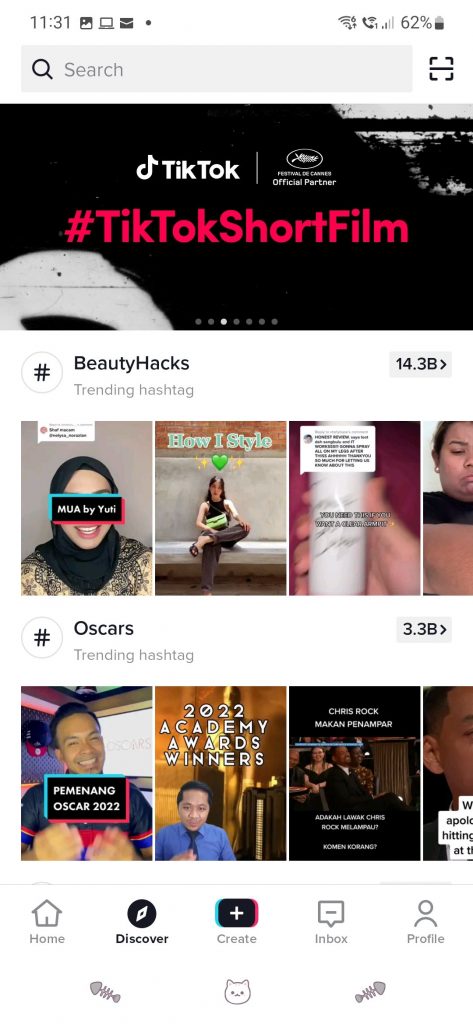
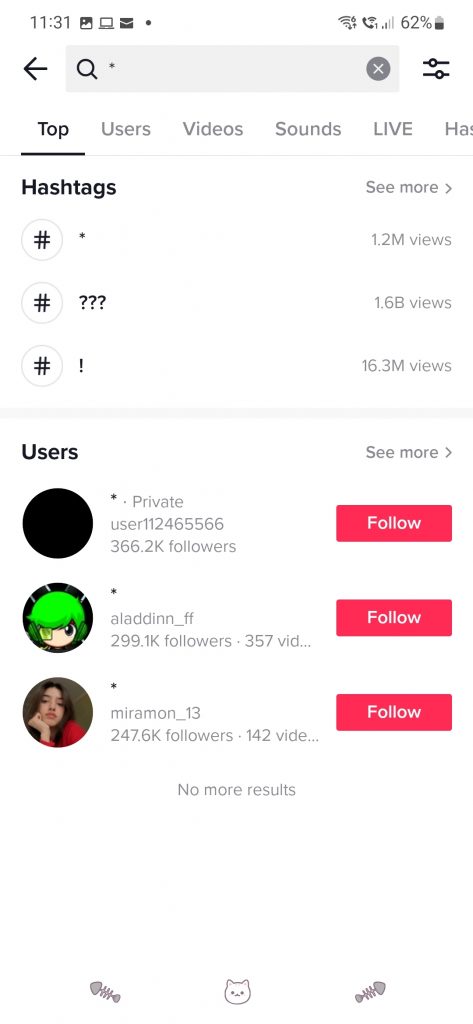
To find your lost video, press the Discover button at the bottom of the screen. Press the Search section of the Discover page and type in the asterisk (*), then press the filters button on the top right.
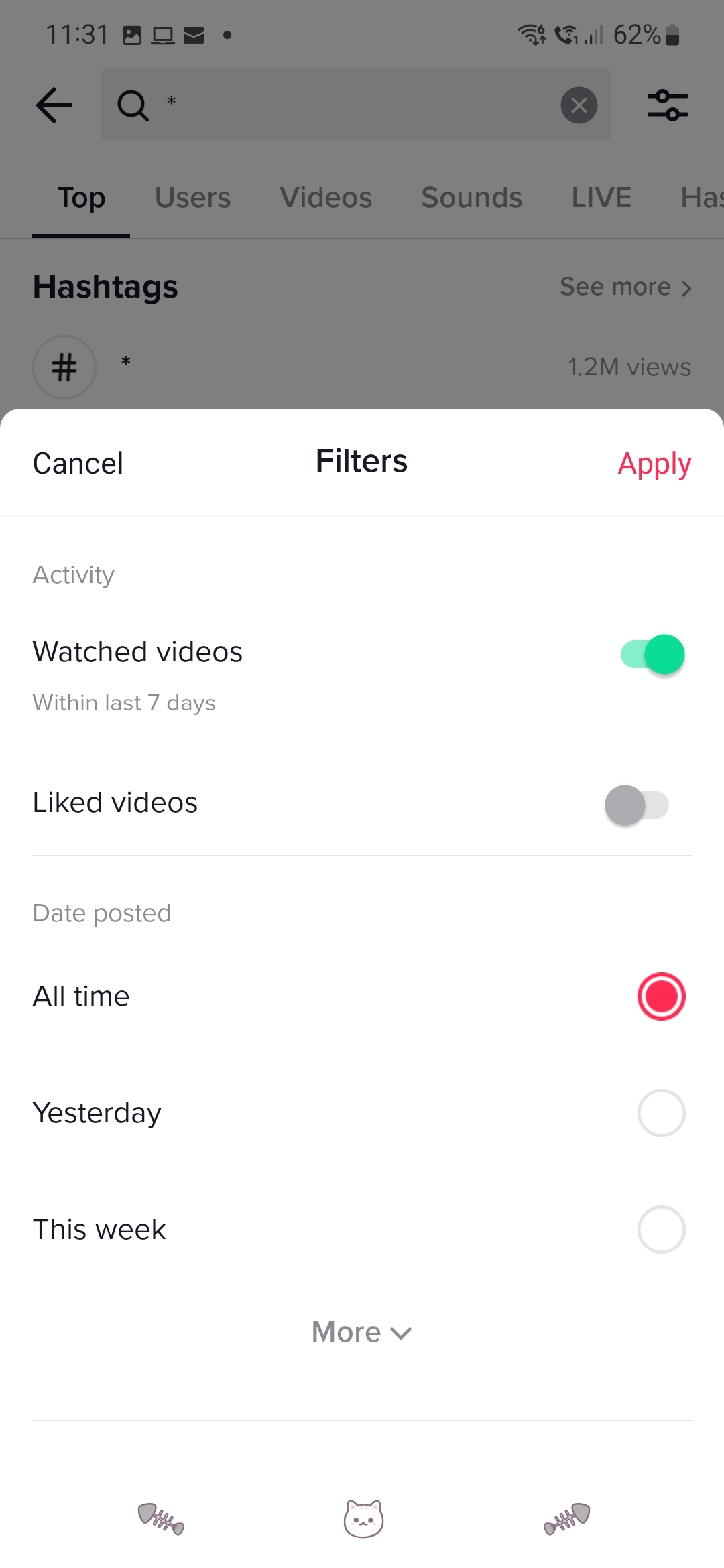

Under Filters, swipe the “Watched videos” option—where it says you can find videos watched within the last 7 days. You’d then might be able to find the video you’re looking for. If you know a little more information about the TikTok video you want to find, you can type in more specific stuff and search via the “Watched videos” filter.

Besides this method, there’s a more inconvenient way, which is for users to download their entire data from the app and access a zip file showing their “video browsing history”. But, I’d rather not download an entire browsing history to find one video.

NEW! TikTok Watch History https://t.co/vxXy9L0VJb

— Matt Navarra (I quit X. Follow me on Threads) (@MattNavarra) March 26, 2022

TikTok reportedly is testing out a “Watch history” feature that would let users find that lost video with just a few steps through Settings. According to the platform, it plans to expand the test and roll out the feature to more users.

“We’re always thinking about new ways to bring value to our community and enrich the TikTok experience,” said a TikTok spokesperson.

Hopefully, TikTok rolls out the feature to more users—because I would love something like it. The workarounds could work if I’m desperate, but if it’s too much work to find it I would rather forget it.

[ SOURCE ]

Related reading

  • TikTok really wants to make its “Stories” feature a thing, but no one wants it
  • TikTok is expanding its max video length to 10 minutes. Will this ruin the app’s appeal?
Tags: TikTokTikTok For You PageTikTok Watch History
Dzamira Dzafri

Dzamira Dzafri

POPULAR

TikTok is testing a “watch history” feature, but here’s how to find lost videos in the meantime

March 29, 2022

2026 Proton Saga revealed: 1.5L i-GT engine, L1 ADAS, dual screens, wireless Apple CarPlay

November 3, 2025

CelcomDigi, Maxis and YTL set to take over MOF’s DNB stake for nearly RM1 billion

November 7, 2025

OnePlus 15 coming this 13 November. Malaysia’s first Snapdragon 8 Elite Gen 5 smartphone?

November 4, 2025

CIMB launches OCTO Biz app with AI tools and instant financing for SMEs

October 9, 2025

TNG showcases Titan Flow, Barrier-less MLFF tolling system that uses RFID, ANPR, LiDAR and AI

November 5, 2025

Copyright © 2025 · SoyaCincau.com
Mind Blow Sdn Bhd (1076827-P)

  • ADVERTISE
  • DISCLAIMER

Copyright © 2025 · SoyaCincau.com – Mind Blow Sdn Bhd (1076827-P)

  • ADVERTISE
  • DISCLAIMER