• 中文版
  • BM
  • News
  • Deals
  • Reviews
    • First Impressions
    • Hands-on
    • Comparisons
  • Tech
    • Mobile
    • Computers
    • Cameras
    • Wearables
    • Audio
    • Drones
  • Telco
    • Celcom
    • Digi
    • Maxis
    • Time
    • Tune Talk
    • U Mobile
    • Unifi
    • Yes
  • Cars
  • Contribute
  • Jobs
Menu
  • 中文版
  • BM
  • News
  • Deals
  • Reviews
    • First Impressions
    • Hands-on
    • Comparisons
  • Tech
    • Mobile
    • Computers
    • Cameras
    • Wearables
    • Audio
    • Drones
  • Telco
    • Celcom
    • Digi
    • Maxis
    • Time
    • Tune Talk
    • U Mobile
    • Unifi
    • Yes
  • Cars
  • Contribute
  • Jobs
Search
  • Tech
    • News
    • Mobile
    • Computers
    • Cameras
    • Wearables
    • Audio
    • Drones
  • Telco
    • Celcom
    • Digi
    • Maxis
    • Time
    • U Mobile
    • Unifi
    • Yes
  • Reviews
    • First Impressions
    • Hands-on
    • Comparisons
  • Buyer’s Guide
  • Opinions
  • Digital Life
  • Video
  • Deals
  • How-To
  • Cars
  • Bahasa Melayu
  • EV
  • Contribute
  • Advertise
Menu
  • Tech
    • News
    • Mobile
    • Computers
    • Cameras
    • Wearables
    • Audio
    • Drones
  • Telco
    • Celcom
    • Digi
    • Maxis
    • Time
    • U Mobile
    • Unifi
    • Yes
  • Reviews
    • First Impressions
    • Hands-on
    • Comparisons
  • Buyer’s Guide
  • Opinions
  • Digital Life
  • Video
  • Deals
  • How-To
  • Cars
  • Bahasa Melayu
  • EV
  • Contribute
  • Advertise
Search
Close
Home Tech Computers

Microsoft won’t stop you installing Windows 11 on older PCs, but you may not want to

  • BY Raymond Saw
  • 28 August 2021
  • 6:25 pm
  • Comment
Share on FacebookShare on Twitter

After the initial blowback of Windows 11’s surprisingly high CPU requirements, Microsoft had promised to test older CPUs for Windows 11 compatibility. Now, they’ve finally revealed which older CPUs will natively support Windows 11 and they’ve added…. not much.

In a new post on the Windows Insider Blog, Microsoft reveals that following their testing, they will be adding the 7th generation high-end Intel Core X-series and the workstation Xeon W-series of processors, as well as the Intel Core i7-7820HQ, the only mainstream processor to make the list. Coincidentally, the Core i7-7820HQ is also the CPU used in Microsoft’s Surface Studio 2, their all-in-one desktop. In fact, there’s only a total of three machines with that processor under the hood.

In case you were wondering, there are only THREE devices with the 7820HQ that are supported on Windows 11 lol pic.twitter.com/fHakhabsCa

— Zac Bowden (@zacbowden) August 28, 2021

As for AMD users, you’ll be disappointed to know that Microsoft won’t be adding any first gen AMD Zen CPUs into the list of Windows 11-compatible processors. That being said, Microsoft has also confirmed that they won’t be stopping you from installing Windows 11 onto any hardware you want. You just won’t be able to upgrade it via Windows 10; instead you’ll have to manually install it using an ISO file of Windows 11.

The downside of doing so, apart from having to do it manually, is that you’ll likely not get any Windows 11 updates. Not only that, but you may not get crucial security updates as well, potentially making your PC’s security worse than if it was still running Windows 10. In Microsoft’s defense though, they do claim to have solid reasons behind their decision.

According to Microsoft, internal testing showed that devices that didn’t meet their system requirements had 52% more kernel mode crashes. Devices that do meet the Windows 11 minimum system requirements on the other hand only crashed 0.02% of the time. That being said, we don’t know the exact components used in the ‘devices that don’t meet minimum system requirements’.

Lastly, Microsoft also finally released an updated preview version of the PC Health Check app. This app was supposed to check your computer’s hardware to see if it was eligible for Windows 11 or not, but its initial version led to more confusion than answers. This new version expands on the eligibility check and now tells you what components exactly are missing or lacking to make it Windows 11-compatible.
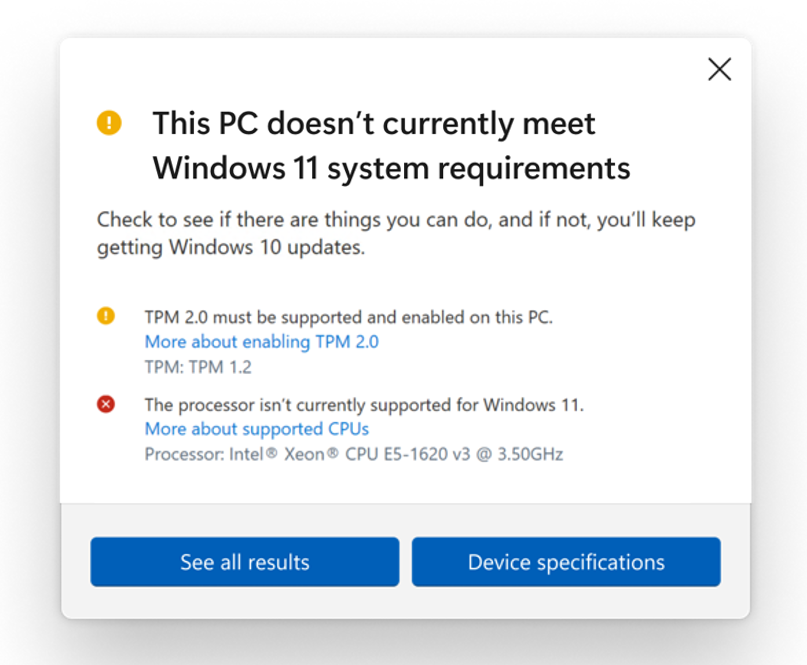
If you’d like to download the new PC Health Check app, you can click here to download it, though do note that you’ll first need to be part of the Windows Insider program. You can also read Microsoft’s new blog post in full on their Windows Insider Blog.

[ SOURCE 2 ]

Tags: AMDintelmicrosoftmicrosoft windows 11Windowswindows 11
Raymond Saw

Raymond Saw

POPULAR

Microsoft won’t stop you installing Windows 11 on older PCs, but you may not want to

August 28, 2021

Samsung Galaxy A26 5G for Just RM1,099: The Most A-mazing Deal in Town?

December 22, 2025

Max Out Your Samsung Galaxy S25’s Camera Potential with These Must-Try Features

December 23, 2025

We Took the Samsung Galaxy S25 Ultra for a Festive Night Shoot: Here’s What We Learnt

December 23, 2025

Instagram “Reset your Password” Email: Is there a Data Breach at Meta?

January 11, 2026

Grab the Samsung Galaxy Z Flip7 with up to RM2,550 savings this holiday season

December 27, 2025

Copyright © 2025 · SoyaCincau.com
Mind Blow Sdn Bhd (1076827-P)

  • ADVERTISE
  • DISCLAIMER

Copyright © 2026 · SoyaCincau.com – Mind Blow Sdn Bhd (1076827-P)

  • ADVERTISE
  • DISCLAIMER