• 中文版
  • BM
  • News
  • Deals
  • Reviews
    • First Impressions
    • Hands-on
    • Comparisons
  • Tech
    • Mobile
    • Computers
    • Cameras
    • Wearables
    • Audio
    • Drones
  • Telco
    • Celcom
    • Digi
    • Maxis
    • Time
    • Tune Talk
    • U Mobile
    • Unifi
    • Yes
  • Cars
  • Contribute
  • Jobs
Menu
  • 中文版
  • BM
  • News
  • Deals
  • Reviews
    • First Impressions
    • Hands-on
    • Comparisons
  • Tech
    • Mobile
    • Computers
    • Cameras
    • Wearables
    • Audio
    • Drones
  • Telco
    • Celcom
    • Digi
    • Maxis
    • Time
    • Tune Talk
    • U Mobile
    • Unifi
    • Yes
  • Cars
  • Contribute
  • Jobs
Search
  • Tech
    • News
    • Mobile
    • Computers
    • Cameras
    • Wearables
    • Audio
    • Drones
  • Telco
    • Celcom
    • Digi
    • Maxis
    • Time
    • U Mobile
    • Unifi
    • Yes
  • Reviews
    • First Impressions
    • Hands-on
    • Comparisons
  • Buyer’s Guide
  • Opinions
  • Digital Life
  • Video
  • Deals
  • How-To
  • Cars
  • Bahasa Melayu
  • EV
  • Contribute
  • Advertise
Menu
  • Tech
    • News
    • Mobile
    • Computers
    • Cameras
    • Wearables
    • Audio
    • Drones
  • Telco
    • Celcom
    • Digi
    • Maxis
    • Time
    • U Mobile
    • Unifi
    • Yes
  • Reviews
    • First Impressions
    • Hands-on
    • Comparisons
  • Buyer’s Guide
  • Opinions
  • Digital Life
  • Video
  • Deals
  • How-To
  • Cars
  • Bahasa Melayu
  • EV
  • Contribute
  • Advertise
Search
Close
Home News

Gmail for iPad finally supports Split View multitasking after 5 years

  • BY Nic Ker
  • 9 July 2020
  • 12:42 pm
  • Comment
Share on FacebookShare on Twitter

When Apple first introduced Split View multitasking for iOS 9 back in 2015, it was heralded as a big deal for mobile devices. The continued development of the iPad as a substitute for laptops (what’s a computer?) also meant that the reliance on Split View multitasking grew through the years—although not every app supported the functionality at first.

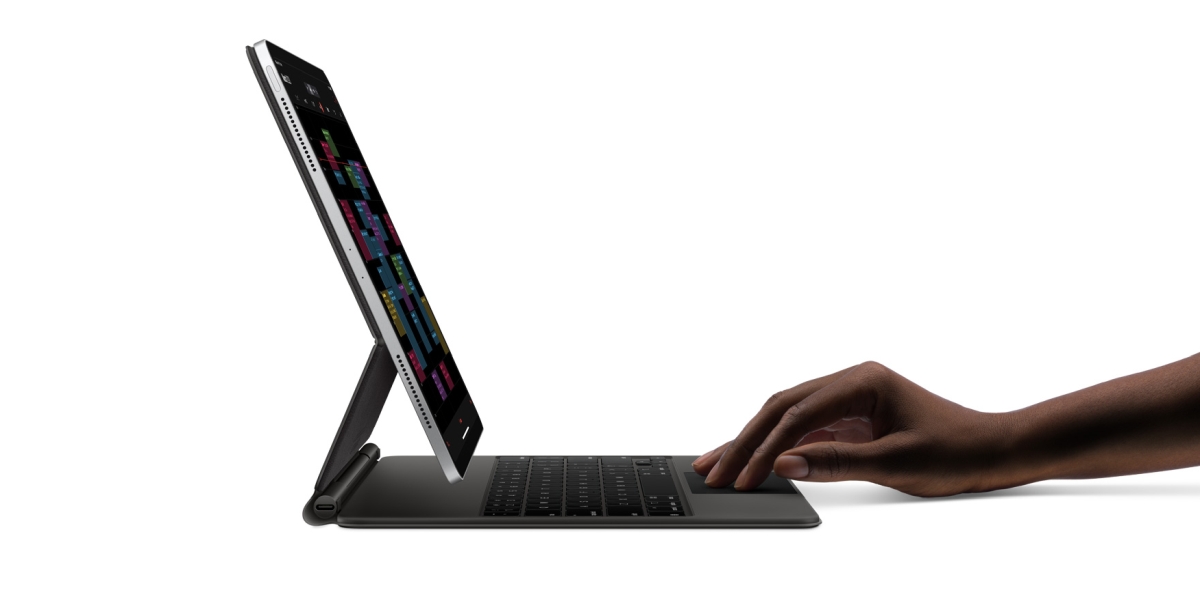
And now, Google has finally announced that Split View multitasking support is coming to Gmail for iPad after five long years. In case you aren’t familiar with the iOS multitasking feature, you’ll need to drag an app out of the dock and slide it to the left/right of your screen—while having another app open.

Split View will work with Gmail alongside other supported iOS applications. For example, you’ll be able to view Gmail and Google Chrome windows side-by-side, or even drag photos from one application to the other via Split View. To be utterly frank, the feature has been around (and widely used) for a long time now, and I can’t understand what has taken Google this long to bring over support for the iPad.
Split View

For now, this means that multitasking is now supported on a number of Google’s popular apps. There’s Docs, Sheets, and Slides, as well as YouTube and Chrome—so the addition of Split View to Gmail for iPad has certainly been a long, long time coming.

You won’t need to actually enable the feature; it’s on by default. However, if you’ve managed to somehow disable multitasking on your iPad, head over to Settings > Home Screen & Dock > Multitasking, and select “Allow Multiple Apps”.

The feature is now available to all users, so be sure to check the App Store on your iPad to update to the latest version of the Gmail for iPad. To find out more, click here.

Related reading

iPad: Finally, you can now use Microsoft Office in Split View
At long last, Dark Mode for Facebook is coming to mobile users soon
Tags: AppleGmailiPadiPhoneMobile
Nic Ker

Nic Ker

POPULAR

Gmail for iPad finally supports Split View multitasking after 5 years

July 9, 2020

The Foldable Paradox: Why the “Best” Phone Depends Entirely on Your Routine

September 14, 2026

How Do You Want to Pay for Your iPhone 18 Pro? 3 Ways to Get More Value

September 18, 2026

BeONE Mobile officially launches as Maxis-powered MVNO, 150GB prepaid plan from RM25

September 28, 2026

Uniqlo Proton Collection coming soon: Featuring e.MAS 7, S70, X50, Satria Neo R3, and 1985 Saga

September 25, 2026

Maybank BTS World Tour Arirang debit card: Everything you need to know before applying

September 24, 2026

Copyright © 2026 · SoyaCincau.com
Mind Blow Sdn Bhd (1076827-P)

  • ADVERTISE
  • DISCLAIMER

Copyright © 2026 · SoyaCincau.com – Mind Blow Sdn Bhd (1076827-P)

  • ADVERTISE
  • DISCLAIMER