• 中文版
  • BM
  • News
  • Deals
  • Reviews
    • First Impressions
    • Hands-on
    • Comparisons
  • Tech
    • Mobile
    • Computers
    • Cameras
    • Wearables
    • Audio
    • Drones
  • Telco
    • Celcom
    • Digi
    • Maxis
    • Time
    • Tune Talk
    • U Mobile
    • Unifi
    • Yes
  • Cars
  • Contribute
  • Jobs
Menu
  • 中文版
  • BM
  • News
  • Deals
  • Reviews
    • First Impressions
    • Hands-on
    • Comparisons
  • Tech
    • Mobile
    • Computers
    • Cameras
    • Wearables
    • Audio
    • Drones
  • Telco
    • Celcom
    • Digi
    • Maxis
    • Time
    • Tune Talk
    • U Mobile
    • Unifi
    • Yes
  • Cars
  • Contribute
  • Jobs
Search
  • Tech
    • News
    • Mobile
    • Computers
    • Cameras
    • Wearables
    • Audio
    • Drones
  • Telco
    • Celcom
    • Digi
    • Maxis
    • Time
    • U Mobile
    • Unifi
    • Yes
  • Reviews
    • First Impressions
    • Hands-on
    • Comparisons
  • Buyer’s Guide
  • Opinions
  • Digital Life
  • Video
  • Deals
  • How-To
  • Cars
  • Bahasa Melayu
  • EV
  • Contribute
  • Advertise
Menu
  • Tech
    • News
    • Mobile
    • Computers
    • Cameras
    • Wearables
    • Audio
    • Drones
  • Telco
    • Celcom
    • Digi
    • Maxis
    • Time
    • U Mobile
    • Unifi
    • Yes
  • Reviews
    • First Impressions
    • Hands-on
    • Comparisons
  • Buyer’s Guide
  • Opinions
  • Digital Life
  • Video
  • Deals
  • How-To
  • Cars
  • Bahasa Melayu
  • EV
  • Contribute
  • Advertise
Search
Close
Home News

iOS 11.3.1 fixes iPhone 8 unresponsive screen issue

  • BY Alexander Wong
  • 25 April 2018
  • 11:30 am
  • Comment
Share on FacebookShare on Twitter

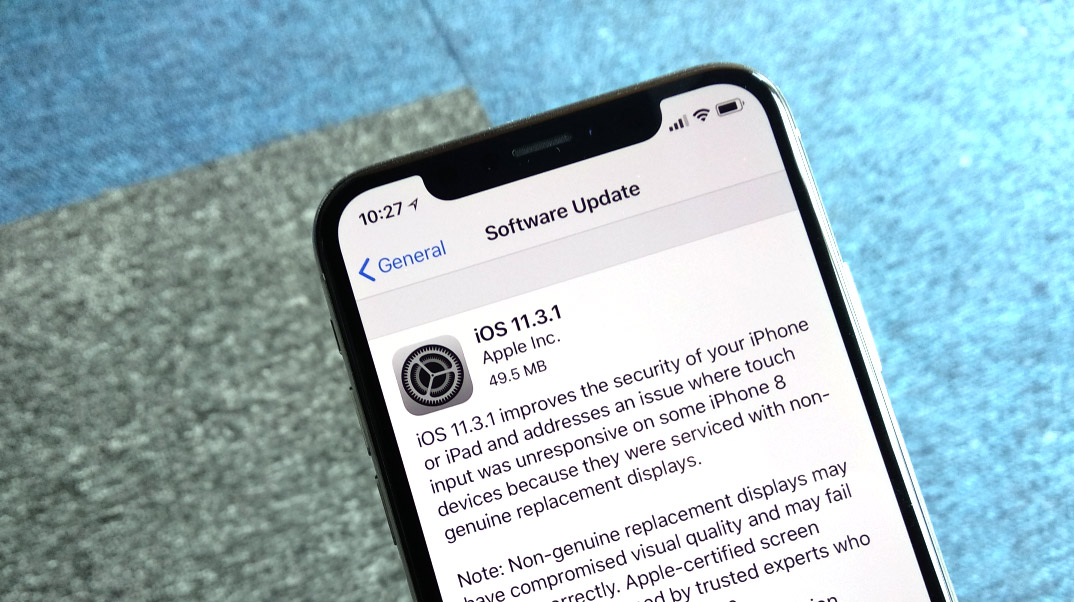
Apple has just pushed out its new iOS 11.3.1 update which not only improves security but also fixes an issue that affects some iPhone 8 devices. Apparently, some iPhone 8 users are having unresponsive touch input after a screen replacement.

According to Apple, this affects those who have repaired their iPhone 8 with non-genuine replacement displays. They also emphasised that non-genuine parts may compromise visual quality and may fail to work as intended.

The iOS 11.3.1 update is available now and you can check manually under Settings > General > Software Update.

[ SOURCE ]

Tags: AppleiOSiOS 11iOS 11.3.1iOS updateiPhoneiPhone 8
Alexander Wong

Alexander Wong

POPULAR

iOS 11.3.1 fixes iPhone 8 unresponsive screen issue

April 25, 2018

Malaysia to review EV policy amid concerns over strict rules affecting BYD CKD operations in Tanjung Malim

April 17, 2026
TQ Wuling Bingo EV Malaysia

TQ Wuling Bingo is now available for rental in Malaysia via GoEV

April 14, 2026

Honda Super-One: The affordable compact EV Malaysians need?

April 14, 2026

Honor 600 series makes its debut in Malaysia on 22 April, featuring 200MP camera with AI Image to Video 2.0

April 13, 2026

Malaysia’s EV charging network is still broken? Raya trip almost turns into a disaster | Let’s Talk About #139

April 15, 2026

Copyright © 2025 · SoyaCincau.com
Mind Blow Sdn Bhd (1076827-P)

  • ADVERTISE
  • DISCLAIMER

Copyright © 2026 · SoyaCincau.com – Mind Blow Sdn Bhd (1076827-P)

  • ADVERTISE
  • DISCLAIMER