• 中文版
  • BM
  • News
  • Deals
  • Reviews
    • First Impressions
    • Hands-on
    • Comparisons
  • Tech
    • Mobile
    • Computers
    • Cameras
    • Wearables
    • Audio
    • Drones
  • Telco
    • Celcom
    • Digi
    • Maxis
    • Time
    • Tune Talk
    • U Mobile
    • Unifi
    • Yes
  • Cars
  • Contribute
  • Jobs
Menu
  • 中文版
  • BM
  • News
  • Deals
  • Reviews
    • First Impressions
    • Hands-on
    • Comparisons
  • Tech
    • Mobile
    • Computers
    • Cameras
    • Wearables
    • Audio
    • Drones
  • Telco
    • Celcom
    • Digi
    • Maxis
    • Time
    • Tune Talk
    • U Mobile
    • Unifi
    • Yes
  • Cars
  • Contribute
  • Jobs
Search
  • Tech
    • News
    • Mobile
    • Computers
    • Cameras
    • Wearables
    • Audio
    • Drones
  • Telco
    • Celcom
    • Digi
    • Maxis
    • Time
    • U Mobile
    • Unifi
    • Yes
  • Reviews
    • First Impressions
    • Hands-on
    • Comparisons
  • Buyer’s Guide
  • Opinions
  • Digital Life
  • Video
  • Deals
  • How-To
  • Cars
  • Bahasa Melayu
  • EV
  • Contribute
  • Advertise
Menu
  • Tech
    • News
    • Mobile
    • Computers
    • Cameras
    • Wearables
    • Audio
    • Drones
  • Telco
    • Celcom
    • Digi
    • Maxis
    • Time
    • U Mobile
    • Unifi
    • Yes
  • Reviews
    • First Impressions
    • Hands-on
    • Comparisons
  • Buyer’s Guide
  • Opinions
  • Digital Life
  • Video
  • Deals
  • How-To
  • Cars
  • Bahasa Melayu
  • EV
  • Contribute
  • Advertise
Search
Close
Home Digital Life

Apple Clips is like Snapchat and Instagram without a social network

  • BY Rory Lee
  • 22 March 2017
  • 1:13 am
  • Comment
Share on FacebookShare on Twitter

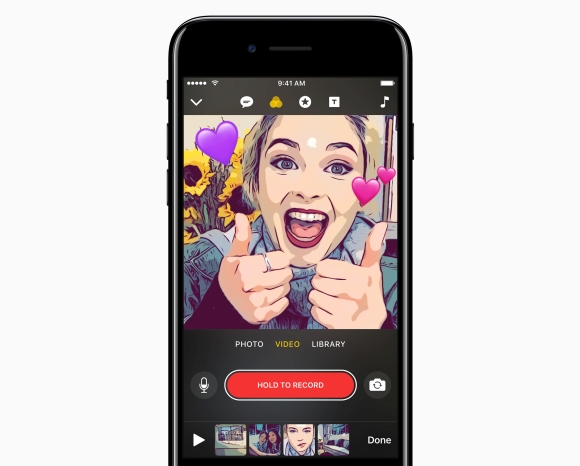
I know, I know, the title might be a little confusing. But that is exactly what Apple‘s new application for iOS is — a simple video and photo capture + editor designed to capture “social videos” without actually having its own social network to share it on.

You can think of it as a video editor for your phone that lets you put cool filters, put cool text and share it on whichever social media platform you think is cool. Here’s what you can do with it.

First, you can edit videos and photos that have been captured through the app, or ones that you have stored on your phone’s storage. Clips will let you capture or upload single videos of up to 30 minutes per clip and combine them into a single clip that can be up to 60 minutes long.

You have four different ways of stylising your videos: Live Tiles, Filters, Overlays and Posters — y’know, sort of like Snapchat or Instagram. With Live Tiles, the application will let you add text over your videos or photos using your voice so you don’t have to type them out, and if you’re shooting videos, you don’t have to time the appearance of the text with when you say it — the app does it for you. However, Lauren Goode from TheVerge notes that this is perhaps the least intuitive aspect of Clips.
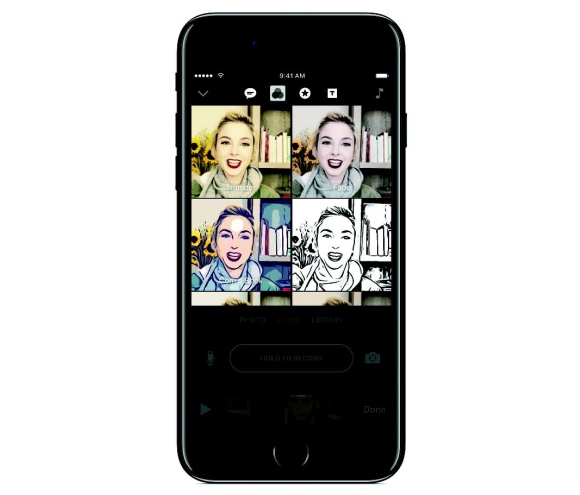
Filters, on the other hand, are pretty self-explanatory. You can choose from a variety of different filters to spice up your video, and if you’re recording, these filters are applied in live view, not after your video is done.

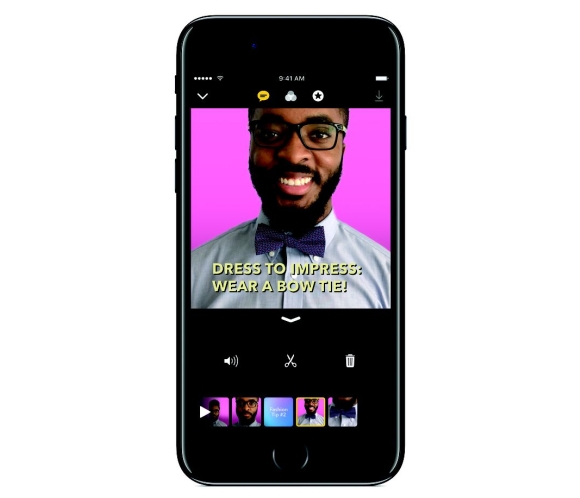
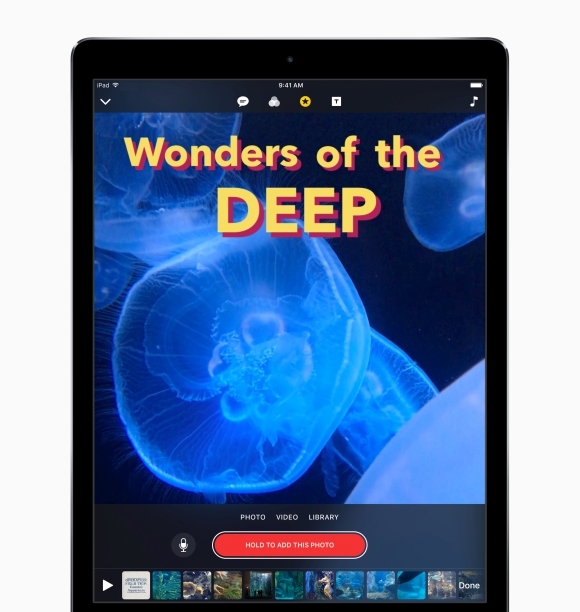
Overlays let you add things like text, speech bubbles, shapes, banners, and of course, emojis to your photos or videos. However, you can’t scribble on them which is a little bit of a shame. Posters, on the other hand, let you create full-screen animated text-based cards that you can use for title cards or transitions in your videos.
Then, once you’re done, you can share your footage on your favourite social media platforms like Facebook, Instagram, Twitter and Youtube, or send them directly to certain contacts via iMessage. If you’re sending through iMessage, Clips even has a built-in facial recognition software that will identify the people in the videos and make “smart suggestions” on who you can send the videos too.
As far as the announcement goes, Clips does seem like a fairly serious mobile video editing application. The biggest hints are the long 60-minute video limits and the fact that the app encourages you to create and edit in timelines. However, it is rather odd that Clips restricts footage shot on the application to a square format. I don’t think that will work particularly well when shared on YouTube…

This app is set to launch in April, free to download from the App Store, and will be compatible with devices from the iPhone 5s and above with support for iPads and iPods coming later. Devices must be running iOS 10.3 to be compatible. Whether Apple will support Android devices in the future is anyone’s guess.

What do you guys think of Clips? Let me know in the comments below!

[SOURCE, 2, VIA]

Tags: AppAppleApple ClipsApple. iOSapplicationClipsFacebookInstagramiOSiPadiPhonemobile video editorphoto editingphoto editing iPhonephoto editorsnapchatvideo editingvideo editoryoutube
Rory Lee

Rory Lee

POPULAR

Apple Clips is like Snapchat and Instagram without a social network

March 22, 2017
BYD Tech Discovery KL

MITI’s CBU EV ruling will wipe out current EV lineup from BYD, iCaur, Mini, Smart, Toyota, and more

May 7, 2026
Proton EV Plant, Tanjung Malim

MITI says EVs won’t become more expensive, but can Malaysia’s CKD industry fill the gap?

May 10, 2026
Rear view of the OPPO Find X9 Ultra in Tundra Umber standing vertically on a stone surface with a lush green bokeh background. The device features an eco-friendly vegan leather back with a classic stitching design , vertically oriented Hasselblad and OPPO logos , and a large circular Master Lens camera module with a bronze-toned knurled ring.

Clearing Every Expectation: How the OPPO Find X9 Ultra Redefines the Modern Flagship Experience

April 16, 2026

Maxis Home Solar now offers outright purchase option, with up to 80% electricity bill savings

May 11, 2026

The Best Camera is the One You Have with You; The OPPO Find X9 Ultra Wants to be Your Only One

May 6, 2026

Copyright © 2025 · SoyaCincau.com
Mind Blow Sdn Bhd (1076827-P)

  • ADVERTISE
  • DISCLAIMER

Copyright © 2026 · SoyaCincau.com – Mind Blow Sdn Bhd (1076827-P)

  • ADVERTISE
  • DISCLAIMER