• 中文版
  • BM
  • News
  • Deals
  • Reviews
    • First Impressions
    • Hands-on
    • Comparisons
  • Tech
    • Mobile
    • Computers
    • Cameras
    • Wearables
    • Audio
    • Drones
  • Telco
    • Celcom
    • Digi
    • Maxis
    • Time
    • Tune Talk
    • U Mobile
    • Unifi
    • Yes
  • Cars
  • Contribute
  • Jobs
Menu
  • 中文版
  • BM
  • News
  • Deals
  • Reviews
    • First Impressions
    • Hands-on
    • Comparisons
  • Tech
    • Mobile
    • Computers
    • Cameras
    • Wearables
    • Audio
    • Drones
  • Telco
    • Celcom
    • Digi
    • Maxis
    • Time
    • Tune Talk
    • U Mobile
    • Unifi
    • Yes
  • Cars
  • Contribute
  • Jobs
Search
  • Tech
    • News
    • Mobile
    • Computers
    • Cameras
    • Wearables
    • Audio
    • Drones
  • Telco
    • Celcom
    • Digi
    • Maxis
    • Time
    • U Mobile
    • Unifi
    • Yes
  • Reviews
    • First Impressions
    • Hands-on
    • Comparisons
  • Buyer’s Guide
  • Opinions
  • Digital Life
  • Video
  • Deals
  • How-To
  • Cars
  • Bahasa Melayu
  • EV
  • Contribute
  • Advertise
Menu
  • Tech
    • News
    • Mobile
    • Computers
    • Cameras
    • Wearables
    • Audio
    • Drones
  • Telco
    • Celcom
    • Digi
    • Maxis
    • Time
    • U Mobile
    • Unifi
    • Yes
  • Reviews
    • First Impressions
    • Hands-on
    • Comparisons
  • Buyer’s Guide
  • Opinions
  • Digital Life
  • Video
  • Deals
  • How-To
  • Cars
  • Bahasa Melayu
  • EV
  • Contribute
  • Advertise
Search
Close
Home News

Google revamps Drive to 2.0 with desktop-like interface

  • BY soyacincau
  • 9 July 2014
  • 11:08 am
  • Comment
Share on FacebookShare on Twitter

140709-google-drive-2.0

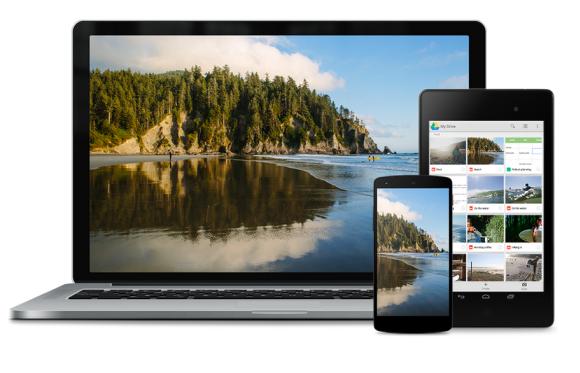
During Google I/0, they have announced a couple of new changes for Drive including its unlimited cloud storage solution for enterprise. To bring Drive to the next level, they have finally revamped its interface to make it as easy to use as your local desktop storage.

To get to your files quicker, you can view your files in thumbnail grid view and select multiple files by clicking and dragging your cursor. Alternatively, you can search in any view to jump straight to the files you are looking for. In-conjunction with the new Drive for Work file audit feature, you are also able to check your sharing history as well. For those who work a lot with MS Office files like Word, Excel and Powerpoint, you can now create and edit them directly from Drive thanks to its integration with QuickOffice.

At time of writing, the version 2.0 app on smart phones is already available but the desktop version on drive.google.com is still showing the old one at time of posting. The new 2.0 interface is rolling out in stages and we reckon it would be available very soon.

Watch the Google Drive 2.0 video after the break.

[ SOURCE ]

Tags: Cloud StorageDriveDrive 2.0googleGoogle DriveGoogle Drive 2.0
soyacincau

soyacincau

POPULAR

Google revamps Drive to 2.0 with desktop-like interface

July 9, 2014

Proton S70 i-GT 1.5 NA is now official: Priced from as low as RM56,800

September 22, 2026

New MyKad hits another snag: MyDigital ID online registration not ready yet

September 20, 2026

Don’t rush to replace your MyKad: New card faces eKYC verification issues

September 19, 2026

How Do You Want to Pay for Your iPhone 18 Pro? 3 Ways to Get More Value

September 18, 2026

Xiaomi 18 Pro series coming to Malaysia this year with Privacy Display, Snapdragon 8 Elite Gen 6

September 24, 2026

Copyright © 2026 · SoyaCincau.com
Mind Blow Sdn Bhd (1076827-P)

  • ADVERTISE
  • DISCLAIMER

Copyright © 2026 · SoyaCincau.com – Mind Blow Sdn Bhd (1076827-P)

  • ADVERTISE
  • DISCLAIMER