• 中文版
  • BM
  • News
  • Deals
  • Reviews
    • First Impressions
    • Hands-on
    • Comparisons
  • Tech
    • Mobile
    • Computers
    • Cameras
    • Wearables
    • Audio
    • Drones
  • Telco
    • Celcom
    • Digi
    • Maxis
    • Time
    • Tune Talk
    • U Mobile
    • Unifi
    • Yes
  • Cars
  • Contribute
  • Jobs
Menu
  • 中文版
  • BM
  • News
  • Deals
  • Reviews
    • First Impressions
    • Hands-on
    • Comparisons
  • Tech
    • Mobile
    • Computers
    • Cameras
    • Wearables
    • Audio
    • Drones
  • Telco
    • Celcom
    • Digi
    • Maxis
    • Time
    • Tune Talk
    • U Mobile
    • Unifi
    • Yes
  • Cars
  • Contribute
  • Jobs
Search
  • Tech
    • News
    • Mobile
    • Computers
    • Cameras
    • Wearables
    • Audio
    • Drones
  • Telco
    • Celcom
    • Digi
    • Maxis
    • Time
    • U Mobile
    • Unifi
    • Yes
  • Reviews
    • First Impressions
    • Hands-on
    • Comparisons
  • Buyer’s Guide
  • Opinions
  • Digital Life
  • Video
  • Deals
  • How-To
  • Cars
  • Bahasa Melayu
  • EV
  • Contribute
  • Advertise
Menu
  • Tech
    • News
    • Mobile
    • Computers
    • Cameras
    • Wearables
    • Audio
    • Drones
  • Telco
    • Celcom
    • Digi
    • Maxis
    • Time
    • U Mobile
    • Unifi
    • Yes
  • Reviews
    • First Impressions
    • Hands-on
    • Comparisons
  • Buyer’s Guide
  • Opinions
  • Digital Life
  • Video
  • Deals
  • How-To
  • Cars
  • Bahasa Melayu
  • EV
  • Contribute
  • Advertise
Search
Close
Home News

New HTC Sense 5.5 brings host of new UI improvements, now lets you switch off BlinkFeed

  • BY soyacincau
  • 8 October 2013
  • 10:30 pm
  • Comment
Share on FacebookShare on Twitter

131008-htc-sense-5.5-update-1

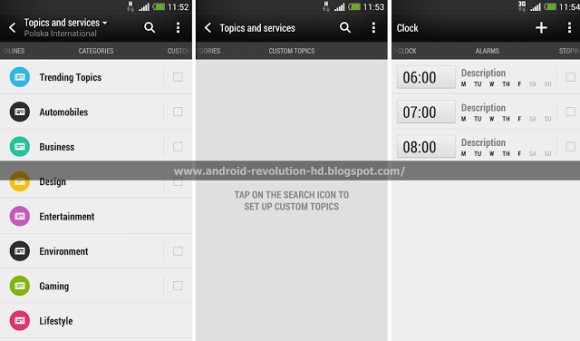
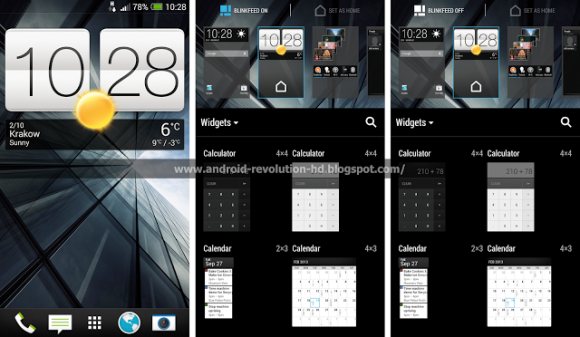
The current HTC Sense 5.0 on the latest HTC devices is rather refreshing with a clean and modern design. Now its upcoming HTC Sense 5.5 offers yet another revamp and interestingly lets you toggle BlinkFeed on or off. HTC’s BlinkFeed is the default home screen which pulls up your favourite content, RSS feeds and social stream in a nice graphical tiled format. Personally we prefer the typical home screen with a big time and weather widget followed by our frequently used shortcuts. At the moment, you can’t turn off blinkfeed and the only way to hide it is to move it to another panel and set a new one as your default home screen.

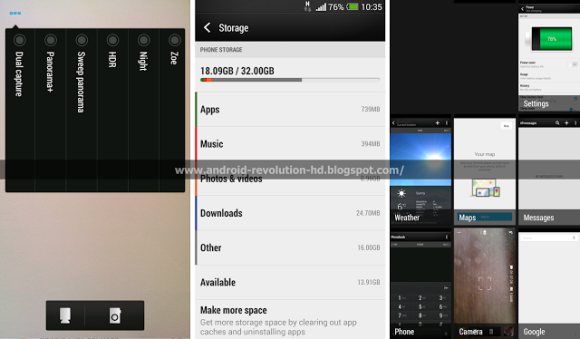
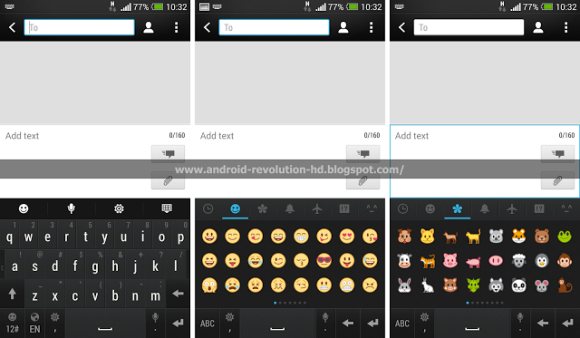
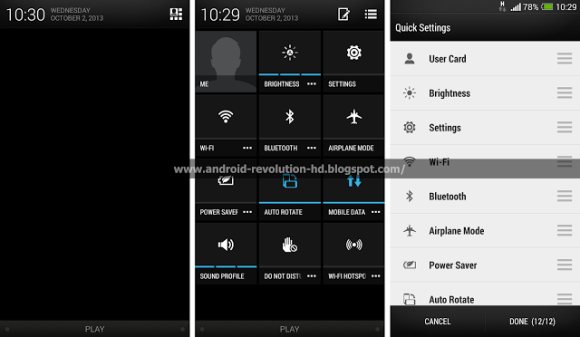
Apart from that, the new Sense 5.5 update allows you to customise the pull down quick settings panel and there’s also a new Do Not Disturb (DND) mode. In the imaging department, there’s also new features such as Dual Capture and a new Panorama+ mode. The recent apps interface is also tweaked slightly to display running apps with bigger tiles.

Apparently some of these changes are part of the Android 4.3 update that’s coming soon to HTC One and looks like the full HTC Sense 5.5 upgrade will come in the following update.

Head after the break for more sample screenshots.
131008-htc-sense-5.5-update-2

131008-htc-sense-5.5-update-3

131008-htc-sense-5.5-update-4

131008-htc-sense-5.5-update-5

[ SOURCE, VIA ]

Tags: HTCHTC Butterfly SHTC Onehtc senseHTC Sense 5.5
soyacincau

soyacincau

POPULAR

Can RM10 Actually Buy You Gold? Here’s How Pos ArRahnu Gold-i Works

September 2, 2026

Beyond Home Wi-Fi: How Time Internet is Expanding Connectivity to Condo Parking Bays

August 31, 2026

New HTC Sense 5.5 brings host of new UI improvements, now lets you switch off BlinkFeed

October 8, 2013

Malaysia introduces new MyKad with 53 security features and NFC. Here’s what you need to know

September 16, 2026

Perodua QV-E now available for as low as RM53,499 in conjunction with Malaysia Day

September 15, 2026

How Do You Want to Pay for Your iPhone 18 Pro? 3 Ways to Get More Value

September 18, 2026

Copyright © 2026 · SoyaCincau.com
Mind Blow Sdn Bhd (1076827-P)

  • ADVERTISE
  • DISCLAIMER

Copyright © 2026 · SoyaCincau.com – Mind Blow Sdn Bhd (1076827-P)

  • ADVERTISE
  • DISCLAIMER