• 中文版
  • BM
  • News
  • Deals
  • Reviews
    • First Impressions
    • Hands-on
    • Comparisons
  • Tech
    • Mobile
    • Computers
    • Cameras
    • Wearables
    • Audio
    • Drones
  • Telco
    • Celcom
    • Digi
    • Maxis
    • Time
    • Tune Talk
    • U Mobile
    • Unifi
    • Yes
  • Cars
  • Contribute
  • Jobs
Menu
  • 中文版
  • BM
  • News
  • Deals
  • Reviews
    • First Impressions
    • Hands-on
    • Comparisons
  • Tech
    • Mobile
    • Computers
    • Cameras
    • Wearables
    • Audio
    • Drones
  • Telco
    • Celcom
    • Digi
    • Maxis
    • Time
    • Tune Talk
    • U Mobile
    • Unifi
    • Yes
  • Cars
  • Contribute
  • Jobs
Search
  • Tech
    • News
    • Mobile
    • Computers
    • Cameras
    • Wearables
    • Audio
    • Drones
  • Telco
    • Celcom
    • Digi
    • Maxis
    • Time
    • U Mobile
    • Unifi
    • Yes
  • Reviews
    • First Impressions
    • Hands-on
    • Comparisons
  • Buyer’s Guide
  • Opinions
  • Digital Life
  • Video
  • Deals
  • How-To
  • Cars
  • Bahasa Melayu
  • EV
  • Contribute
  • Advertise
Menu
  • Tech
    • News
    • Mobile
    • Computers
    • Cameras
    • Wearables
    • Audio
    • Drones
  • Telco
    • Celcom
    • Digi
    • Maxis
    • Time
    • U Mobile
    • Unifi
    • Yes
  • Reviews
    • First Impressions
    • Hands-on
    • Comparisons
  • Buyer’s Guide
  • Opinions
  • Digital Life
  • Video
  • Deals
  • How-To
  • Cars
  • Bahasa Melayu
  • EV
  • Contribute
  • Advertise
Search
Close
Home Digital Life Apps

Instagram launches Security Checkup tool to help you secure your account after you get hacked

  • BY Redza Dzafri
  • 15 July 2021
  • 1:15 pm
  • Comment
Share on FacebookShare on Twitter

This week, Instagram launched a new Security Checkup feature to help keep your account secure. If you’ve been hacked, this tool will help you check your login activity, review your profile information, and update your recovery contact info.
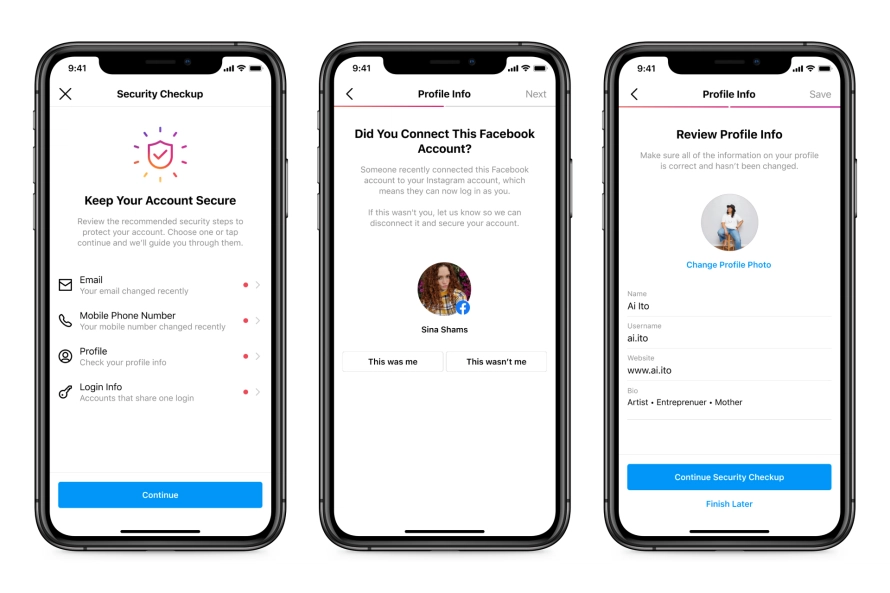
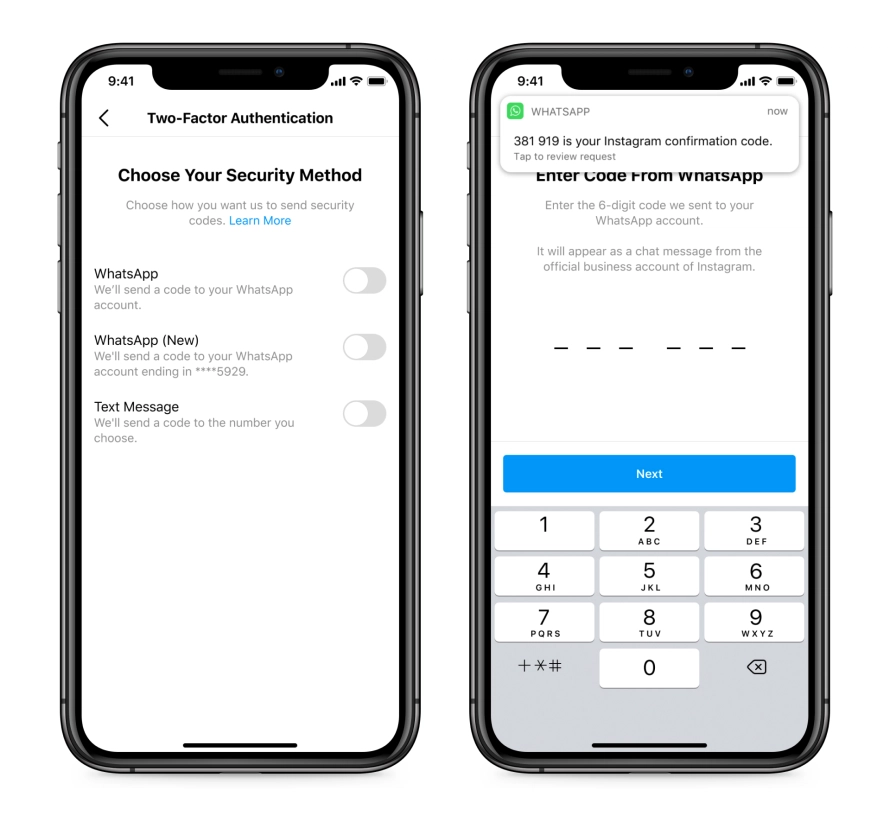
In the blog post where they mention this tool, they go over some additional ways to secure your account. The main thing they strongly suggest doing is enabling two-factor-authentication. They even alluded to the fact that you will be able to use your WhatsApp number to authenticate your account in the coming weeks.
They also emphasized that Instagram will never send you a DM. Over the past few months, there has been a rise in malicious accounts trying to get personal information through phishing. They often pose as Instagram in these phishing attacks, and users should stay cautious. If they require to contact you, it should be through the ‘E-mails from Instagram’ tab in your settings.

Instagram also encourages users to report any fraudulent or malicious accounts that have been found. This, along with their own safety methods, will help reduce the number of people affected by these scammers.

[ SOURCE ]

Tags: hackInstagramsecurityWhatsapp
Redza Dzafri

Redza Dzafri

POPULAR

Instagram launches Security Checkup tool to help you secure your account after you get hacked

July 15, 2021

Proton S70 i-GT 1.5 NA is now official: Priced from as low as RM56,800

September 22, 2026

New MyKad hits another snag: MyDigital ID online registration not ready yet

September 20, 2026

Xiaomi 18 Pro series coming to Malaysia this year with Privacy Display, Snapdragon 8 Elite Gen 6

September 24, 2026

Don’t rush to replace your MyKad: New card faces eKYC verification issues

September 19, 2026

How Do You Want to Pay for Your iPhone 18 Pro? 3 Ways to Get More Value

September 18, 2026

Copyright © 2026 · SoyaCincau.com
Mind Blow Sdn Bhd (1076827-P)

  • ADVERTISE
  • DISCLAIMER

Copyright © 2026 · SoyaCincau.com – Mind Blow Sdn Bhd (1076827-P)

  • ADVERTISE
  • DISCLAIMER