
• 中文版
  • BM
  • News
  • Deals
  • Reviews
    • First Impressions
    • Hands-on
    • Comparisons
  • Tech
    • Mobile
    • Computers
    • Cameras
    • Wearables
    • Audio
    • Drones
  • Telco
    • Celcom
    • Digi
    • Maxis
    • Time
    • Tune Talk
    • U Mobile
    • Unifi
    • Yes
  • Cars
  • Contribute
  • Jobs
Menu
  • 中文版
  • BM
  • News
  • Deals
  • Reviews
    • First Impressions
    • Hands-on
    • Comparisons
  • Tech
    • Mobile
    • Computers
    • Cameras
    • Wearables
    • Audio
    • Drones
  • Telco
    • Celcom
    • Digi
    • Maxis
    • Time
    • Tune Talk
    • U Mobile
    • Unifi
    • Yes
  • Cars
  • Contribute
  • Jobs
Search
  • Tech
    • News
    • Mobile
    • Computers
    • Cameras
    • Wearables
    • Audio
    • Drones
  • Telco
    • Celcom
    • Digi
    • Maxis
    • Time
    • U Mobile
    • Unifi
    • Yes
  • Reviews
    • First Impressions
    • Hands-on
    • Comparisons
  • Buyer’s Guide
  • Opinions
  • Digital Life
  • Video
  • Deals
  • How-To
  • Cars
  • Bahasa Melayu
  • EV
  • Contribute
  • Advertise
Menu
  • Tech
    • News
    • Mobile
    • Computers
    • Cameras
    • Wearables
    • Audio
    • Drones
  • Telco
    • Celcom
    • Digi
    • Maxis
    • Time
    • U Mobile
    • Unifi
    • Yes
  • Reviews
    • First Impressions
    • Hands-on
    • Comparisons
  • Buyer’s Guide
  • Opinions
  • Digital Life
  • Video
  • Deals
  • How-To
  • Cars
  • Bahasa Melayu
  • EV
  • Contribute
  • Advertise
Search
Close
Home Digital Life

It’s now even easier to top-up GrabPay eWallet with your Maybank account

  • BY Alexander Wong
  • 17 February 2020
  • 9:03 am
  • Comment
Share on FacebookShare on Twitter

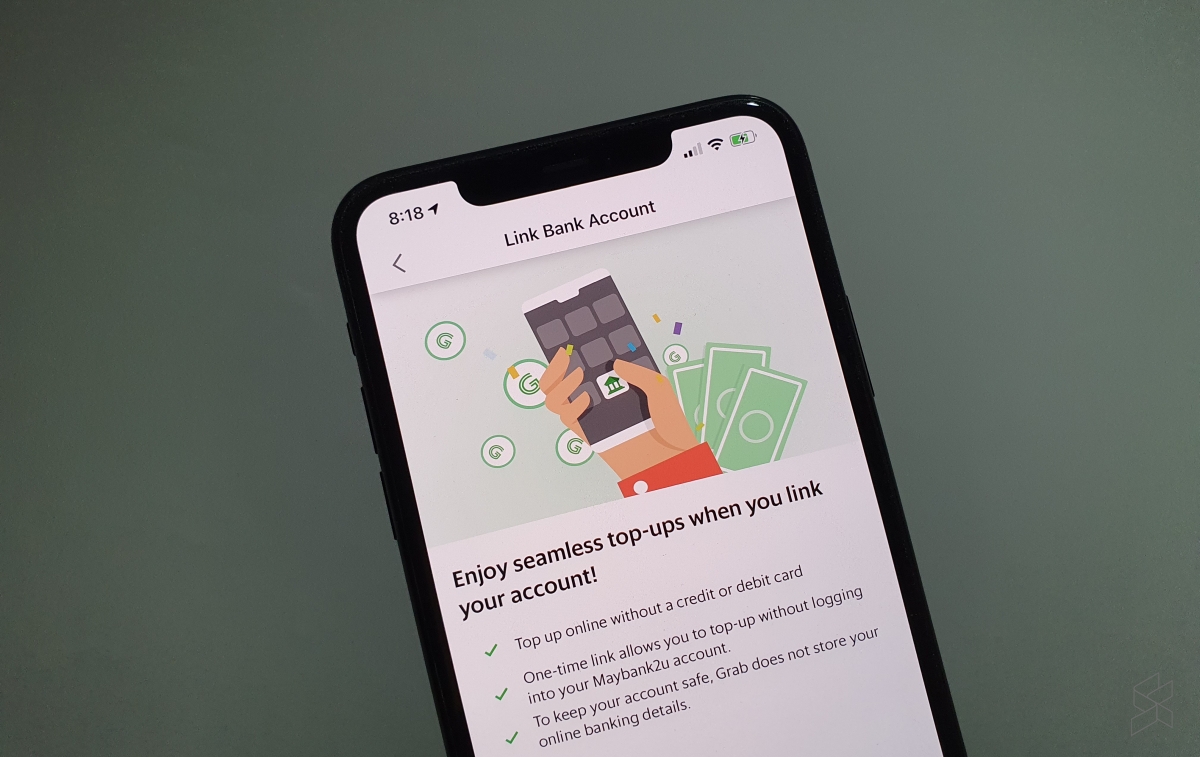
If you maintain a GrabPay account, topping up via credit or debit card is pretty seamless and you can even enable auto top-up. For those that still use online banking, it can be very troublesome as you would need to login to your bank account and then wait for the SMS verification code. If you’re in a hurry to get a ride home, this can be very frustrating. Now there’s an easier way to reload if you have a Maybank online banking account.
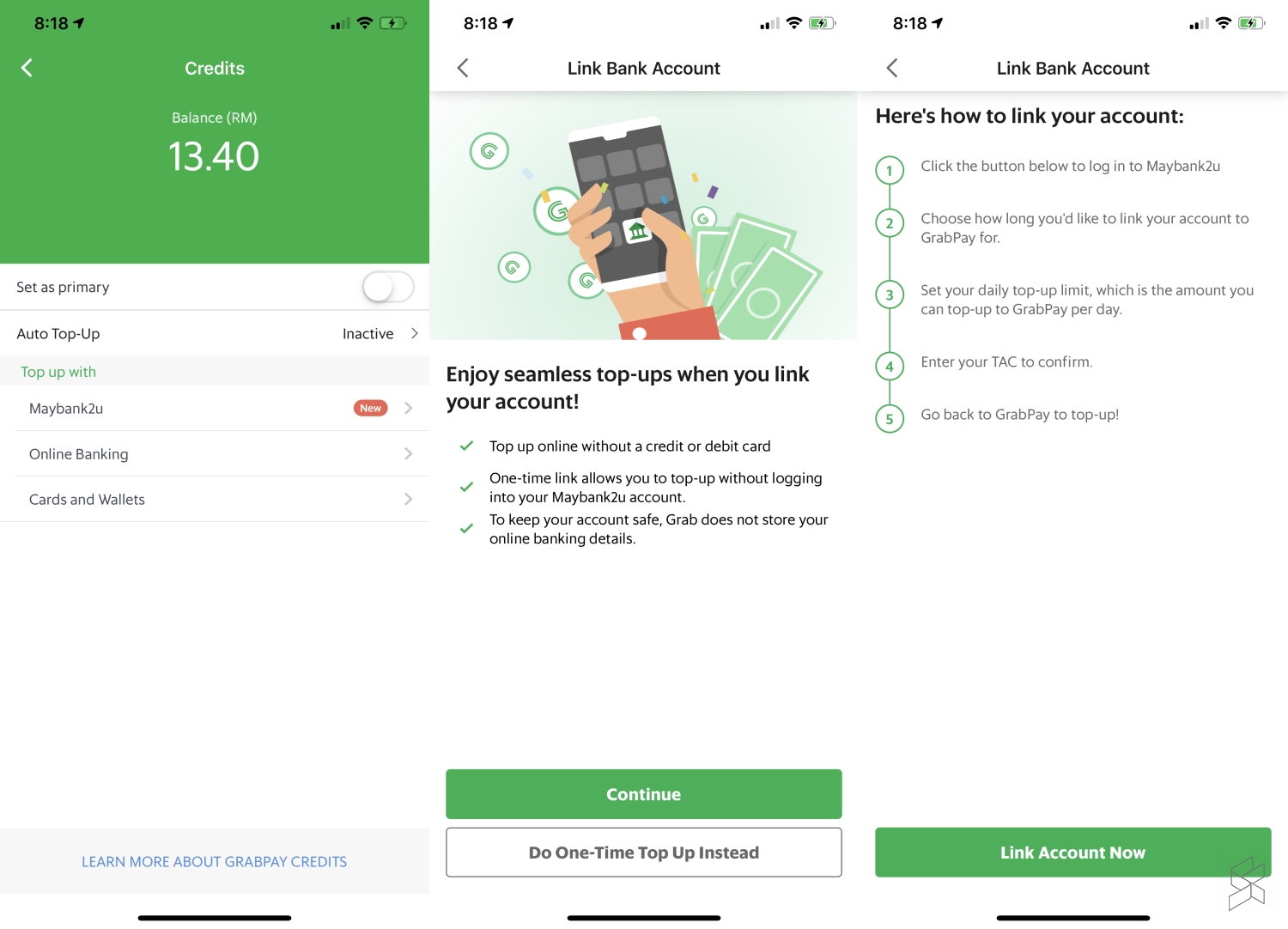
GrabPay is now allowing Maybank2U users to link their bank account to GrabPay for a seamless reload experience. This means you can reload your eWallet by just entering your desired amount and then hit “Top Up”.

To get started, just launch the Grab app, select Payment and then tap on “Top Up”. Next, tap on the new “Maybank2u” option which appears above Online Banking and follow the next steps on the screen.

You’ll need to grant GrabPay permission by linking your desired Maybank account and this even works with Maybank’s MAE account which is a digital bank account that’s open to everyone.
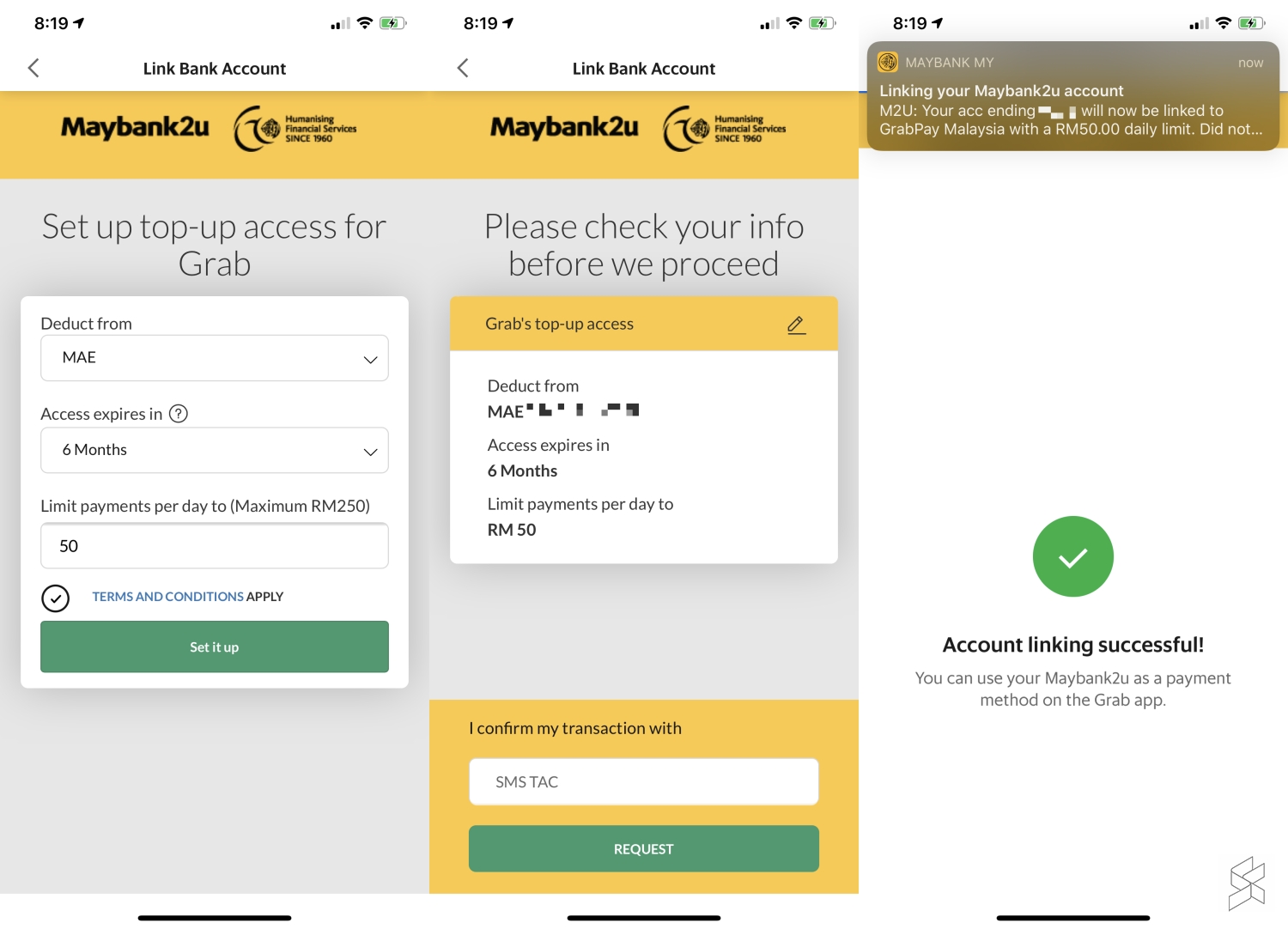
For better control, you can set the duration of the access between 3 to 12 months as well as a daily transaction limit. To confirm the linkage, it will also require a TAC which is sent to your registered mobile number.
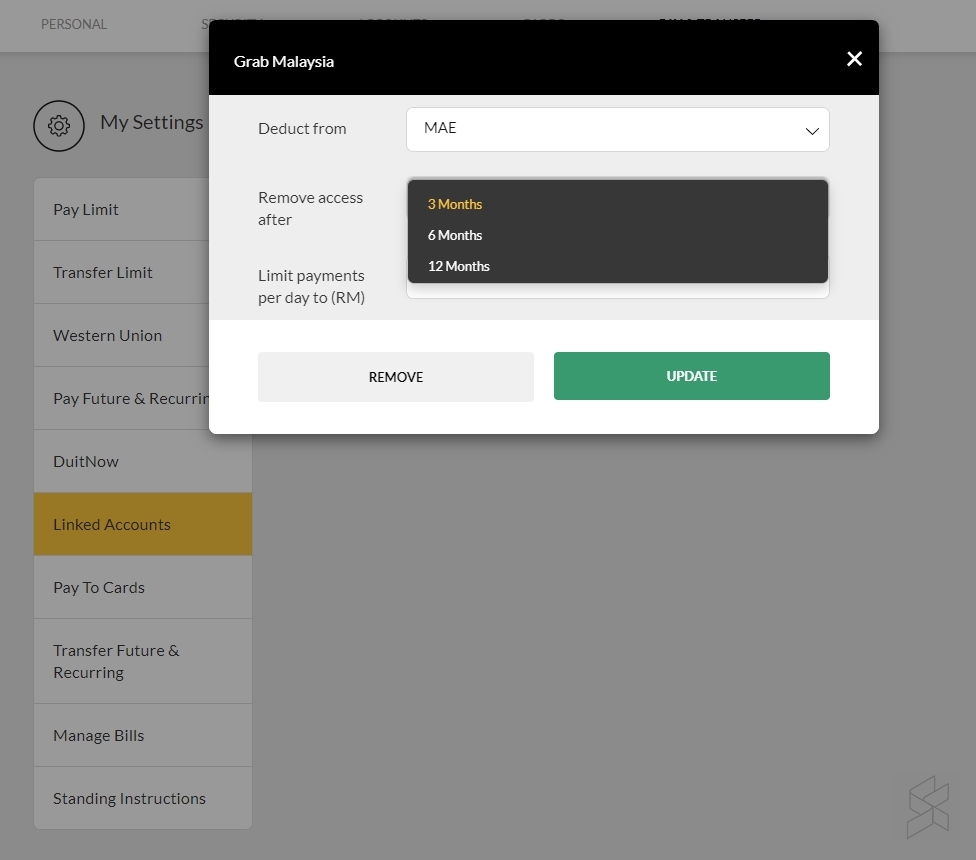
If you want to remove the link to GrabPay or wanted to change some settings, you can do so via Maybank2U on your desktop. Just go to My Settings > Pay & Transfer and look for “Linked Accounts”. From here you can change your access duration, daily limit or remove it altogether.
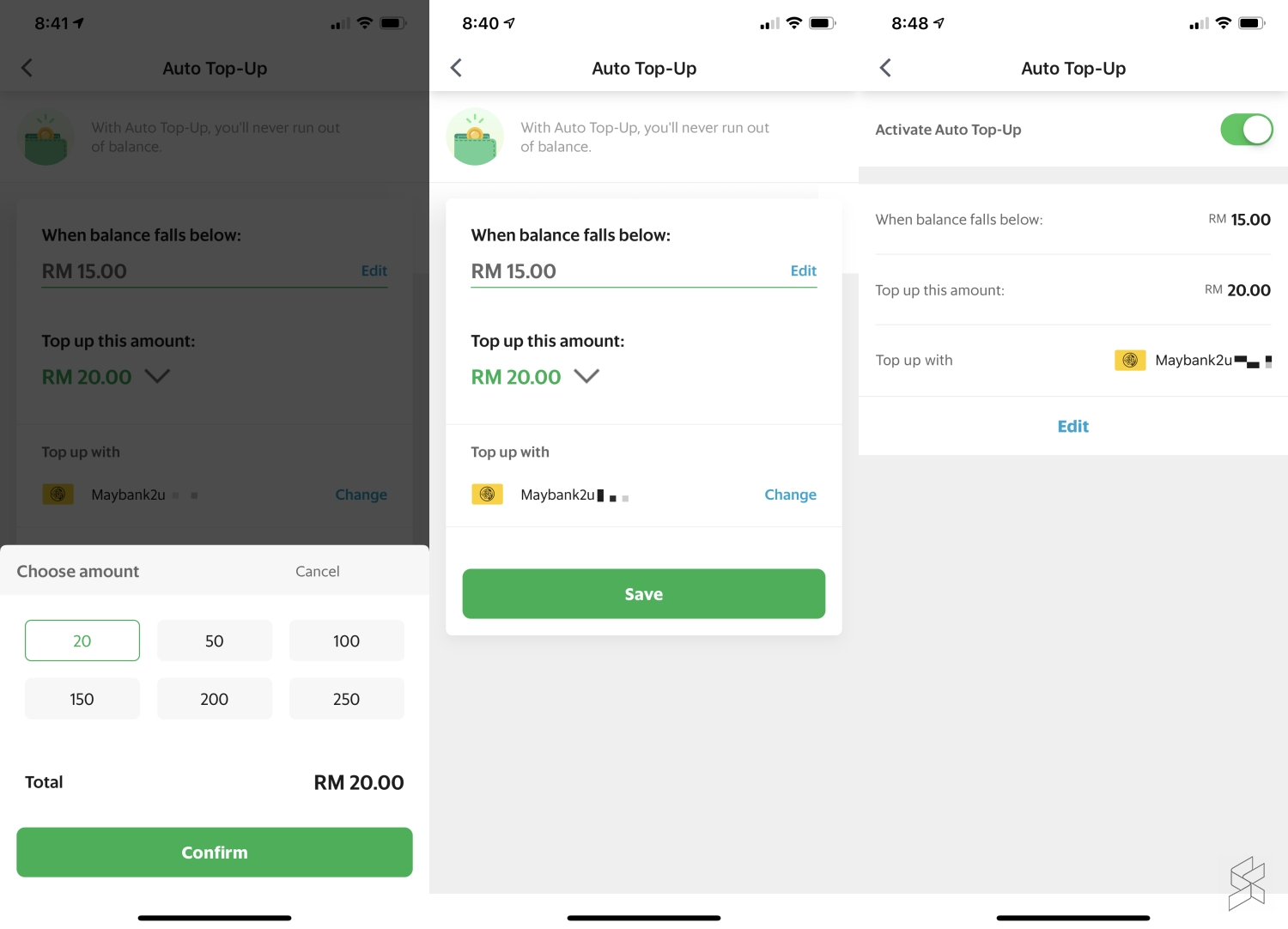
For greater convenience, you can also enable Auto Reload for GrabPay with your linked Maybank account. You can set when to trigger the auto-reload (when the balance falls below at least RM15) and choose between RM20 to RM250 to top up your GrabPay eWallet.

Related reading

No more GrabRewards Points for cash payments after 15 March 2020
eWallets disable transfer feature after you redeem RM30 eTunai Rakyat
eTunai Rakyat: Everything you need to know about the RM30 eWallet initiative
Tags: ewalletGrabPayMaeMaybankmaybank2u
Alexander Wong

Alexander Wong

POPULAR

It’s now even easier to top-up GrabPay eWallet with your Maybank account

February 17, 2020
Rear view of the OPPO Find X9 Ultra in Tundra Umber standing vertically on a stone surface with a lush green bokeh background. The device features an eco-friendly vegan leather back with a classic stitching design , vertically oriented Hasselblad and OPPO logos , and a large circular Master Lens camera module with a bronze-toned knurled ring.

Clearing Every Expectation: How the OPPO Find X9 Ultra Redefines the Modern Flagship Experience

April 16, 2026

Maxis Home Solar now offers outright purchase option, with up to 80% electricity bill savings

May 11, 2026
Proton EV Plant, Tanjung Malim

MITI says EVs won’t become more expensive, but can Malaysia’s CKD industry fill the gap?

May 10, 2026

Vibe Mobile is U Mobile’s latest MVNO partner for 5G services

May 11, 2026
Denza B8 PHEV

Denza B8 to debut in Malaysia this month

May 11, 2026

Copyright © 2025 · SoyaCincau.com
Mind Blow Sdn Bhd (1076827-P)

  • ADVERTISE
  • DISCLAIMER

Copyright © 2026 · SoyaCincau.com – Mind Blow Sdn Bhd (1076827-P)

  • ADVERTISE
  • DISCLAIMER





