• 中文版
  • BM
  • News
  • Deals
  • Reviews
    • First Impressions
    • Hands-on
    • Comparisons
  • Tech
    • Mobile
    • Computers
    • Cameras
    • Wearables
    • Audio
    • Drones
  • Telco
    • Celcom
    • Digi
    • Maxis
    • Time
    • Tune Talk
    • U Mobile
    • Unifi
    • Yes
  • Cars
  • Contribute
  • Jobs
Menu
  • 中文版
  • BM
  • News
  • Deals
  • Reviews
    • First Impressions
    • Hands-on
    • Comparisons
  • Tech
    • Mobile
    • Computers
    • Cameras
    • Wearables
    • Audio
    • Drones
  • Telco
    • Celcom
    • Digi
    • Maxis
    • Time
    • Tune Talk
    • U Mobile
    • Unifi
    • Yes
  • Cars
  • Contribute
  • Jobs
Search
  • Tech
    • News
    • Mobile
    • Computers
    • Cameras
    • Wearables
    • Audio
    • Drones
  • Telco
    • Celcom
    • Digi
    • Maxis
    • Time
    • U Mobile
    • Unifi
    • Yes
  • Reviews
    • First Impressions
    • Hands-on
    • Comparisons
  • Buyer’s Guide
  • Opinions
  • Digital Life
  • Video
  • Deals
  • How-To
  • Cars
  • Bahasa Melayu
  • EV
  • Contribute
  • Advertise
Menu
  • Tech
    • News
    • Mobile
    • Computers
    • Cameras
    • Wearables
    • Audio
    • Drones
  • Telco
    • Celcom
    • Digi
    • Maxis
    • Time
    • U Mobile
    • Unifi
    • Yes
  • Reviews
    • First Impressions
    • Hands-on
    • Comparisons
  • Buyer’s Guide
  • Opinions
  • Digital Life
  • Video
  • Deals
  • How-To
  • Cars
  • Bahasa Melayu
  • EV
  • Contribute
  • Advertise
Search
Close
Home Digital Life

Did you know that you need to run malware scans on your Samsung smart TV?

  • BY Nic Ker
  • 19 June 2019
  • 6:38 pm
  • Comment
Share on FacebookShare on Twitter

Two days ago, Samsung’s U.S. support account tweeted a rather worrying warning to their smart TV customers: You should scan your smart TVs for malware every few weeks, specifically Samsung QLED smart TVs. The tweet was then deleted after a few hours, prompting many to wonder; Do Samsung’s devices have a security vulnerability of some sort?
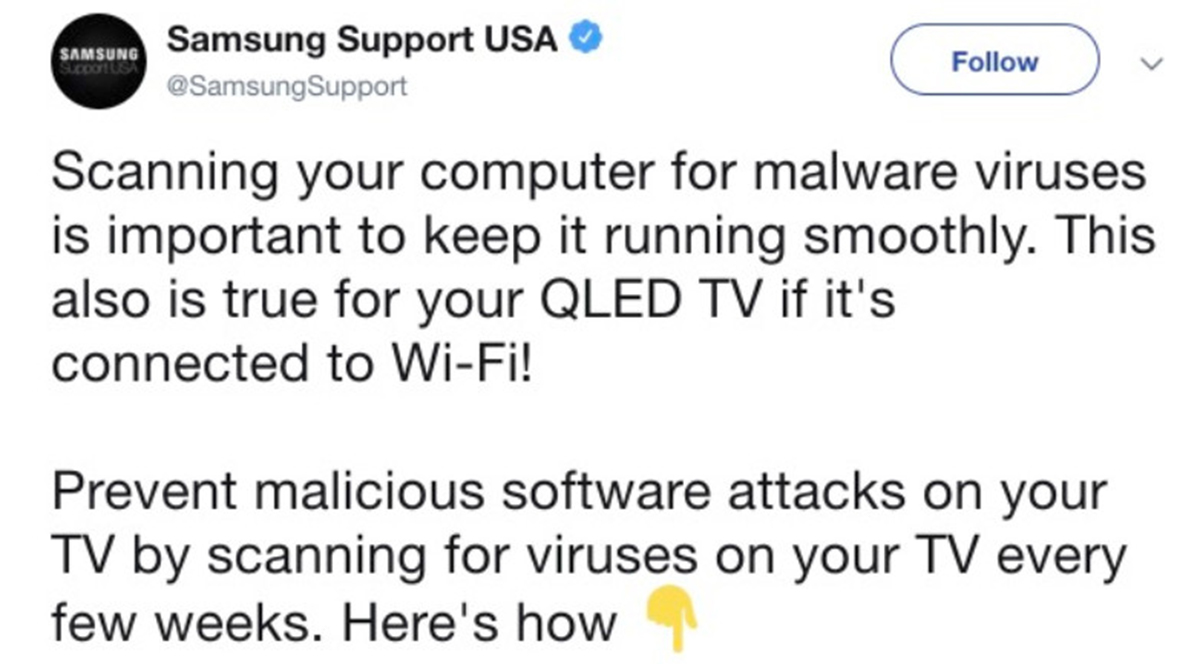
The tweet, in itself, is worrying. While smart TVs are growing in their capabilities and function, shouldn’t stuff like malware scans be automated processes? TVs, after all, cater to a wide variety of consumers—including those that aren’t that comfortable with modern technology.

In addition to that, many may not even know that smart TVs even require malware scans/checks. As someone that has been using smart TVs for awhile now, I’ve personally never done a malware scan on any of my TVs—much less someone that’s adopting the technology for the first time.

As for Samsung smart TVs, they come with McAfee Security for TV built into the system;

At the moment, there haven’t been any reports of any recent security vulnerabilities within Samsung’s smart TV OS, Tizen. That said, WikiLeaks reported in 2017 that a security flaw in Tizen’s OS allowed the CIA to turn smart TVs into listening devices—through software called “Weeping Angel”.

It’s worth mentioning that smart TVs, just like many smart devices, have many functions that work over Wi-Fi (and concurrently, the internet). As such, users should always be wary of online threats, and smart TV users should run malware scans on their devices regularly.

[ SOURCE ]

Tags: malwareSamsungSmart TVTizenTVTwitterWarning
Nic Ker

Nic Ker

POPULAR

Did you know that you need to run malware scans on your Samsung smart TV?

June 19, 2019
Photo by Vitaly Gariev

Countdown to Kickoff: Unifi TV Brings All 104 FIFA World Cup 2026 Matches Live in HD

June 11, 2026

WhatsApp is finally getting usernames: Here’s why you should reserve yours now

June 30, 2026

We’ve been accepting broken laptop designs for 20 years. Here’s what finally changed

June 9, 2026

MacBooks, Mac mini, iMac and iPads just got a lot more expensive in Malaysia

June 26, 2026

DNB activates additional 100MHz 5G spectrum as U Mobile exits its network

July 1, 2026

Copyright © 2025 · SoyaCincau.com
Mind Blow Sdn Bhd (1076827-P)

  • ADVERTISE
  • DISCLAIMER

Copyright © 2026 · SoyaCincau.com – Mind Blow Sdn Bhd (1076827-P)

  • ADVERTISE
  • DISCLAIMER