
• 中文版
  • BM
  • News
  • Deals
  • Reviews
    • First Impressions
    • Hands-on
    • Comparisons
  • Tech
    • Mobile
    • Computers
    • Cameras
    • Wearables
    • Audio
    • Drones
  • Telco
    • Celcom
    • Digi
    • Maxis
    • Time
    • Tune Talk
    • U Mobile
    • Unifi
    • Yes
  • Cars
  • Contribute
  • Jobs
Menu
  • 中文版
  • BM
  • News
  • Deals
  • Reviews
    • First Impressions
    • Hands-on
    • Comparisons
  • Tech
    • Mobile
    • Computers
    • Cameras
    • Wearables
    • Audio
    • Drones
  • Telco
    • Celcom
    • Digi
    • Maxis
    • Time
    • Tune Talk
    • U Mobile
    • Unifi
    • Yes
  • Cars
  • Contribute
  • Jobs
Search
  • Tech
    • News
    • Mobile
    • Computers
    • Cameras
    • Wearables
    • Audio
    • Drones
  • Telco
    • Celcom
    • Digi
    • Maxis
    • Time
    • U Mobile
    • Unifi
    • Yes
  • Reviews
    • First Impressions
    • Hands-on
    • Comparisons
  • Buyer’s Guide
  • Opinions
  • Digital Life
  • Video
  • Deals
  • How-To
  • Cars
  • Bahasa Melayu
  • EV
  • Contribute
  • Advertise
Menu
  • Tech
    • News
    • Mobile
    • Computers
    • Cameras
    • Wearables
    • Audio
    • Drones
  • Telco
    • Celcom
    • Digi
    • Maxis
    • Time
    • U Mobile
    • Unifi
    • Yes
  • Reviews
    • First Impressions
    • Hands-on
    • Comparisons
  • Buyer’s Guide
  • Opinions
  • Digital Life
  • Video
  • Deals
  • How-To
  • Cars
  • Bahasa Melayu
  • EV
  • Contribute
  • Advertise
Search
Close
Home Digital Life

Check out these 3 new WhatsApp features on iOS

  • BY Alexander Wong
  • 7 June 2017
  • 3:39 pm
  • Comment
Share on FacebookShare on Twitter

WhatsApp has updated its iOS app which now comes with several nifty new features. These would definitely make your buzzing group chats more pleasant to use.
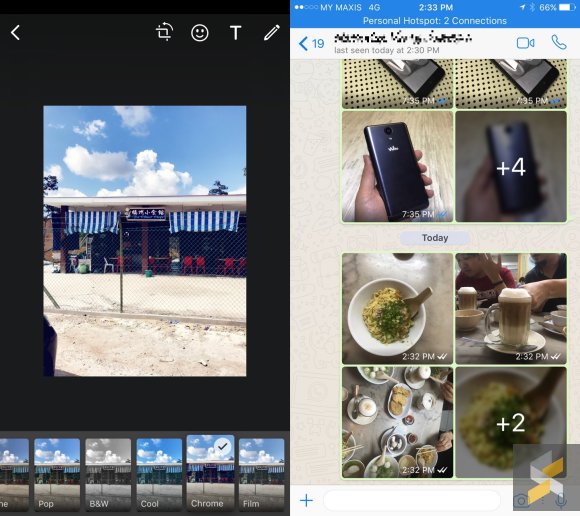
If you love to stylise your photos before sending it out, WhatsApp now has filters built-in. When you select a picture, you can swipe up to apply one of 5 filters – Pop, B&W, Cool, Chrome and Film.

The latest update also manages bulk photos very well. If someone sends 4 or more photos/videos, WhatsApp will group it up in a mini-album. You can tap on it to view it in full screen and it lets you scroll down to view all photos/videos from the album. This is perfect for times when someone floods the group chat with photos back to back.
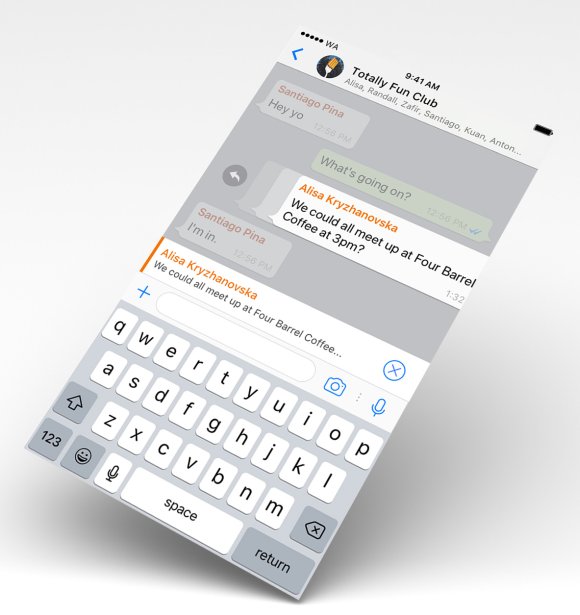
The last feature is great when you’re in a WhatsApp group with multiple conversations taking place. To respond to a specific message, you can now swipe the chat bubble to the right for a quick reply. This is more efficient than the usual long tap and then selecting Reply from the pop-up menu.

At the moment, these new features are only available on iOS. So far there’s no mention of when it’s coming to Android but it should happen pretty soon.

[ SOURCE, IMAGE CREDIT ]

Tags: AlbumAppleFiltersiOSiPhoneSwipe to replyWhatsappWhatsApp Featurerswhatsapp ios
Alexander Wong

Alexander Wong

POPULAR

Nissan Finally Gives the Serena a Real Hybrid Powertrain in Malaysia. Estimated from RM160k to RM180k

January 16, 2026

Neta V now available for only RM40k, but with a limited 6-month warranty

January 31, 2026

Check out these 3 new WhatsApp features on iOS

June 7, 2017

Perodua QV-E only costs RM1.4k to maintain for 5 years, cheaper than Axia

January 30, 2026

Tired of cracked screens or short battery life? The REDMI Note 15 Series take a durability-first approach

January 15, 2026

Is your TNG eWallet suspended? Here’s what you should do

January 27, 2026

Copyright © 2025 · SoyaCincau.com
Mind Blow Sdn Bhd (1076827-P)

  • ADVERTISE
  • DISCLAIMER

Copyright © 2026 · SoyaCincau.com – Mind Blow Sdn Bhd (1076827-P)

  • ADVERTISE
  • DISCLAIMER