

• 中文版
  • BM
  • News
  • Deals
  • Reviews
    • First Impressions
    • Hands-on
    • Comparisons
  • Tech
    • Mobile
    • Computers
    • Cameras
    • Wearables
    • Audio
    • Drones
  • Telco
    • Celcom
    • Digi
    • Maxis
    • Time
    • Tune Talk
    • U Mobile
    • Unifi
    • Yes
  • Cars
  • Contribute
  • Jobs
Menu
  • 中文版
  • BM
  • News
  • Deals
  • Reviews
    • First Impressions
    • Hands-on
    • Comparisons
  • Tech
    • Mobile
    • Computers
    • Cameras
    • Wearables
    • Audio
    • Drones
  • Telco
    • Celcom
    • Digi
    • Maxis
    • Time
    • Tune Talk
    • U Mobile
    • Unifi
    • Yes
  • Cars
  • Contribute
  • Jobs
Search
  • Tech
    • News
    • Mobile
    • Computers
    • Cameras
    • Wearables
    • Audio
    • Drones
  • Telco
    • Celcom
    • Digi
    • Maxis
    • Time
    • U Mobile
    • Unifi
    • Yes
  • Reviews
    • First Impressions
    • Hands-on
    • Comparisons
  • Buyer’s Guide
  • Opinions
  • Digital Life
  • Video
  • Deals
  • How-To
  • Cars
  • Bahasa Melayu
  • EV
  • Contribute
  • Advertise
Menu
  • Tech
    • News
    • Mobile
    • Computers
    • Cameras
    • Wearables
    • Audio
    • Drones
  • Telco
    • Celcom
    • Digi
    • Maxis
    • Time
    • U Mobile
    • Unifi
    • Yes
  • Reviews
    • First Impressions
    • Hands-on
    • Comparisons
  • Buyer’s Guide
  • Opinions
  • Digital Life
  • Video
  • Deals
  • How-To
  • Cars
  • Bahasa Melayu
  • EV
  • Contribute
  • Advertise
Search
Close
Home Digital Life

Check out these 3 new WhatsApp features on iOS

  • BY Alexander Wong
  • 7 June 2017
  • 3:39 pm
  • Comment
Share on FacebookShare on Twitter

WhatsApp has updated its iOS app which now comes with several nifty new features. These would definitely make your buzzing group chats more pleasant to use.
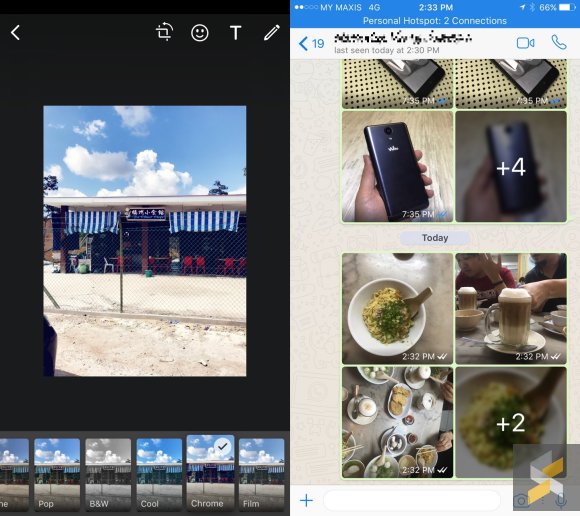
If you love to stylise your photos before sending it out, WhatsApp now has filters built-in. When you select a picture, you can swipe up to apply one of 5 filters – Pop, B&W, Cool, Chrome and Film.

The latest update also manages bulk photos very well. If someone sends 4 or more photos/videos, WhatsApp will group it up in a mini-album. You can tap on it to view it in full screen and it lets you scroll down to view all photos/videos from the album. This is perfect for times when someone floods the group chat with photos back to back.
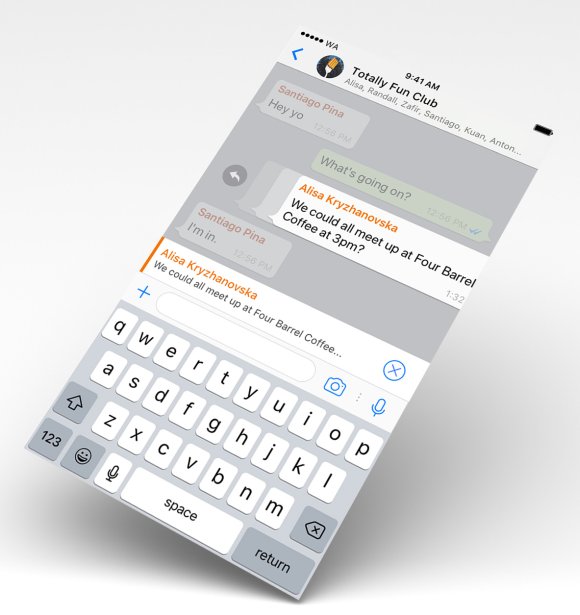
The last feature is great when you’re in a WhatsApp group with multiple conversations taking place. To respond to a specific message, you can now swipe the chat bubble to the right for a quick reply. This is more efficient than the usual long tap and then selecting Reply from the pop-up menu.

At the moment, these new features are only available on iOS. So far there’s no mention of when it’s coming to Android but it should happen pretty soon.

[ SOURCE, IMAGE CREDIT ]

Tags: AlbumAppleFiltersiOSiPhoneSwipe to replyWhatsappWhatsApp Featurerswhatsapp ios
Alexander Wong

Alexander Wong

POPULAR

Check out these 3 new WhatsApp features on iOS

June 7, 2017
vivo V70 FE 200MP camera phone in Malaysia - Best value alternative for phones under RM2,000

High-Resolution Meets High-Endurance: A Closer Look at the vivo V70 FE

April 10, 2026
Apple Tap To Pay on iPhone Malaysia

Apple’s Tap to Pay on iPhone is now in Malaysia

April 22, 2026

Zeekr 8X: Premium 900V PHEV SUV, up to triple-motor setup and 0–100km/h in 2.96s

April 20, 2026

Zeekr 009 upgraded for 2026: 900V architecture, 912hp, swiveling seats and 10-80% charge in 10 minutes

April 26, 2026

Can you and your family enjoy a 100% electric drive without ever plugging in?

April 23, 2026

Copyright © 2025 · SoyaCincau.com
Mind Blow Sdn Bhd (1076827-P)

  • ADVERTISE
  • DISCLAIMER

Copyright © 2026 · SoyaCincau.com – Mind Blow Sdn Bhd (1076827-P)

  • ADVERTISE
  • DISCLAIMER