
If you regularly use RHB Online Banking on your desktop or laptop, you may need to check your browser version soon.
Effective 31 October 2026, RHB will no longer support access through outdated web browsers as part of its effort to keep online banking transactions secure.
To avoid any sudden service disruptions when logging into your account, you will need to ensure your browser is updated to the minimum required version before the deadline hits
Minimum supported browser versions
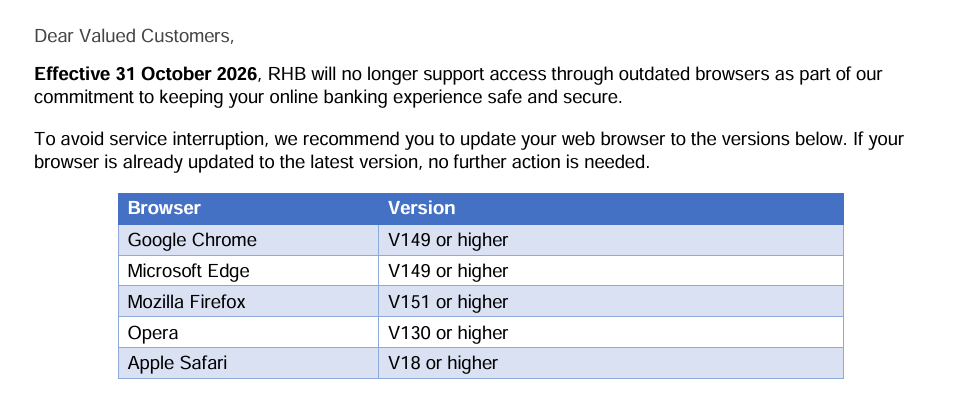
To avoid service interruption when logging into RHB Online Banking, you will need to update your web browser to the following versions or higher:
- Google Chrome: Version 149 or higher
- Microsoft Edge: Version 149 or higher
- Mozilla Firefox: Version 151 or higher
- Opera: Version 130 or higher
- Apple Safari: Version 18 or higher
Why is RHB doing this?
Outdated browsers no longer receive official security patches from software developers, leaving users vulnerable to security risks.
To protect customer accounts, RHB will completely block access from browsers that fall below these version requirements.
What do you need to do?
If your browser is already updated to the latest version, you don’t need to take any action.
If you aren’t sure, you can check or update your browser by going to the Settings or Help menu in your browser and selecting About Browser.
This will automatically check for and prompt you to install the latest build.
If your computer running an old operating system cannot update to these browser versions, you won’t be able to access RHB Online Banking via a web browser.
As an alternative, RHB suggests using the official RHB Mobile Banking App, which can be downloaded from the Google Play Store or Apple App Store.