• 中文版
  • BM
  • News
  • Deals
  • Reviews
    • First Impressions
    • Hands-on
    • Comparisons
  • Tech
    • Mobile
    • Computers
    • Cameras
    • Wearables
    • Audio
    • Drones
  • Telco
    • Celcom
    • Digi
    • Maxis
    • Time
    • Tune Talk
    • U Mobile
    • Unifi
    • Yes
  • Cars
  • Contribute
  • Jobs
Menu
  • 中文版
  • BM
  • News
  • Deals
  • Reviews
    • First Impressions
    • Hands-on
    • Comparisons
  • Tech
    • Mobile
    • Computers
    • Cameras
    • Wearables
    • Audio
    • Drones
  • Telco
    • Celcom
    • Digi
    • Maxis
    • Time
    • Tune Talk
    • U Mobile
    • Unifi
    • Yes
  • Cars
  • Contribute
  • Jobs
Search
  • Tech
    • News
    • Mobile
    • Computers
    • Cameras
    • Wearables
    • Audio
    • Drones
  • Telco
    • Celcom
    • Digi
    • Maxis
    • Time
    • U Mobile
    • Unifi
    • Yes
  • Reviews
    • First Impressions
    • Hands-on
    • Comparisons
  • Buyer’s Guide
  • Opinions
  • Digital Life
  • Video
  • Deals
  • How-To
  • Cars
  • Bahasa Melayu
  • EV
  • Contribute
  • Advertise
Menu
  • Tech
    • News
    • Mobile
    • Computers
    • Cameras
    • Wearables
    • Audio
    • Drones
  • Telco
    • Celcom
    • Digi
    • Maxis
    • Time
    • U Mobile
    • Unifi
    • Yes
  • Reviews
    • First Impressions
    • Hands-on
    • Comparisons
  • Buyer’s Guide
  • Opinions
  • Digital Life
  • Video
  • Deals
  • How-To
  • Cars
  • Bahasa Melayu
  • EV
  • Contribute
  • Advertise
Search
Close
Home Digital Life Apps

Gmail Trick: Unsubscribe from unsolicited newsletters with one click

  • BY Janarrthine Kannan
  • 24 August 2026
  • 12:03 pm
  • Comment
Share on FacebookShare on Twitter

Did you know that Google Gmail has a built-in subscription manager that lets you view and clean up active email subscriptions from a single page?

This eliminates the need to hunt for hidden unsubscribe links at the bottom of individual marketing emails.

How to access Gmail’s hidden subscription manager

The fastest way to view your active subscriptions on a desktop browser is by editing your inbox URL.

Step 1: Open Gmail in your desktop browser.

Step 2: Go to the browser address bar, go to the end of the URL, and replace “#inbox” with “#sub”.


Step 3: Press “Enter”.

This opens a consolidated dashboard of your active subscriptions, allowing you to unsubscribe directly.
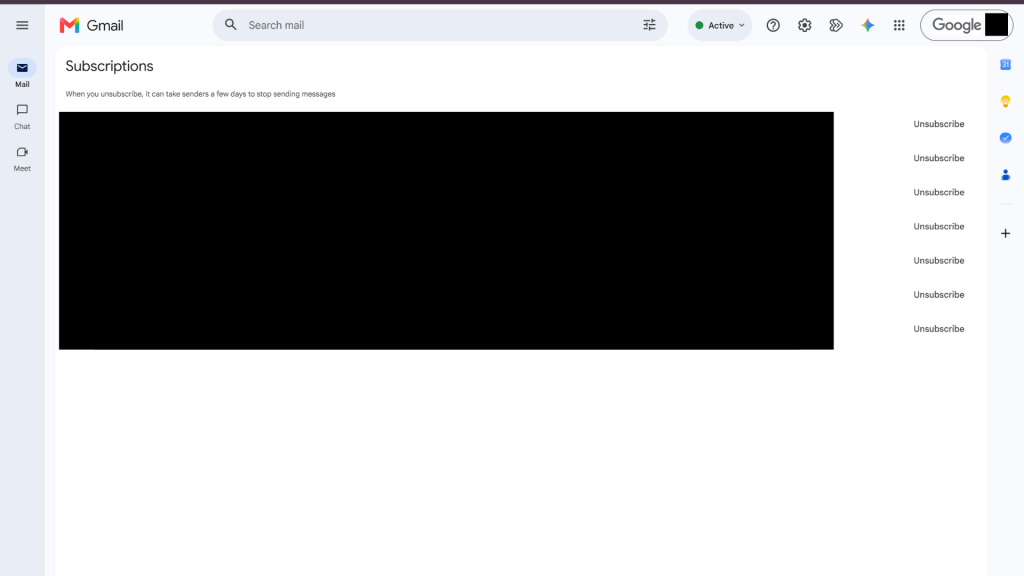
Alternatively, you can access this page through the standard navigation. On desktop, expand the left sidebar by clicking “More”, scroll to the bottom, and select “Manage Subscriptions”. On mobile, tap the top-left menu icon, scroll below the Trash folder, and tap “Manage Subscriptions”.

Track down data leaks with the ‘+’ alias trick
You can also trace who shares your contact details by using Gmail’s plus sign alias method. You do not have to create a new email address.

Instead, you can use this format when signing up on a website. The emails will still reach your original mailbox.

When registering for a service, add a plus sign and a tag after your username, such as ‘[email protected]’ or ‘[email protected]’.

This also helps identify who is selling your email since spam will be addressed to the specific email. You can filter out the address to keep your inbox spam free by creating an automated filter to archive or delete those messages automatically.

Manage paid app subscriptions
To avoid unwanted recurring charges, check your active paid services directly.

You can view, manage, or cancel active app subscriptions by opening your Google Play Store account settings. Centralising your billing ensures you are not paying for unused monthly or annual subscriptions.

Tags: GmailGmail tipsgoogle
Janarrthine Kannan

Janarrthine Kannan

POPULAR

Gmail Trick: Unsubscribe from unsolicited newsletters with one click

August 24, 2026

How Do You Want to Pay for Your iPhone 18 Pro? 3 Ways to Get More Value

September 18, 2026

The Foldable Paradox: Why the “Best” Phone Depends Entirely on Your Routine

September 14, 2026

BeONE Mobile officially launches as Maxis-powered MVNO, 150GB prepaid plan from RM25

September 28, 2026

Heading to Sepang International Circuit for F1 Bahrain Grand Prix? Here are the Grab drop off and shuttle rules

October 1, 2026

Uniqlo Proton Collection coming soon: Featuring e.MAS 7, S70, X50, Satria Neo R3, and 1985 Saga

September 25, 2026

Copyright © 2026 · SoyaCincau.com
Mind Blow Sdn Bhd (1076827-P)

  • ADVERTISE
  • DISCLAIMER

Copyright © 2026 · SoyaCincau.com – Mind Blow Sdn Bhd (1076827-P)

  • ADVERTISE
  • DISCLAIMER