• 中文版
  • BM
  • News
  • Deals
  • Reviews
    • First Impressions
    • Hands-on
    • Comparisons
  • Tech
    • Mobile
    • Computers
    • Cameras
    • Wearables
    • Audio
    • Drones
  • Telco
    • Celcom
    • Digi
    • Maxis
    • Time
    • Tune Talk
    • U Mobile
    • Unifi
    • Yes
  • Cars
  • Contribute
  • Jobs
Menu
  • 中文版
  • BM
  • News
  • Deals
  • Reviews
    • First Impressions
    • Hands-on
    • Comparisons
  • Tech
    • Mobile
    • Computers
    • Cameras
    • Wearables
    • Audio
    • Drones
  • Telco
    • Celcom
    • Digi
    • Maxis
    • Time
    • Tune Talk
    • U Mobile
    • Unifi
    • Yes
  • Cars
  • Contribute
  • Jobs
Search
  • Tech
    • News
    • Mobile
    • Computers
    • Cameras
    • Wearables
    • Audio
    • Drones
  • Telco
    • Celcom
    • Digi
    • Maxis
    • Time
    • U Mobile
    • Unifi
    • Yes
  • Reviews
    • First Impressions
    • Hands-on
    • Comparisons
  • Buyer’s Guide
  • Opinions
  • Digital Life
  • Video
  • Deals
  • How-To
  • Cars
  • Bahasa Melayu
  • EV
  • Contribute
  • Advertise
Menu
  • Tech
    • News
    • Mobile
    • Computers
    • Cameras
    • Wearables
    • Audio
    • Drones
  • Telco
    • Celcom
    • Digi
    • Maxis
    • Time
    • U Mobile
    • Unifi
    • Yes
  • Reviews
    • First Impressions
    • Hands-on
    • Comparisons
  • Buyer’s Guide
  • Opinions
  • Digital Life
  • Video
  • Deals
  • How-To
  • Cars
  • Bahasa Melayu
  • EV
  • Contribute
  • Advertise
Search
Close
Home Digital Life Apps

Samsung Galaxy S26 users in Malaysia can AirDrop files to iPhone, iPad and Mac from 25 March

  • BY Alexander Wong
  • 24 March 2026
  • 6:07 pm
  • Comment
Share on FacebookShare on Twitter

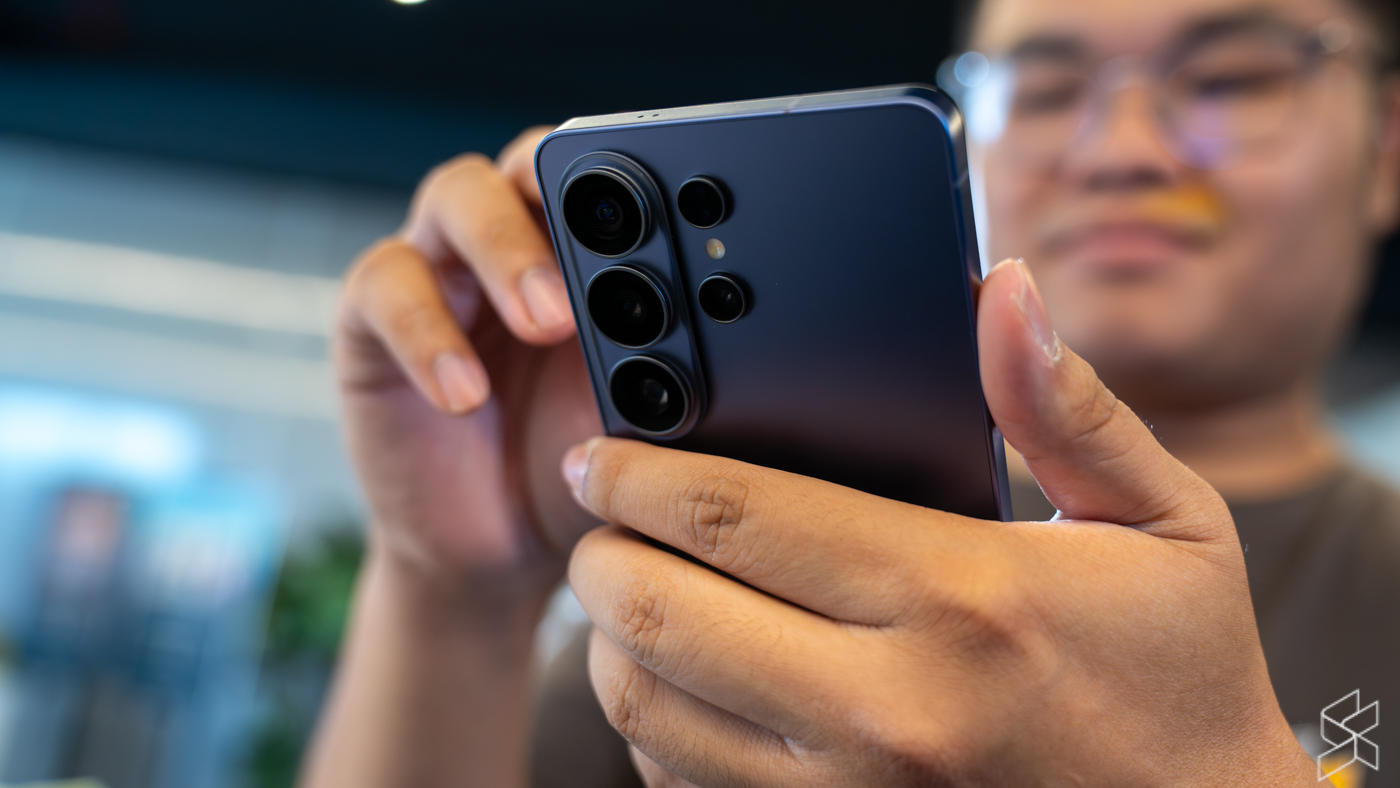
Samsung Galaxy S26 users can finally share photos, videos and files seamlessly with Apple iPhone, iPad and Mac users via AirDrop. The support for AirDrop file sharing via the Quick Share function is now rolling out globally for the Galaxy S26 series and Malaysian users are set to receive it starting 25th March 2026.

The feature for the latest Samsung flagship smartphones was initially rolled out in Korea and it will expand to other regions including Southeast Asia, Hong Kong, Japan, Taiwan, North America, Europe and Latin America.

For now, the file sharing feature will roll out initially for the Galaxy S26, S26+ and S26 Ultra. The smartphone maker says that expansion to additional devices will be announced at a later date.

How to AirDrop from Samsung to iPhone and vice versa?
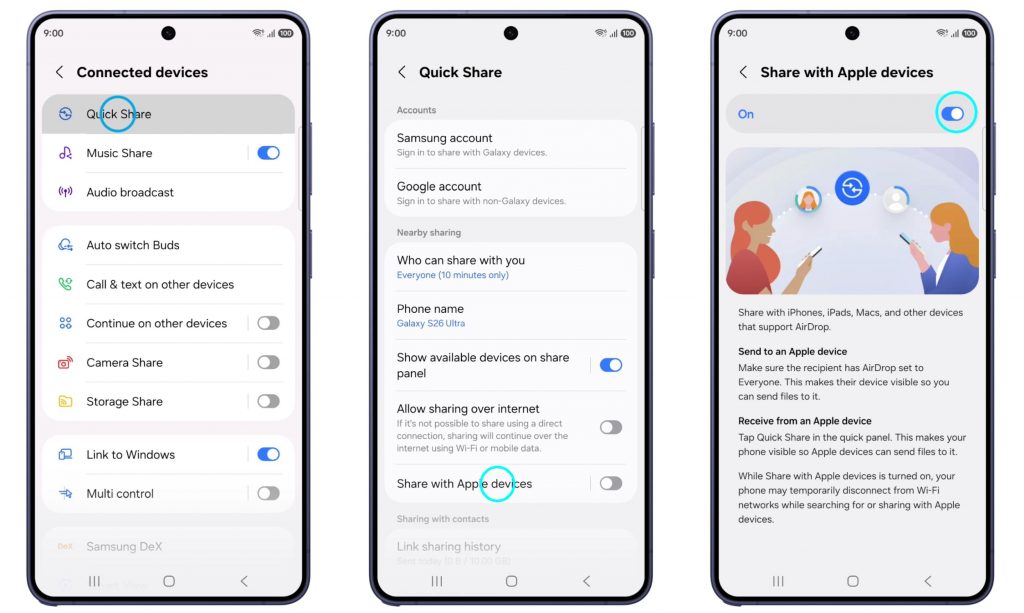
To enable seamless file sharing with iPhone, just go to Settings > Connected Devices > QuickShare and then tap on Share with Apple devices. Toggle the feature to On to enable cross platform sharing with Apple devices.

Once enabled, you can send files to Apple users within your vicinity via the Quick Share feature. Make sure the recipient has set their AirDrop settings to “Everyone for 10 minutes” so that their devices are visible to you. It doesn’t work if the iPhone’s AirDrop settings is set for “Contacts Only”.

To receive files, just tap on Quick Share from the quick panel on your Galaxy S26. This would enable other Apple users to detect your device.


Tags: AirDropMobileQuick ShareSamsungSamsung Galaxy S26Samsung Galaxy S26 PlusSamsung Galaxy S26 Ultra
Alexander Wong

Alexander Wong

POPULAR

Samsung Galaxy S26 users in Malaysia can AirDrop files to iPhone, iPad and Mac from 25 March

March 24, 2026

Is Your Current Phone Generations Behind? Here’s a Simpler Way to Close the Gap

March 13, 2026

EV owners can enjoy cheaper home charging with TNB’s off-peak pricing

June 21, 2025
TQ Wuling Bingo EV Malaysia

TQ Wuling Bingo is now available for rental in Malaysia via GoEV

April 14, 2026

Honor 600 series makes its debut in Malaysia on 22 April, featuring 200MP camera with AI Image to Video 2.0

April 13, 2026

Honda Super-One: The affordable compact EV Malaysians need?

April 14, 2026

Copyright © 2025 · SoyaCincau.com
Mind Blow Sdn Bhd (1076827-P)

  • ADVERTISE
  • DISCLAIMER

Copyright © 2026 · SoyaCincau.com – Mind Blow Sdn Bhd (1076827-P)

  • ADVERTISE
  • DISCLAIMER