
• 中文版
  • BM
  • News
  • Deals
  • Reviews
    • First Impressions
    • Hands-on
    • Comparisons
  • Tech
    • Mobile
    • Computers
    • Cameras
    • Wearables
    • Audio
    • Drones
  • Telco
    • Celcom
    • Digi
    • Maxis
    • Time
    • Tune Talk
    • U Mobile
    • Unifi
    • Yes
  • Cars
  • Contribute
  • Jobs
Menu
  • 中文版
  • BM
  • News
  • Deals
  • Reviews
    • First Impressions
    • Hands-on
    • Comparisons
  • Tech
    • Mobile
    • Computers
    • Cameras
    • Wearables
    • Audio
    • Drones
  • Telco
    • Celcom
    • Digi
    • Maxis
    • Time
    • Tune Talk
    • U Mobile
    • Unifi
    • Yes
  • Cars
  • Contribute
  • Jobs
Search
  • Tech
    • News
    • Mobile
    • Computers
    • Cameras
    • Wearables
    • Audio
    • Drones
  • Telco
    • Celcom
    • Digi
    • Maxis
    • Time
    • U Mobile
    • Unifi
    • Yes
  • Reviews
    • First Impressions
    • Hands-on
    • Comparisons
  • Buyer’s Guide
  • Opinions
  • Digital Life
  • Video
  • Deals
  • How-To
  • Cars
  • Bahasa Melayu
  • EV
  • Contribute
  • Advertise
Menu
  • Tech
    • News
    • Mobile
    • Computers
    • Cameras
    • Wearables
    • Audio
    • Drones
  • Telco
    • Celcom
    • Digi
    • Maxis
    • Time
    • U Mobile
    • Unifi
    • Yes
  • Reviews
    • First Impressions
    • Hands-on
    • Comparisons
  • Buyer’s Guide
  • Opinions
  • Digital Life
  • Video
  • Deals
  • How-To
  • Cars
  • Bahasa Melayu
  • EV
  • Contribute
  • Advertise
Search
Close
Home Digital Life Apps

WhatsApp offers new text formatting – numbered lists and block quotes are now available

  • BY Sharil Abdul Rahman
  • 22 February 2024
  • 10:42 am
  • Comment
Share on FacebookShare on Twitter

WhatsApp just updated the app to feature more formatting in the chat box. Previously, users could italicise, bold or strikethrough words and sentences using special marks in the messages before sending them to the other party. Now there are four formatting options available to emphasise the message being sent over.

If you are interested in checking it out, the new formatting options are:
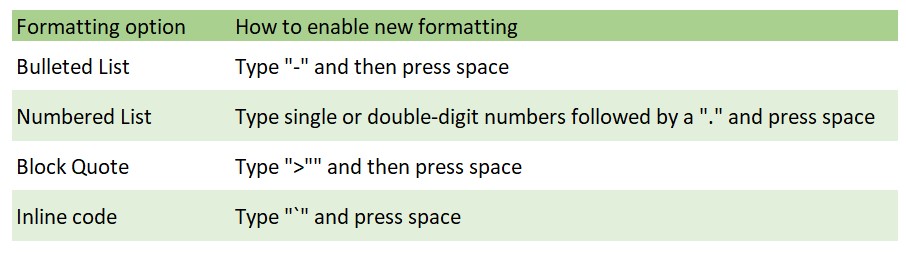
Alternatively, you can format your messages by selecting the word or sentence and pressing the triple dot menu on the top right on Android or selecting and double tapping the word and choosing Format on iOS.

The new options are now available across Android, iOS, the web version, and the Mac desktop version. Unfortunately, the formatting is not available yet for the Windows desktop version and Meta did not say if and when it will be available for Windows.
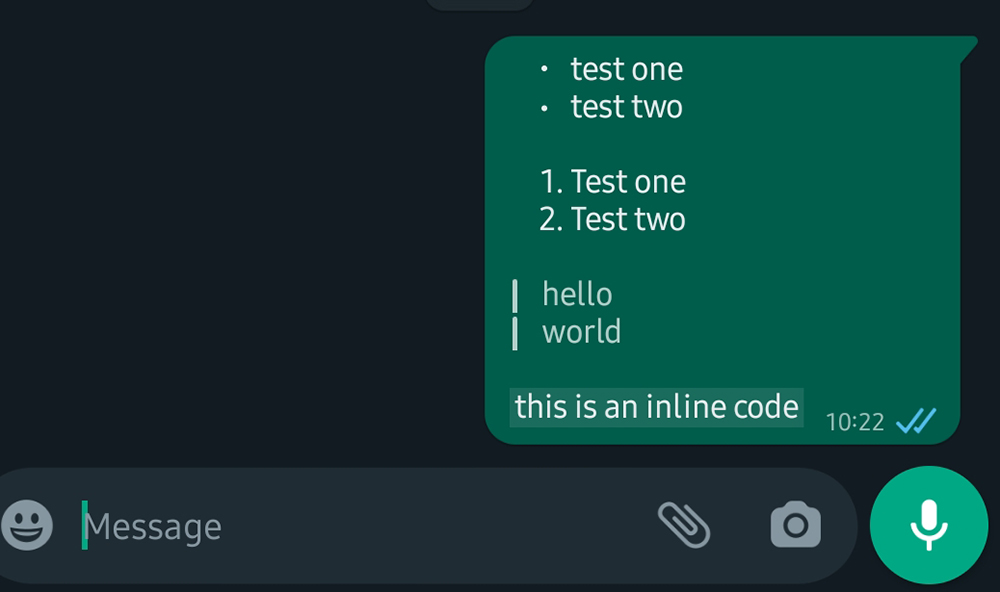
Sample of what the new formatting will look like in chat

Meta also said the options are also available on Channels.

You can check out all the available formatting on the official WhatsApp FAQ here.

Tags: MetaMobileWhatApp MessengerWhatsapp
Sharil Abdul Rahman

Sharil Abdul Rahman

POPULAR

WhatsApp offers new text formatting – numbered lists and block quotes are now available

February 22, 2024
vivo V70 FE 200MP camera phone in Malaysia - Best value alternative for phones under RM2,000

High-Resolution Meets High-Endurance: A Closer Look at the vivo V70 FE

April 10, 2026
Apple Tap To Pay on iPhone Malaysia

Apple’s Tap to Pay on iPhone is now in Malaysia

April 22, 2026

Zeekr 8X: Premium 900V PHEV SUV, up to triple-motor setup and 0–100km/h in 2.96s

April 20, 2026

Can you and your family enjoy a 100% electric drive without ever plugging in?

April 23, 2026

Huawei MatePad Mini: Compact tablet with 8.8″ OLED PaperMatte Display, now available for RM2,199

April 22, 2026

Copyright © 2025 · SoyaCincau.com
Mind Blow Sdn Bhd (1076827-P)

  • ADVERTISE
  • DISCLAIMER

Copyright © 2026 · SoyaCincau.com – Mind Blow Sdn Bhd (1076827-P)

  • ADVERTISE
  • DISCLAIMER