
• 中文版
  • BM
  • News
  • Deals
  • Reviews
    • First Impressions
    • Hands-on
    • Comparisons
  • Tech
    • Mobile
    • Computers
    • Cameras
    • Wearables
    • Audio
    • Drones
  • Telco
    • Celcom
    • Digi
    • Maxis
    • Time
    • Tune Talk
    • U Mobile
    • Unifi
    • Yes
  • Cars
  • Contribute
  • Jobs
Menu
  • 中文版
  • BM
  • News
  • Deals
  • Reviews
    • First Impressions
    • Hands-on
    • Comparisons
  • Tech
    • Mobile
    • Computers
    • Cameras
    • Wearables
    • Audio
    • Drones
  • Telco
    • Celcom
    • Digi
    • Maxis
    • Time
    • Tune Talk
    • U Mobile
    • Unifi
    • Yes
  • Cars
  • Contribute
  • Jobs
Search
  • Tech
    • News
    • Mobile
    • Computers
    • Cameras
    • Wearables
    • Audio
    • Drones
  • Telco
    • Celcom
    • Digi
    • Maxis
    • Time
    • U Mobile
    • Unifi
    • Yes
  • Reviews
    • First Impressions
    • Hands-on
    • Comparisons
  • Buyer’s Guide
  • Opinions
  • Digital Life
  • Video
  • Deals
  • How-To
  • Cars
  • Bahasa Melayu
  • EV
  • Contribute
  • Advertise
Menu
  • Tech
    • News
    • Mobile
    • Computers
    • Cameras
    • Wearables
    • Audio
    • Drones
  • Telco
    • Celcom
    • Digi
    • Maxis
    • Time
    • U Mobile
    • Unifi
    • Yes
  • Reviews
    • First Impressions
    • Hands-on
    • Comparisons
  • Buyer’s Guide
  • Opinions
  • Digital Life
  • Video
  • Deals
  • How-To
  • Cars
  • Bahasa Melayu
  • EV
  • Contribute
  • Advertise
Search
Close
Home News

Apple issues iOS 17.0.3 update to fix the iPhone 15 overheating problem

  • BY Sharil Abdul Rahman
  • 5 October 2023
  • 11:46 am
  • Comment
Share on FacebookShare on Twitter

Remember the overheating problem with the new Apple iPhone 15? Well, the Cupertino-based company has just released an update for iOS to fix that problem.

Owners can check if their phone has or can download the new update, 17.0.3. Apple says that the iOS update “provides important bug fixes, security updates and addresses an issue that may cause iPhone to run warmer than expected.”

Apple earlier blamed, or at least partially blamed the overheating problem on unoptimised apps. There is also an iOS bug that contributed to the overheating problem. The company has been working with the developers of those apps (which included Uber, Instagram and Asphalt 9) to resolve the problem.
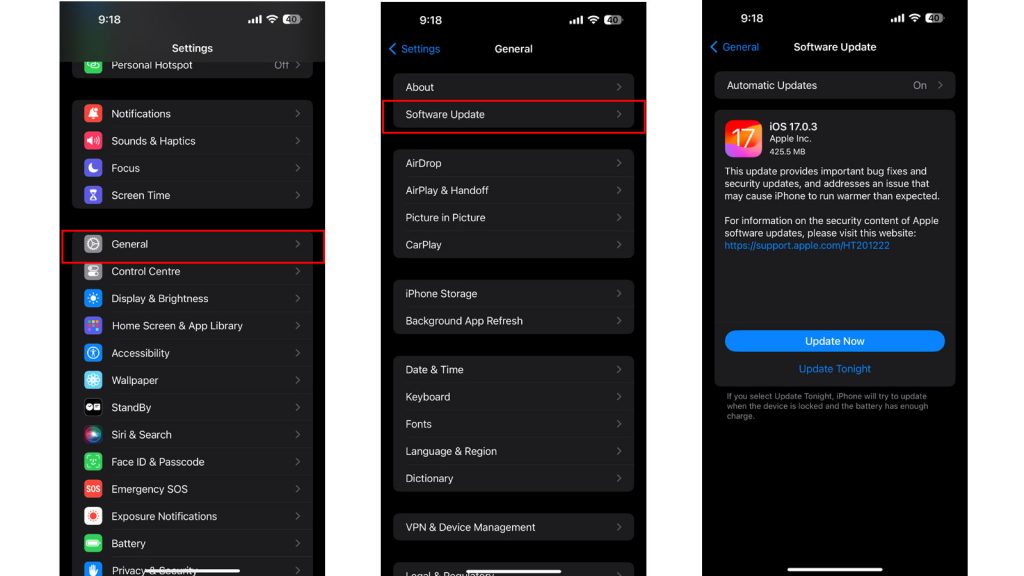
If you want to check out if you can update your phone, you can manually have a look, by heading to the following page on your phone’s settings:

Settings > General > Software Update

The phone will then check if the latest update can be downloaded and will prompt you to download it is ready. Your phone could also be automatically configured to download the latest iOS updates during downtime when it is charging.

If you are worried that the new update will slow down your phone – don’t worry. According to early testing online (as well as our internal testing), there is no performance hit with this particular update so go ahead and install the update to fix the overheating problem.


Tags: iOSiPhoneiPhone 15iPhone 15 PlusiPhone 15 ProiPhone 15 Pro MaxMobile
Sharil Abdul Rahman

Sharil Abdul Rahman

POPULAR

Apple issues iOS 17.0.3 update to fix the iPhone 15 overheating problem

October 5, 2023

Malaysia to review EV policy amid concerns over strict rules affecting BYD CKD operations in Tanjung Malim

April 17, 2026
TQ Wuling Bingo EV Malaysia

TQ Wuling Bingo is now available for rental in Malaysia via GoEV

April 14, 2026

Honor 600 series makes its debut in Malaysia on 22 April, featuring 200MP camera with AI Image to Video 2.0

April 13, 2026

Honda Super-One: The affordable compact EV Malaysians need?

April 14, 2026

Malaysia’s EV charging network is still broken? Raya trip almost turns into a disaster | Let’s Talk About #139

April 15, 2026

Copyright © 2025 · SoyaCincau.com
Mind Blow Sdn Bhd (1076827-P)

  • ADVERTISE
  • DISCLAIMER

Copyright © 2026 · SoyaCincau.com – Mind Blow Sdn Bhd (1076827-P)

  • ADVERTISE
  • DISCLAIMER