• 中文版
  • BM
  • News
  • Deals
  • Reviews
    • First Impressions
    • Hands-on
    • Comparisons
  • Tech
    • Mobile
    • Computers
    • Cameras
    • Wearables
    • Audio
    • Drones
  • Telco
    • Celcom
    • Digi
    • Maxis
    • Time
    • Tune Talk
    • U Mobile
    • Unifi
    • Yes
  • Cars
  • Contribute
  • Jobs
Menu
  • 中文版
  • BM
  • News
  • Deals
  • Reviews
    • First Impressions
    • Hands-on
    • Comparisons
  • Tech
    • Mobile
    • Computers
    • Cameras
    • Wearables
    • Audio
    • Drones
  • Telco
    • Celcom
    • Digi
    • Maxis
    • Time
    • Tune Talk
    • U Mobile
    • Unifi
    • Yes
  • Cars
  • Contribute
  • Jobs
Search
  • Tech
    • News
    • Mobile
    • Computers
    • Cameras
    • Wearables
    • Audio
    • Drones
  • Telco
    • Celcom
    • Digi
    • Maxis
    • Time
    • U Mobile
    • Unifi
    • Yes
  • Reviews
    • First Impressions
    • Hands-on
    • Comparisons
  • Buyer’s Guide
  • Opinions
  • Digital Life
  • Video
  • Deals
  • How-To
  • Cars
  • Bahasa Melayu
  • EV
  • Contribute
  • Advertise
Menu
  • Tech
    • News
    • Mobile
    • Computers
    • Cameras
    • Wearables
    • Audio
    • Drones
  • Telco
    • Celcom
    • Digi
    • Maxis
    • Time
    • U Mobile
    • Unifi
    • Yes
  • Reviews
    • First Impressions
    • Hands-on
    • Comparisons
  • Buyer’s Guide
  • Opinions
  • Digital Life
  • Video
  • Deals
  • How-To
  • Cars
  • Bahasa Melayu
  • EV
  • Contribute
  • Advertise
Search
Close
Home Digital Life Apps

Microsoft Paint will be getting layers, transparency and background removal support – just like Photoshop

  • BY Sharil Abdul Rahman
  • 20 September 2023
  • 6:40 pm
  • Comment
Share on FacebookShare on Twitter

According to the Windows blog, Microsoft is adding some high-end photo editing features into Windows Paint with the upcoming Windows 11 Insider build heading to the Beta, Canary and Dev channels. Layers and Transparency will be available for uses to use, and will be joining Background Removal in the application from now on.
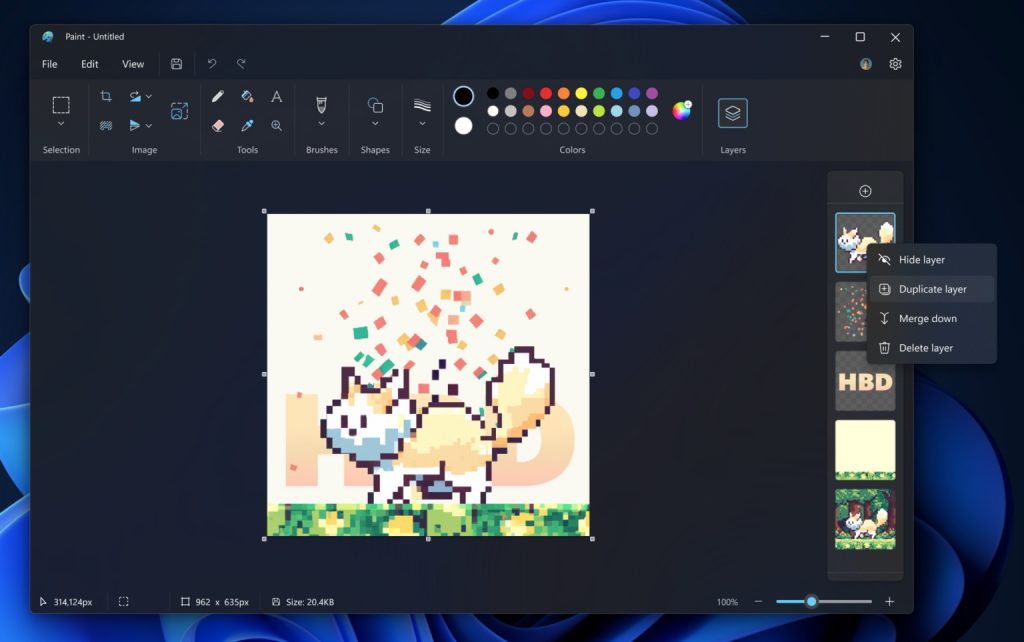
Quoting Microsoft, “You can now add, remove, and manage layers on the canvas to create richer and more complex digital art. With layers, you can stack shapes, text, and other image elements on top of each other.”

While Paint always has the ability to save images in PNG, with the upcoming build users will now be able to save PNG files with transparency layers. The transparency support will be complete – users can delete content from one layer, which will expose the content from the layer below just like Adobe Photoshop.
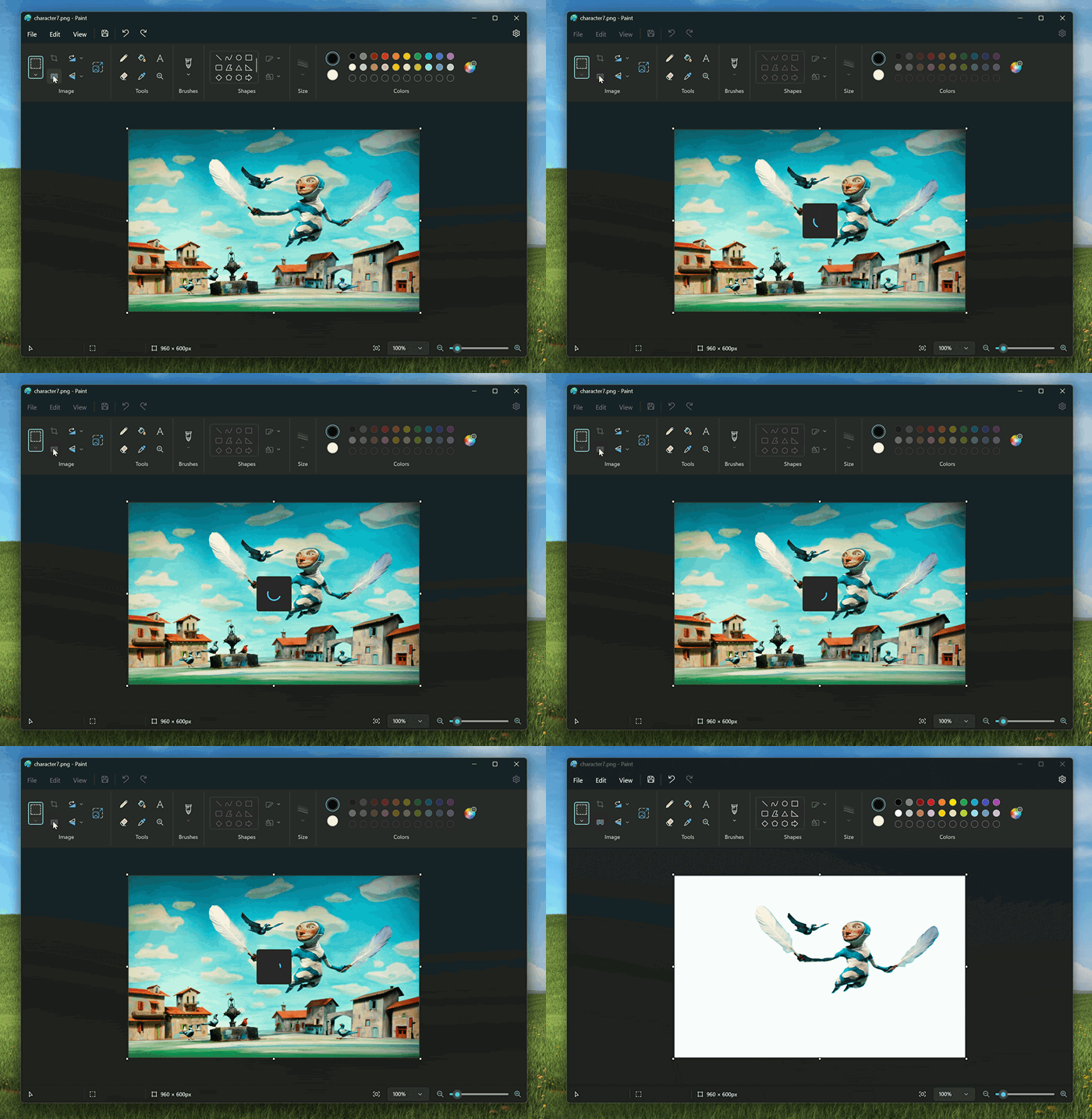
For background removal, it will be a function where users can remove the background of any image automatically in just one click leaving a smooth cutout of the subject. Background removal can detect the subject from the entire canvas or from a selection using the selection tool.

The new additions mean that for most people, you don’t need to get the much more powerful Adobe Photoshop to get intermediate image editing tools. Next time, you just need to fire up Paint. It is no longer just a meme image editor – it is becoming a legitimate editing tool for everyone.

Tags: Adobe PhotoshopmicrosoftMicrosoft Paintmicrosoft windows 11windows 11
Sharil Abdul Rahman

Sharil Abdul Rahman

POPULAR

Microsoft Paint will be getting layers, transparency and background removal support – just like Photoshop

September 20, 2023

Malaysia to review EV policy amid concerns over strict rules affecting BYD CKD operations in Tanjung Malim

April 17, 2026
TQ Wuling Bingo EV Malaysia

TQ Wuling Bingo is now available for rental in Malaysia via GoEV

April 14, 2026

Honda Super-One: The affordable compact EV Malaysians need?

April 14, 2026

Honor 600 series makes its debut in Malaysia on 22 April, featuring 200MP camera with AI Image to Video 2.0

April 13, 2026

Malaysia’s EV charging network is still broken? Raya trip almost turns into a disaster | Let’s Talk About #139

April 15, 2026

Copyright © 2025 · SoyaCincau.com
Mind Blow Sdn Bhd (1076827-P)

  • ADVERTISE
  • DISCLAIMER

Copyright © 2026 · SoyaCincau.com – Mind Blow Sdn Bhd (1076827-P)

  • ADVERTISE
  • DISCLAIMER