• 中文版
  • BM
  • News
  • Deals
  • Reviews
    • First Impressions
    • Hands-on
    • Comparisons
  • Tech
    • Mobile
    • Computers
    • Cameras
    • Wearables
    • Audio
    • Drones
  • Telco
    • Celcom
    • Digi
    • Maxis
    • Time
    • Tune Talk
    • U Mobile
    • Unifi
    • Yes
  • Cars
  • Contribute
  • Jobs
Menu
  • 中文版
  • BM
  • News
  • Deals
  • Reviews
    • First Impressions
    • Hands-on
    • Comparisons
  • Tech
    • Mobile
    • Computers
    • Cameras
    • Wearables
    • Audio
    • Drones
  • Telco
    • Celcom
    • Digi
    • Maxis
    • Time
    • Tune Talk
    • U Mobile
    • Unifi
    • Yes
  • Cars
  • Contribute
  • Jobs
Search
  • Tech
    • News
    • Mobile
    • Computers
    • Cameras
    • Wearables
    • Audio
    • Drones
  • Telco
    • Celcom
    • Digi
    • Maxis
    • Time
    • U Mobile
    • Unifi
    • Yes
  • Reviews
    • First Impressions
    • Hands-on
    • Comparisons
  • Buyer’s Guide
  • Opinions
  • Digital Life
  • Video
  • Deals
  • How-To
  • Cars
  • Bahasa Melayu
  • EV
  • Contribute
  • Advertise
Menu
  • Tech
    • News
    • Mobile
    • Computers
    • Cameras
    • Wearables
    • Audio
    • Drones
  • Telco
    • Celcom
    • Digi
    • Maxis
    • Time
    • U Mobile
    • Unifi
    • Yes
  • Reviews
    • First Impressions
    • Hands-on
    • Comparisons
  • Buyer’s Guide
  • Opinions
  • Digital Life
  • Video
  • Deals
  • How-To
  • Cars
  • Bahasa Melayu
  • EV
  • Contribute
  • Advertise
Search
Close
Home Digital Life

Here’s how to use Twitter Circle to share your deepest secrets without using a private account

  • BY Dzamira Dzafri
  • 4 September 2022
  • 5:02 pm
  • Comment
Share on FacebookShare on Twitter

Twitter has now made its Twitter Circle feature available for everyone. But it doesn’t look like a lot of us know how to access the feature, as it seems to have rolled out for users quietly.

If you’re not familiar with what Twitter Circle is, it’s a lot like Instagram’s “Close Friends” feature, which lets you post on your Instagram Stories—but only for a select few that you handpick. This means that you can use that feature to post certain things to people you trust the most, or to people you’re closest to. Twitter first started testing the feature to “select people” back in May, ahead of the wider rollout.

“Select up to 150 people who can view and interact with the Tweets you send in your Circle. Get started from the Tweet composer or sidebar menu,” wrote Twitter Support.

When you have a big Tweet that's meant for a smaller crowd, send it to your Twitter Circle –– now available for everyone.

Select up to 150 people who can view and interact with the Tweets you send in your Circle. Get started from the Tweet composer or sidebar menu. pic.twitter.com/c4YJTJpOGQ

— Support (@Support) August 30, 2022

While Twitter announced that Circle can be used to everyone, the company did not really send out any push notifications to users informing that the feature existed—or at least, they didn’t send any notifications to me. This explains why a few of my friends of Twitter asked me how to access it. Some even told me that they thought they didn’t have the feature yet.

In fact, the Twitter Circle feature can be used now. Here’s how to access it:

  • On your Twitter mobile app, press the + button to craft a new tweet
  • You’ll see the button above the area where you craft your tweet where it says “Public”. Press on it to “choose your audience”
  • You’ll be able to choose “Twitter Circle” for when you want to tweet to your chosen few

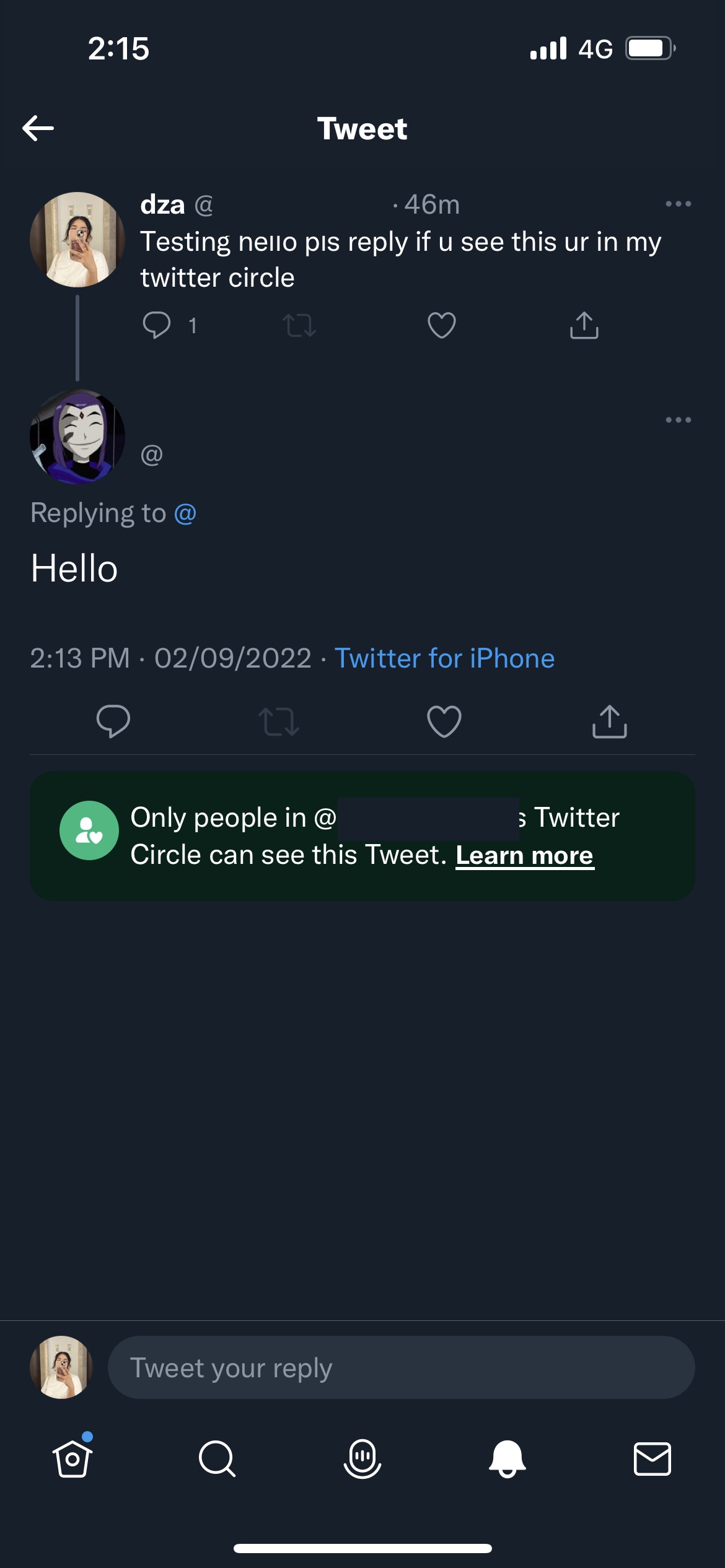
Once you tweet to your Twitter Circle, the platform informs you that only your Twitter Circle can see your tweet. They’re also able to respond to your tweets, and other people who aren’t in your Circle won’t be able to see the tweets. Also, users won’t receive a notification when you add or remove them from your Circle. 

Twitter Circle can help users gain a little more control over their privacy without making their accounts completely private. I personally use it to post more K-Pop related content that I know other followers wouldn’t really be into. But I’d still have to be careful with what I post and who I trust, as even though Circle tweets can’t be seen to others, people can still screenshot the page.


Tags: TwitterTwitter Circletwitter malaysia
Dzamira Dzafri

Dzamira Dzafri

POPULAR

Here’s how to use Twitter Circle to share your deepest secrets without using a private account

September 4, 2022
Rear view of the OPPO Find X9 Ultra in Tundra Umber standing vertically on a stone surface with a lush green bokeh background. The device features an eco-friendly vegan leather back with a classic stitching design , vertically oriented Hasselblad and OPPO logos , and a large circular Master Lens camera module with a bronze-toned knurled ring.

Clearing Every Expectation: How the OPPO Find X9 Ultra Redefines the Modern Flagship Experience

April 16, 2026

SoyaCincau x Dongfeng Pop Up EV Clinic: Track Edition 2026: Chase a podium or cruise with friends; we’re opening the grid to everyone

May 13, 2026

Volvo EX30 owners affected by recall told not to charge above 70% following two fire incidents in Thailand

May 19, 2026
BYD Inokom Visit - May 2026

BYD is here to stay in Malaysia: CKD with Sime Motors set to happen soon?

May 18, 2026

Sarawak’s Batang Lupar 1 Bridge: Malaysia’s longest river-crossing bridge opens today

May 21, 2026

Copyright © 2025 · SoyaCincau.com
Mind Blow Sdn Bhd (1076827-P)

  • ADVERTISE
  • DISCLAIMER

Copyright © 2026 · SoyaCincau.com – Mind Blow Sdn Bhd (1076827-P)

  • ADVERTISE
  • DISCLAIMER