• 中文版
  • BM
  • News
  • Deals
  • Reviews
    • First Impressions
    • Hands-on
    • Comparisons
  • Tech
    • Mobile
    • Computers
    • Cameras
    • Wearables
    • Audio
    • Drones
  • Telco
    • Celcom
    • Digi
    • Maxis
    • Time
    • Tune Talk
    • U Mobile
    • Unifi
    • Yes
  • Cars
  • Contribute
  • Jobs
Menu
  • 中文版
  • BM
  • News
  • Deals
  • Reviews
    • First Impressions
    • Hands-on
    • Comparisons
  • Tech
    • Mobile
    • Computers
    • Cameras
    • Wearables
    • Audio
    • Drones
  • Telco
    • Celcom
    • Digi
    • Maxis
    • Time
    • Tune Talk
    • U Mobile
    • Unifi
    • Yes
  • Cars
  • Contribute
  • Jobs
Search
  • Tech
    • News
    • Mobile
    • Computers
    • Cameras
    • Wearables
    • Audio
    • Drones
  • Telco
    • Celcom
    • Digi
    • Maxis
    • Time
    • U Mobile
    • Unifi
    • Yes
  • Reviews
    • First Impressions
    • Hands-on
    • Comparisons
  • Buyer’s Guide
  • Opinions
  • Digital Life
  • Video
  • Deals
  • How-To
  • Cars
  • Bahasa Melayu
  • EV
  • Contribute
  • Advertise
Menu
  • Tech
    • News
    • Mobile
    • Computers
    • Cameras
    • Wearables
    • Audio
    • Drones
  • Telco
    • Celcom
    • Digi
    • Maxis
    • Time
    • U Mobile
    • Unifi
    • Yes
  • Reviews
    • First Impressions
    • Hands-on
    • Comparisons
  • Buyer’s Guide
  • Opinions
  • Digital Life
  • Video
  • Deals
  • How-To
  • Cars
  • Bahasa Melayu
  • EV
  • Contribute
  • Advertise
Search
Close
Home Digital Life

Apple refused refund request after child spent more than RM66,000 on in-app purchases

  • BY Dzamira Dzafri
  • 16 December 2020
  • 3:31 pm
  • Comment
Share on FacebookShare on Twitter

Jessica Johnson, a mother based in Connecticut, U.S., discovered a series of transactions made on her credit card over a series of months. The purchases were made by her youngest son, George, who was repeatedly acquiring in-game currency for the game Sonic Forces on the iPad.

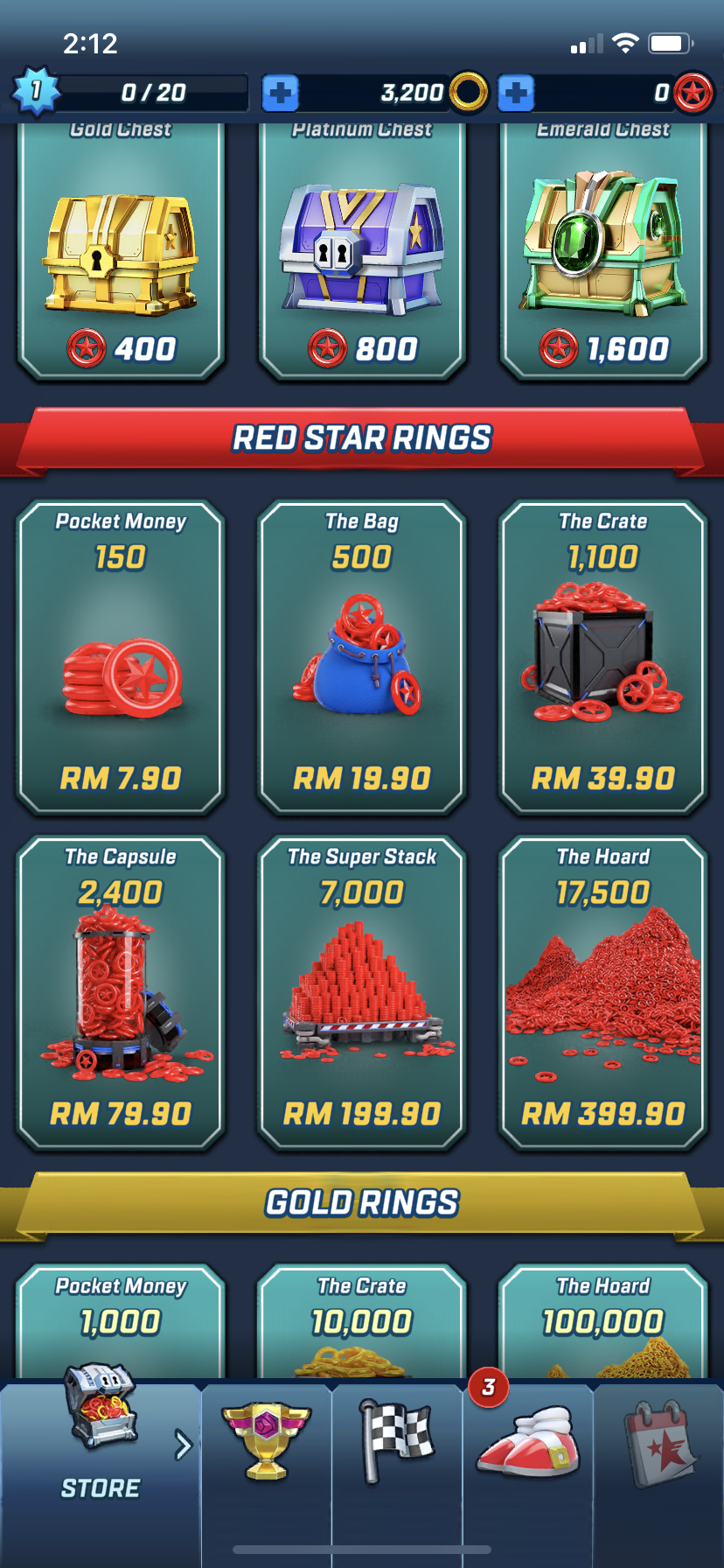
The six-year-old kid ended up spending USD 16,293.10 (RM66,076.67). He started purchasing in-app currency in July this year, starting from a USD 1.99 pack to USD 99.99 bundles. Going through the app myself, the in-app purchases for currency (or Red Star Rings in the game) starts at RM7.90 to RM399.90. On July 9, 25 charges were made to her account—valued at over USD 2,500 (RM10,138.75).
The transactions were initially thought to be fraud by Johnson, who found it “almost impossible” to figure out that they originated from in-app purchases. However, after filing a fraud claim with banking company Chase, they told her the charges were genuine, and Johnson was told to contact Apple.

Once she contacted Apple, she was talked through a “buried running list of all the charges”. She then realised it was her son who made the in-app purchases after seeing the Sonic Forces icon.

“It’s like my 6-year-old was doing lines of cocaine—and doing bigger and bigger hits,” said Johnson.

Despite her mistake, Apple refused to refund her the money as she didn’t inform the company within 60 days of the charges. According to Johnson, she didn’t tell Apple on time because Chase told her the transactions were “likely to be fraud”.

Johnson also claimed that Apple’s representative was cold when she told them she wouldn’t be able to make her mortgage payment. They told her that “there’s a setting, you should have known.”

“Obviously, if I had known there was a setting for that, I wouldn’t have allowed my 6-year-old to run up nearly USD 20,000 in charges for virtual gold rings. These games are designed to be completely predatory and get kids to buy things, What grown-up would spend USD 100 on a chest of virtual gold coins?” said Johnson.

It isn’t clear why the parents weren’t alerted sooner to the purchases as there would be email notifications sent to the iCloud account address when the account was billed. But she does have advice for other parents: “Check your security settings.”
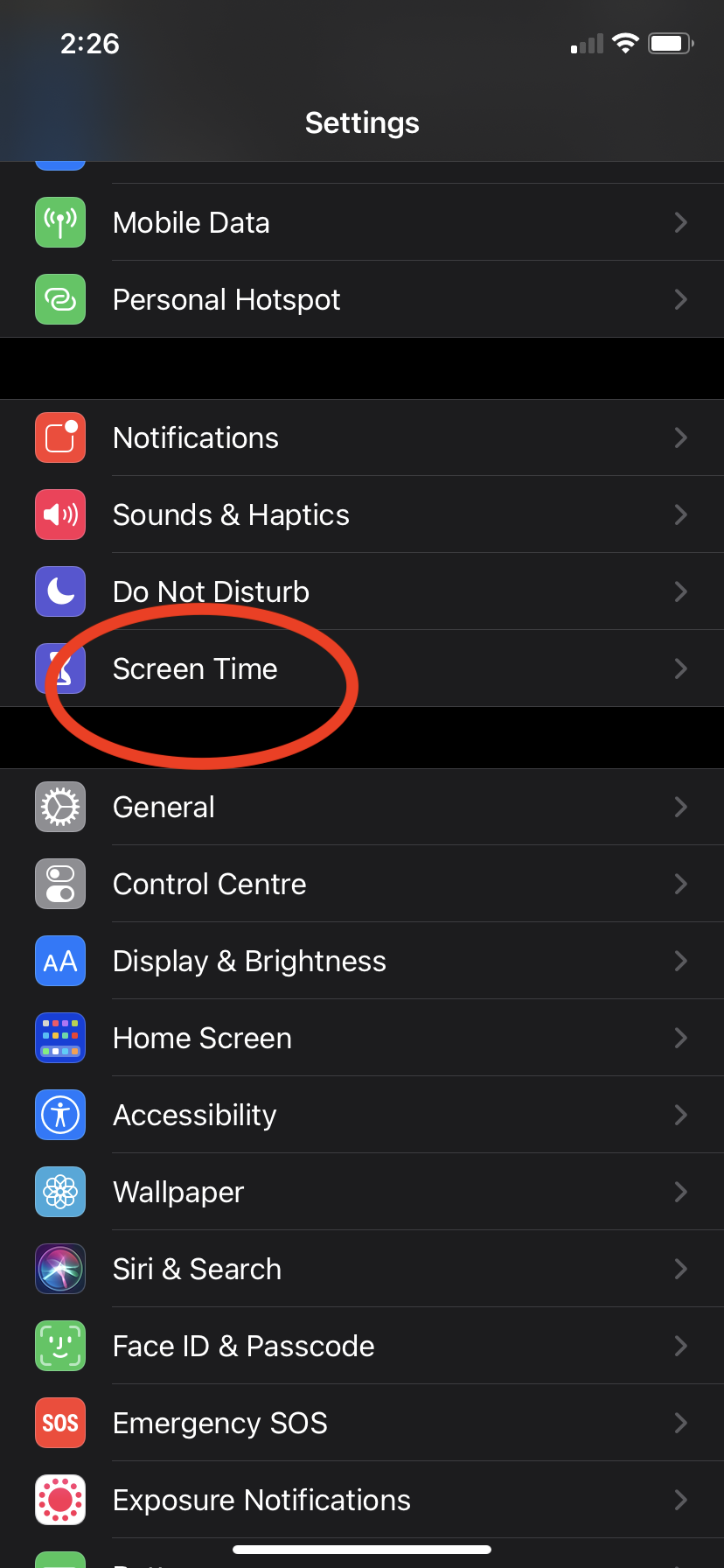
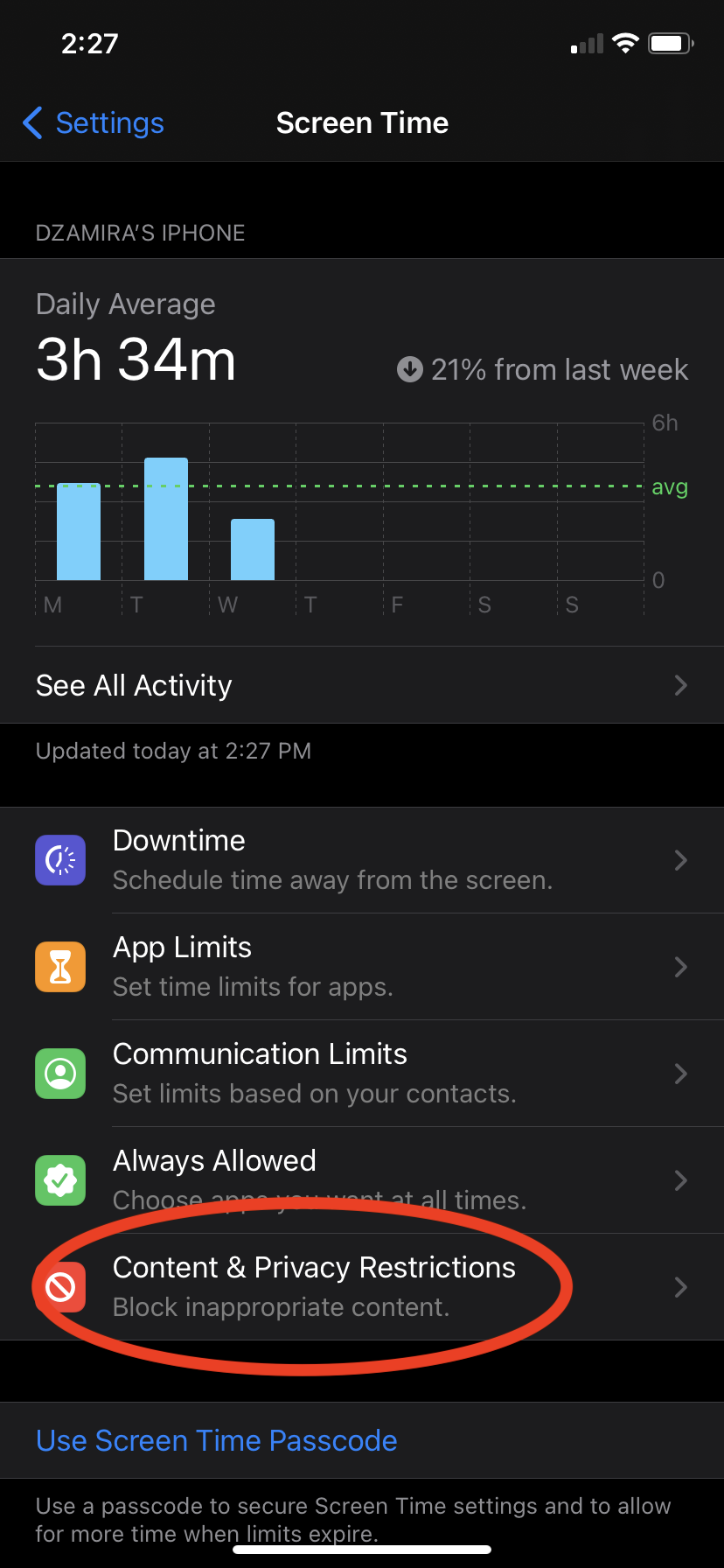
To avoid having this happen to you, you can set parental controls on your in-app purchases. Go to Settings, then Screen Time, then Content & Privacy Restrictions.
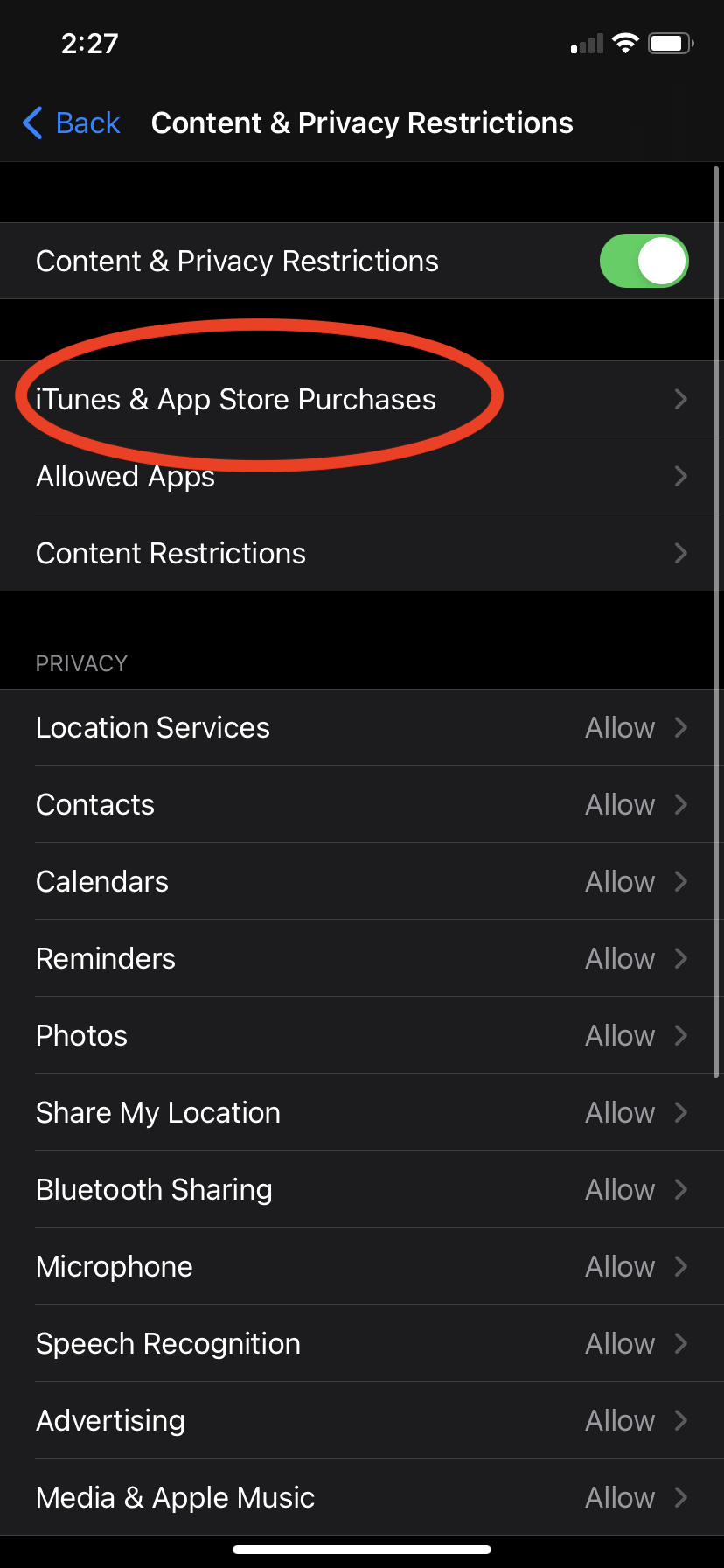
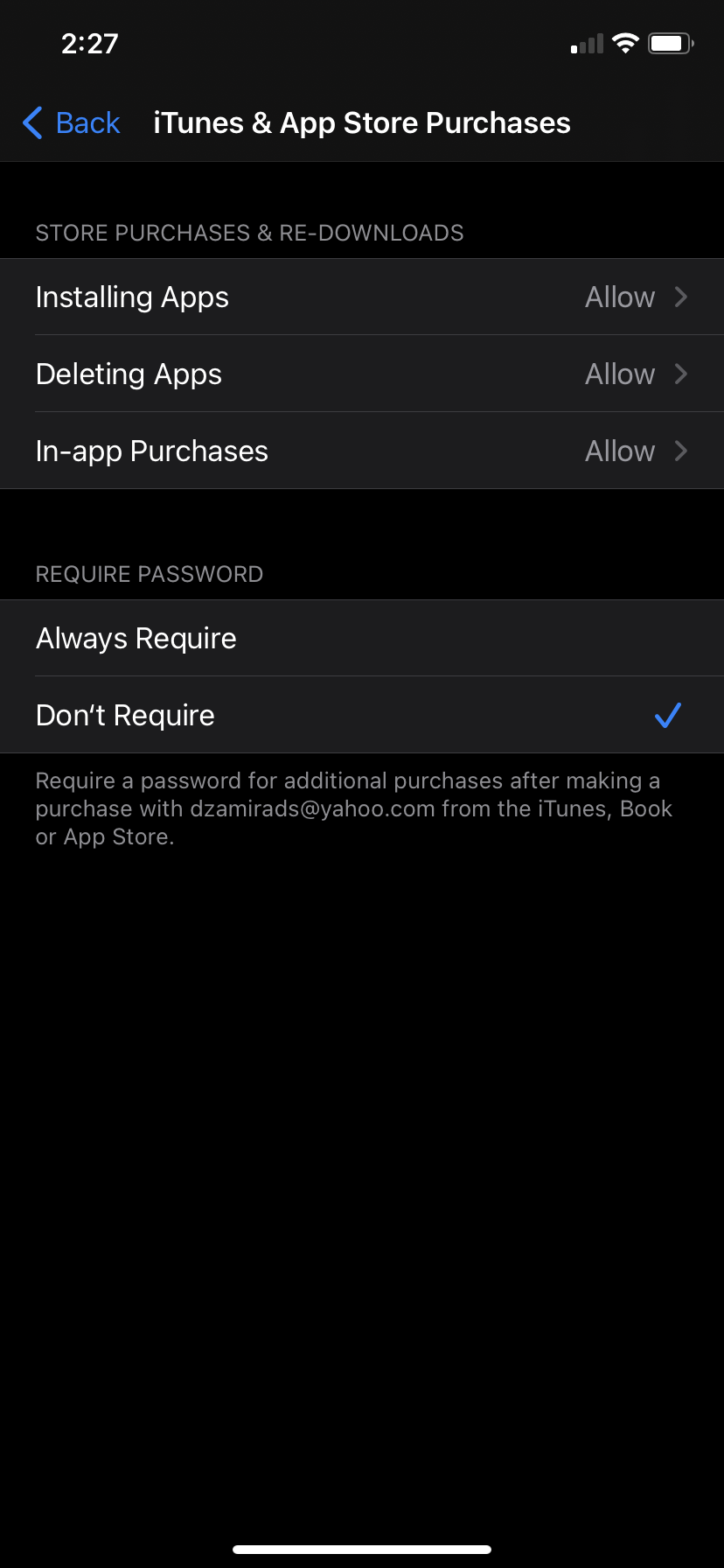
You’ll then need to select iTunes and App Store Purchases to choose your preferred restrictions. The default lets you purchase things without a password and just your Face or Touch ID. You can opt for a password if you’d like, or you can also disable the download of apps, disable deleting apps, and disable in-app purchases.

[ SOURCE ]

Related reading

Is Apple pushing ads in the iPhone and iPad settings app?
Tags: AppleiOSiOS appsiPad
Dzamira Dzafri

Dzamira Dzafri

POPULAR

Apple refused refund request after child spent more than RM66,000 on in-app purchases

December 16, 2020
Rear view of the OPPO Find X9 Ultra in Tundra Umber standing vertically on a stone surface with a lush green bokeh background. The device features an eco-friendly vegan leather back with a classic stitching design , vertically oriented Hasselblad and OPPO logos , and a large circular Master Lens camera module with a bronze-toned knurled ring.

Clearing Every Expectation: How the OPPO Find X9 Ultra Redefines the Modern Flagship Experience

April 16, 2026
Proton EV Plant, Tanjung Malim

MITI says EVs won’t become more expensive, but can Malaysia’s CKD industry fill the gap?

May 10, 2026

Maxis Home Solar now offers outright purchase option, with up to 80% electricity bill savings

May 11, 2026
BYD Tech Discovery KL

MITI’s CBU EV ruling will wipe out current EV lineup from BYD, iCaur, Mini, Smart, Toyota, and more

May 7, 2026

Vibe Mobile is U Mobile’s latest MVNO partner for 5G services

May 11, 2026

Copyright © 2025 · SoyaCincau.com
Mind Blow Sdn Bhd (1076827-P)

  • ADVERTISE
  • DISCLAIMER

Copyright © 2026 · SoyaCincau.com – Mind Blow Sdn Bhd (1076827-P)

  • ADVERTISE
  • DISCLAIMER