• 中文版
  • BM
  • News
  • Deals
  • Reviews
    • First Impressions
    • Hands-on
    • Comparisons
  • Tech
    • Mobile
    • Computers
    • Cameras
    • Wearables
    • Audio
    • Drones
  • Telco
    • Celcom
    • Digi
    • Maxis
    • Time
    • Tune Talk
    • U Mobile
    • Unifi
    • Yes
  • Cars
  • Contribute
  • Jobs
Menu
  • 中文版
  • BM
  • News
  • Deals
  • Reviews
    • First Impressions
    • Hands-on
    • Comparisons
  • Tech
    • Mobile
    • Computers
    • Cameras
    • Wearables
    • Audio
    • Drones
  • Telco
    • Celcom
    • Digi
    • Maxis
    • Time
    • Tune Talk
    • U Mobile
    • Unifi
    • Yes
  • Cars
  • Contribute
  • Jobs
Search
  • Tech
    • News
    • Mobile
    • Computers
    • Cameras
    • Wearables
    • Audio
    • Drones
  • Telco
    • Celcom
    • Digi
    • Maxis
    • Time
    • U Mobile
    • Unifi
    • Yes
  • Reviews
    • First Impressions
    • Hands-on
    • Comparisons
  • Buyer’s Guide
  • Opinions
  • Digital Life
  • Video
  • Deals
  • How-To
  • Cars
  • Bahasa Melayu
  • EV
  • Contribute
  • Advertise
Menu
  • Tech
    • News
    • Mobile
    • Computers
    • Cameras
    • Wearables
    • Audio
    • Drones
  • Telco
    • Celcom
    • Digi
    • Maxis
    • Time
    • U Mobile
    • Unifi
    • Yes
  • Reviews
    • First Impressions
    • Hands-on
    • Comparisons
  • Buyer’s Guide
  • Opinions
  • Digital Life
  • Video
  • Deals
  • How-To
  • Cars
  • Bahasa Melayu
  • EV
  • Contribute
  • Advertise
Search
Close
Home News

WhatsApp: You can now use Huawei Mobile Cloud instead of Google Drive for backups

  • BY Nic Ker
  • 15 June 2020
  • 11:32 am
  • Comment
Share on FacebookShare on Twitter

When Huawei had their infamous fallout with the U.S. government, one of the biggest changes—at least on the consumer side of things—was the replacement of Google Mobile Services (GMS) with Huawei’s own Mobile Services (HMS). This has had some significant consequences, with users missing out on the Google framework, and support for native apps has gone missing (even Google Play).

But one of the many integrated uses of Google’s app is the use of Google Drive to back up WhatsApp chat histories. As someone that switches between mobile devices fairly regularly due to work, using a workaround to transfer chat backups between devices is something that needs to be as simple as possible.

In the past, Huawei users have had to resort to workarounds that involve manually transferring the backup file to a new device. Now, the company has announced that Huawei Mobile Cloud will now allow users to “backup easily” when it comes to their WhatsApp chat logs.

This isn’t exclusive to WhatsApp, with the Huawei Mobile Cloud supporting data backups for WeChat, Telegram, Facebook, Messenger, and Weibo (messages and media). According to the company, chat history is automatically restored whenever a users logs into their Huawei ID account—which means that only Huawei-to-Huawei device transactions are compatible.
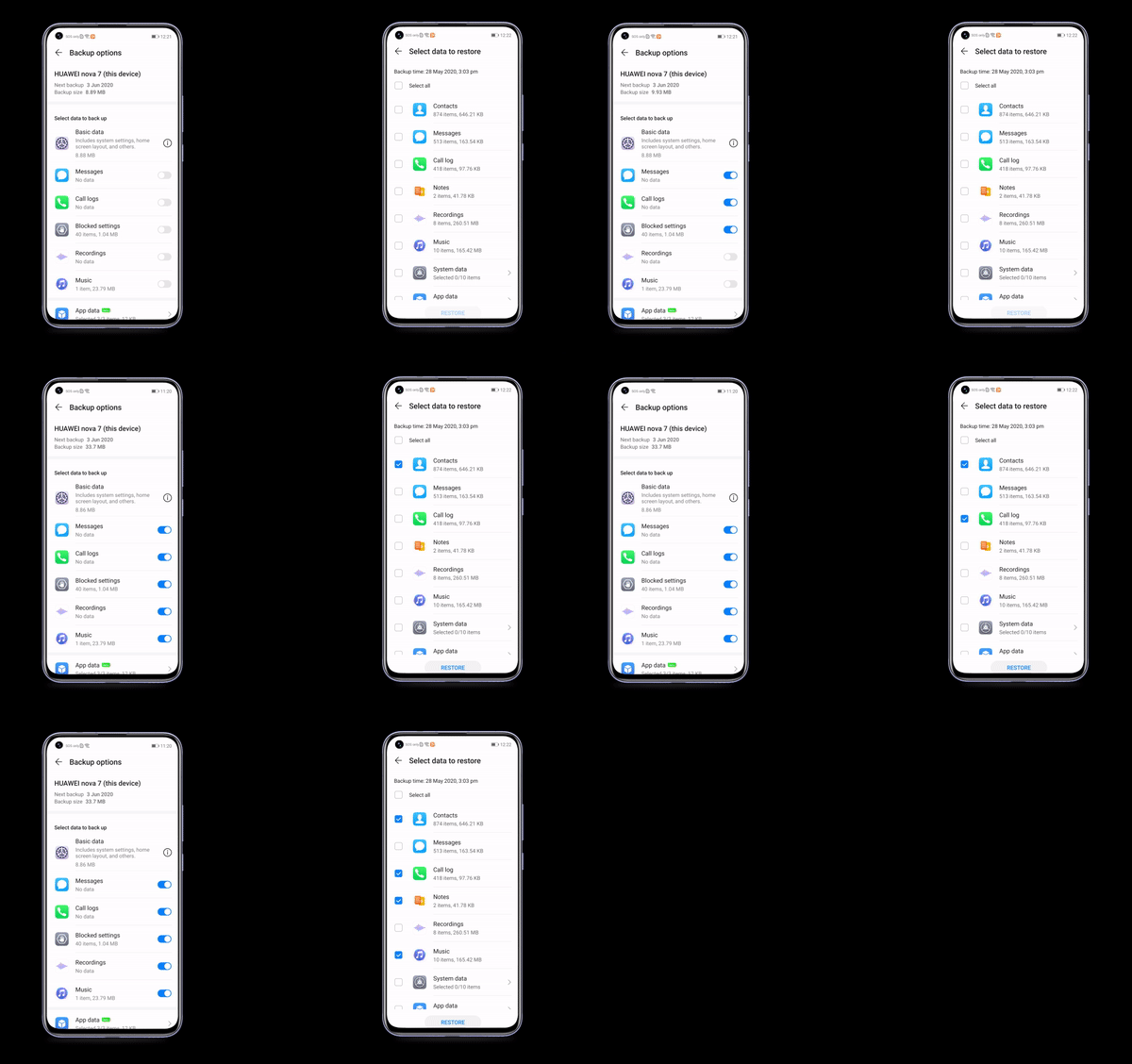
Steps are fairly straightforward:

  • Step 1: Go to setting > tap on your Huawei ID.
  • Step 2: select Cloud > Enable Cloud Backup.
  • Step 3: Select Back-up Options and go to App Data.
  • Step 4: Enable WhatsApp and you have successfully restored your chats logs and files.
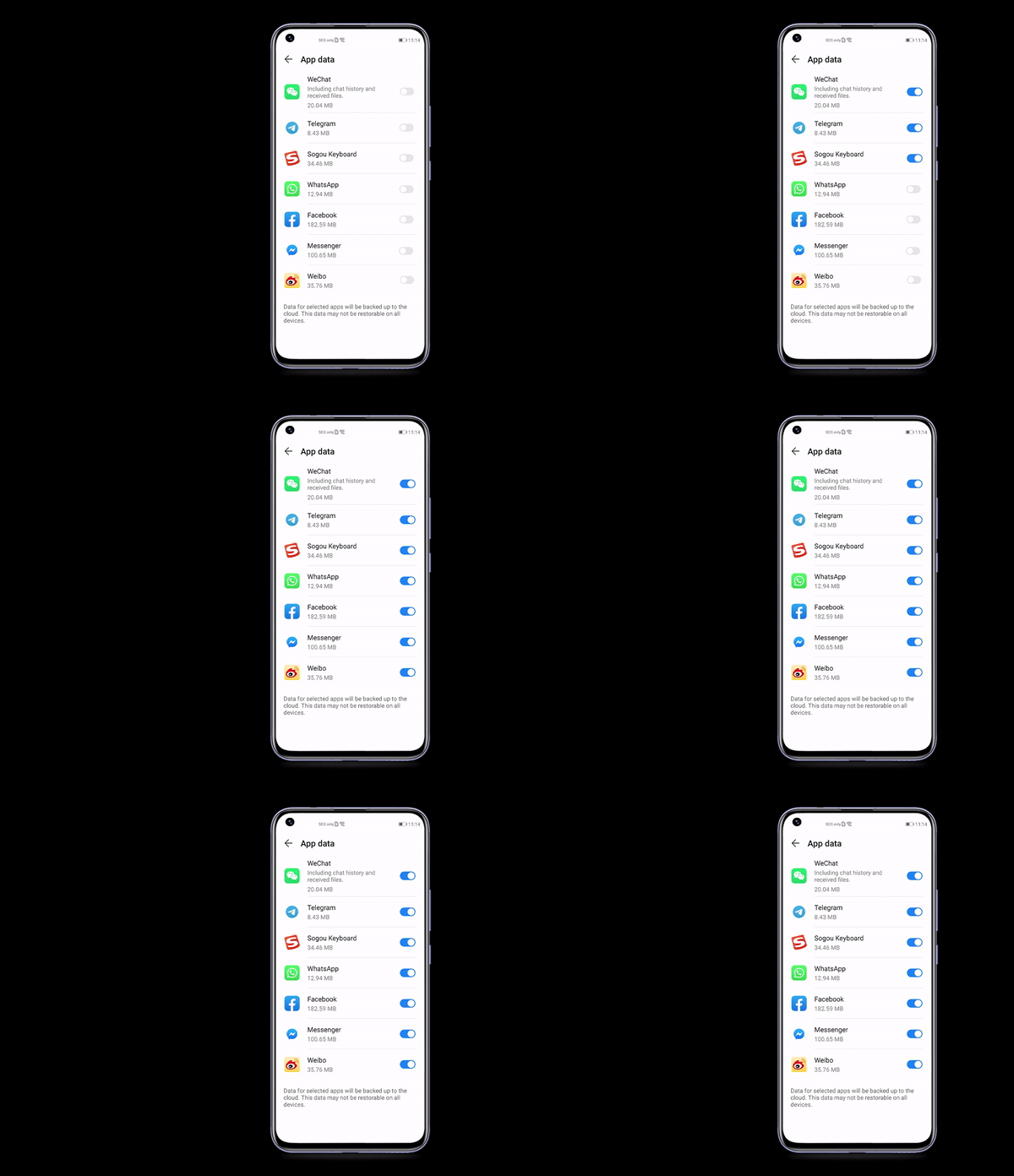
Currently, Huawei Mobile Cloud offers 5GB of free storage which you can use to back up chat histories, app data, and various forms of media. There are also paid upgrades available, including 50GB, 200GB, and 2TB options. For users of the Huawei P40 series, you’ll get 50GB for free for 12 months—find out more here.


Tags: googleGoogle DriveHuaweiMobile
Nic Ker

Nic Ker

POPULAR

WhatsApp: You can now use Huawei Mobile Cloud instead of Google Drive for backups

June 15, 2020

Proton S70 i-GT 1.5 NA is now official: Priced from as low as RM56,800

September 22, 2026

New MyKad hits another snag: MyDigital ID online registration not ready yet

September 20, 2026

Xiaomi 18 Pro series coming to Malaysia this year with Privacy Display, Snapdragon 8 Elite Gen 6

September 24, 2026

Don’t rush to replace your MyKad: New card faces eKYC verification issues

September 19, 2026

How Do You Want to Pay for Your iPhone 18 Pro? 3 Ways to Get More Value

September 18, 2026

Copyright © 2026 · SoyaCincau.com
Mind Blow Sdn Bhd (1076827-P)

  • ADVERTISE
  • DISCLAIMER

Copyright © 2026 · SoyaCincau.com – Mind Blow Sdn Bhd (1076827-P)

  • ADVERTISE
  • DISCLAIMER