
• 中文版
  • BM
  • News
  • Deals
  • Reviews
    • First Impressions
    • Hands-on
    • Comparisons
  • Tech
    • Mobile
    • Computers
    • Cameras
    • Wearables
    • Audio
    • Drones
  • Telco
    • Celcom
    • Digi
    • Maxis
    • Time
    • Tune Talk
    • U Mobile
    • Unifi
    • Yes
  • Cars
  • Contribute
  • Jobs
Menu
  • 中文版
  • BM
  • News
  • Deals
  • Reviews
    • First Impressions
    • Hands-on
    • Comparisons
  • Tech
    • Mobile
    • Computers
    • Cameras
    • Wearables
    • Audio
    • Drones
  • Telco
    • Celcom
    • Digi
    • Maxis
    • Time
    • Tune Talk
    • U Mobile
    • Unifi
    • Yes
  • Cars
  • Contribute
  • Jobs
Search
  • Tech
    • News
    • Mobile
    • Computers
    • Cameras
    • Wearables
    • Audio
    • Drones
  • Telco
    • Celcom
    • Digi
    • Maxis
    • Time
    • U Mobile
    • Unifi
    • Yes
  • Reviews
    • First Impressions
    • Hands-on
    • Comparisons
  • Buyer’s Guide
  • Opinions
  • Digital Life
  • Video
  • Deals
  • How-To
  • Cars
  • Bahasa Melayu
  • EV
  • Contribute
  • Advertise
Menu
  • Tech
    • News
    • Mobile
    • Computers
    • Cameras
    • Wearables
    • Audio
    • Drones
  • Telco
    • Celcom
    • Digi
    • Maxis
    • Time
    • U Mobile
    • Unifi
    • Yes
  • Reviews
    • First Impressions
    • Hands-on
    • Comparisons
  • Buyer’s Guide
  • Opinions
  • Digital Life
  • Video
  • Deals
  • How-To
  • Cars
  • Bahasa Melayu
  • EV
  • Contribute
  • Advertise
Search
Close
Home Digital Life

We’ve broken the AppLock -Fingerprint- “encryption” and it wasn’t even that difficult

  • BY Rory Lee
  • 21 January 2016
  • 9:36 am
  • Comment
Share on FacebookShare on Twitter

160121-lock-applications-with-fingerprint-applock-2

We’ve touched on how good the Nexus 6P’s fingerprint sensor is in the past with its quick unlock speed and high accuracy despite only needing six taps to register your finger. You can also use it to authenticate Google Play as well as Android Pay purchases, but we’ve always hoped it could do more especially since Google baked fingerprint support into Android 6.0 Marshmallow itself.

Thanks to the open API though, now you can use your fingerprint to lock specific apps in your phone — but there’s a catch.

App locking is no new concept. It simply allows you to lock specific applications, requiring either a password or pin to access that particular app. Let’s say, your friends are the nosy bunch and the moment they get their hands on your device, they like to head into the gallery to look at all your embarrassing failed selfie attempts. Thanks to an app locker, you can stop that by protecting access to that application with an app locker. Some devices even have that natively in their Android skin, while others even allow you to lock entire folders of applications.
160121-lock-applications-with-fingerprint-applock

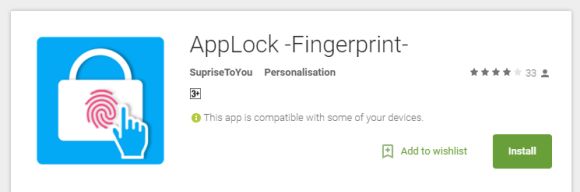
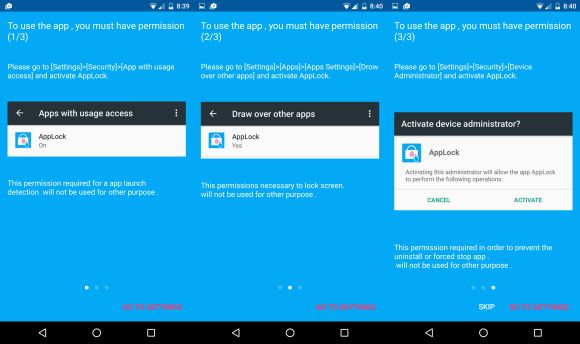
Entering a password is so last century and developer SurpriseToYou have come up with AppLock -Fingerprint-, an app that lets you (if you’re on Android 6.0 Marshmallow) lock individual applications in your phone with your fingerprint. Although we must note the incredibly sketchy developer name. When I’m using a security app, I don’t really want it to surprise me. To use it, the app requires you to grant it three different levels of access — Apps with usage access, Draw over other apps, and Activate device administrator.
160121-lock-applications-with-fingerprint-applock-1

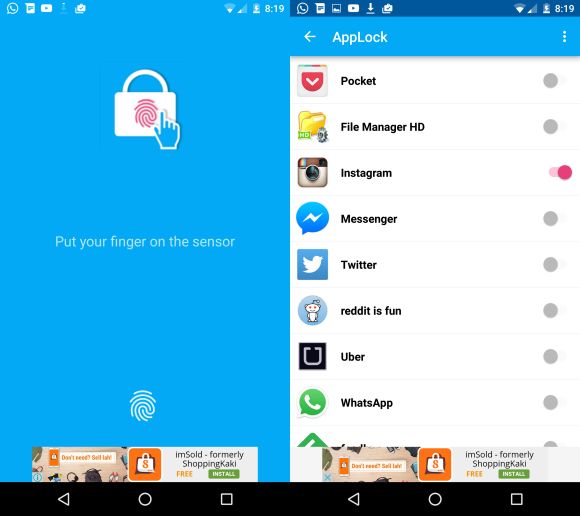
Once in, it’s a simple task of choosing which application you want locked by flicking the toggle next to that specific app. Once you launch the app that you’ve locked, the AppLock -Fingerprint- overlay will draw over the app and ask for your fingerprint.

But, true to the developer’s name, here’s the surprise — when that overlay pops up and “locks” your app, should you receive a banner notification from WhatsApp, the overlay drops and you have access to said “locked” app without ever inputting your fingerprint. What kind of security is this?!

While the fact that this app runs on ads without a way to disable it is a little annoying, I think the far more pressing issue is the fact that you can break the “encryption” with a single banner notification. If, however, that doesn’t bother you and you’re interested in this app, you can get it from the PlayStore. Just, erm I don’t know, turn off your banner notifications in the mean time?


[SOURCE, VIA, 2]

Tags: AppLockAppLock FingerprintFingerprint decryptedFingerprint encryption
Rory Lee

Rory Lee

POPULAR

We’ve broken the AppLock -Fingerprint- “encryption” and it wasn’t even that difficult

January 21, 2016
Rear view of the OPPO Find X9 Ultra in Tundra Umber standing vertically on a stone surface with a lush green bokeh background. The device features an eco-friendly vegan leather back with a classic stitching design , vertically oriented Hasselblad and OPPO logos , and a large circular Master Lens camera module with a bronze-toned knurled ring.

Clearing Every Expectation: How the OPPO Find X9 Ultra Redefines the Modern Flagship Experience

April 16, 2026

SoyaCincau x Dongfeng Pop Up EV Clinic: Track Edition 2026: Chase a podium or cruise with friends; we’re opening the grid to everyone

May 13, 2026

Volvo EX30 owners affected by recall told not to charge above 70% following two fire incidents in Thailand

May 19, 2026
BYD Inokom Visit - May 2026

BYD is here to stay in Malaysia: CKD with Sime Motors set to happen soon?

May 18, 2026

Eastel Prepaid now available via TNG eWallet, offers 100GB 5G data from RM25/month

May 19, 2026

Copyright © 2025 · SoyaCincau.com
Mind Blow Sdn Bhd (1076827-P)

  • ADVERTISE
  • DISCLAIMER

Copyright © 2026 · SoyaCincau.com – Mind Blow Sdn Bhd (1076827-P)

  • ADVERTISE
  • DISCLAIMER




