
• 中文版
  • BM
  • News
  • Deals
  • Reviews
    • First Impressions
    • Hands-on
    • Comparisons
  • Tech
    • Mobile
    • Computers
    • Cameras
    • Wearables
    • Audio
    • Drones
  • Telco
    • Celcom
    • Digi
    • Maxis
    • Time
    • Tune Talk
    • U Mobile
    • Unifi
    • Yes
  • Cars
  • Contribute
  • Jobs
Menu
  • 中文版
  • BM
  • News
  • Deals
  • Reviews
    • First Impressions
    • Hands-on
    • Comparisons
  • Tech
    • Mobile
    • Computers
    • Cameras
    • Wearables
    • Audio
    • Drones
  • Telco
    • Celcom
    • Digi
    • Maxis
    • Time
    • Tune Talk
    • U Mobile
    • Unifi
    • Yes
  • Cars
  • Contribute
  • Jobs
Search
  • Tech
    • News
    • Mobile
    • Computers
    • Cameras
    • Wearables
    • Audio
    • Drones
  • Telco
    • Celcom
    • Digi
    • Maxis
    • Time
    • U Mobile
    • Unifi
    • Yes
  • Reviews
    • First Impressions
    • Hands-on
    • Comparisons
  • Buyer’s Guide
  • Opinions
  • Digital Life
  • Video
  • Deals
  • How-To
  • Cars
  • Bahasa Melayu
  • EV
  • Contribute
  • Advertise
Menu
  • Tech
    • News
    • Mobile
    • Computers
    • Cameras
    • Wearables
    • Audio
    • Drones
  • Telco
    • Celcom
    • Digi
    • Maxis
    • Time
    • U Mobile
    • Unifi
    • Yes
  • Reviews
    • First Impressions
    • Hands-on
    • Comparisons
  • Buyer’s Guide
  • Opinions
  • Digital Life
  • Video
  • Deals
  • How-To
  • Cars
  • Bahasa Melayu
  • EV
  • Contribute
  • Advertise
Search
Close
Home Digital Life

You can add “MagSafe” to your MacBook and USB Type-C Laptops

  • BY Alexander Wong
  • 5 January 2016
  • 1:15 pm
  • Comment
Share on FacebookShare on Twitter

160105-griffin-breaksafe-magnetic-usb-type-c-cable-01

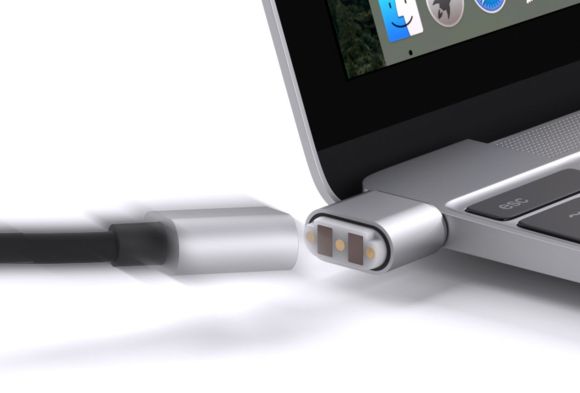
The MacBook Air and MacBook Pro uses a MagSafe charging connector that latches to your laptop with the help of magnets. It is an interesting safety feature as it disconnects if someone tripped over your cable, avoiding the risk of dragging your laptop to the ground. When Apple introduced the new ultra-thin MacBook, it was ditched in favour of the all-new USB Type-C. This is supposedly the future standard of connectivity, allowing you to deliver power, data and even high-resolution video on a single cable.

Sadly that means you’re stuck with an old-school cable design like other gadgets. If you want to restore that MagSafe feature of old, cable maker Griffin finally has a solution for you.
160105-griffin-breaksafe-magnetic-usb-type-c-cable-02

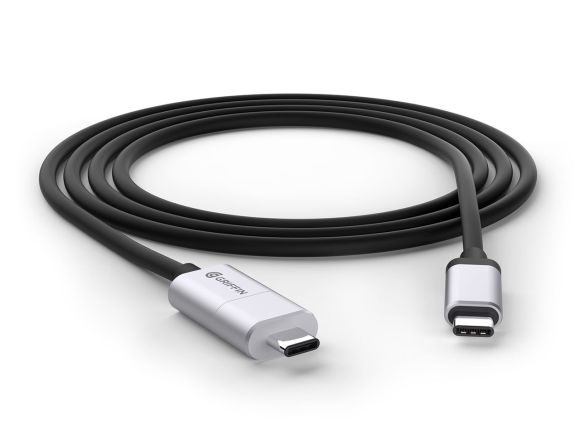
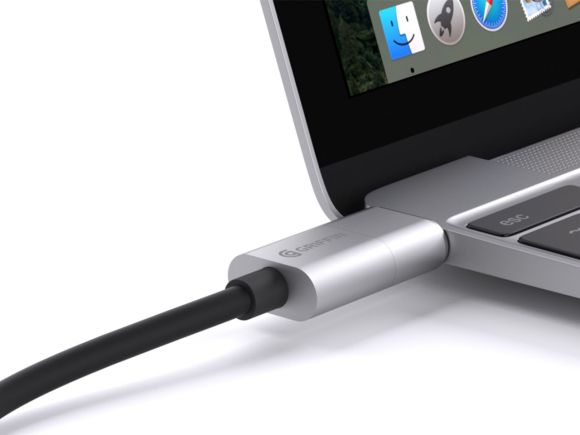
Simply called as BreakSafe, the new magnetic USB cable works essentially like the MagSafe that came as standard with previous MacBook models. It is fairly easy to release and it will automatically disconnect when there’s excessive pressure. On one end, you get a fixed USB Type-C connector that goes into your power adapter, while the other end has two pieces, with the small stub that stays permanently in your MacBook port.
160105-griffin-breaksafe-magnetic-usb-type-c-cable-03

The cable is 6 feet (1.8 metres) long and the magnetic connector is about 12.8mm deep. On their online store, it is listed as coming soon with the retail price tag of US$39.99 (about RM173). As comparison, the original USB Type-C cable (2 metres) for the MacBook is going for RM139.
160105-znaps-magsafe-usb-connector

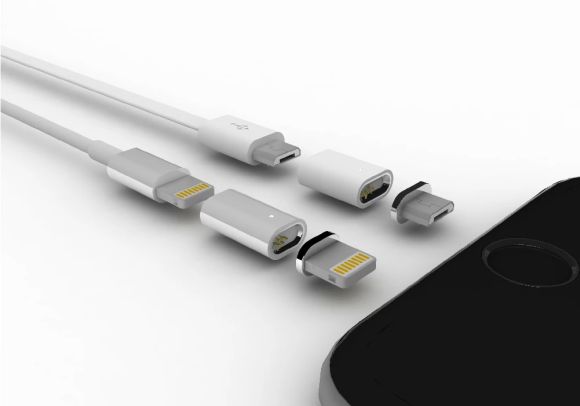
If you’re looking for a sleeker alternative, there’s Znaps that debut on KickStarter. This isn’t a cable but a two-piece connector head that gives you a “MagSafe” and a reversible feature for your existing Lightning, Micro-USB and USB Type-C cables. A set for Lightning and Micro-USB costs US$18.00 (about RM78) while USB Type-C costs US$24.00 (about RM104). Individual connectors and adapters are sold separately so you can “MagSafe” your entire device collection if required. You can pre-order now and they will ship by end of this month.


[ SOURCE, VIA ]

Tags: BreakSafe Magnetic USB Type C CableCES 2016GriffinGriffin USB Type CMagnetic Release CableMagnetic USB Type C CablemagsafeUSB CableUSB Type-C cable
Alexander Wong

Alexander Wong

POPULAR

You can add “MagSafe” to your MacBook and USB Type-C Laptops

January 5, 2016
Rear view of the OPPO Find X9 Ultra in Tundra Umber standing vertically on a stone surface with a lush green bokeh background. The device features an eco-friendly vegan leather back with a classic stitching design , vertically oriented Hasselblad and OPPO logos , and a large circular Master Lens camera module with a bronze-toned knurled ring.

Clearing Every Expectation: How the OPPO Find X9 Ultra Redefines the Modern Flagship Experience

April 16, 2026

Volvo EX30 owners affected by recall told not to charge above 70% following two fire incidents in Thailand

May 19, 2026

SoyaCincau x Dongfeng Pop Up EV Clinic: Track Edition 2026: Chase a podium or cruise with friends; we’re opening the grid to everyone

May 13, 2026
BYD Inokom Visit - May 2026

BYD is here to stay in Malaysia: CKD with Sime Motors set to happen soon?

May 18, 2026

SoyaCincau x Dongfeng: We’re taking over Sepang for Malaysia’s biggest EV Track Day for 2026

May 8, 2026

Copyright © 2025 · SoyaCincau.com
Mind Blow Sdn Bhd (1076827-P)

  • ADVERTISE
  • DISCLAIMER

Copyright © 2026 · SoyaCincau.com – Mind Blow Sdn Bhd (1076827-P)

  • ADVERTISE
  • DISCLAIMER




