• 中文版
  • BM
  • News
  • Deals
  • Reviews
    • First Impressions
    • Hands-on
    • Comparisons
  • Tech
    • Mobile
    • Computers
    • Cameras
    • Wearables
    • Audio
    • Drones
  • Telco
    • Celcom
    • Digi
    • Maxis
    • Time
    • Tune Talk
    • U Mobile
    • Unifi
    • Yes
  • Cars
  • Contribute
  • Jobs
Menu
  • 中文版
  • BM
  • News
  • Deals
  • Reviews
    • First Impressions
    • Hands-on
    • Comparisons
  • Tech
    • Mobile
    • Computers
    • Cameras
    • Wearables
    • Audio
    • Drones
  • Telco
    • Celcom
    • Digi
    • Maxis
    • Time
    • Tune Talk
    • U Mobile
    • Unifi
    • Yes
  • Cars
  • Contribute
  • Jobs
Search
  • Tech
    • News
    • Mobile
    • Computers
    • Cameras
    • Wearables
    • Audio
    • Drones
  • Telco
    • Celcom
    • Digi
    • Maxis
    • Time
    • U Mobile
    • Unifi
    • Yes
  • Reviews
    • First Impressions
    • Hands-on
    • Comparisons
  • Buyer’s Guide
  • Opinions
  • Digital Life
  • Video
  • Deals
  • How-To
  • Cars
  • Bahasa Melayu
  • EV
  • Contribute
  • Advertise
Menu
  • Tech
    • News
    • Mobile
    • Computers
    • Cameras
    • Wearables
    • Audio
    • Drones
  • Telco
    • Celcom
    • Digi
    • Maxis
    • Time
    • U Mobile
    • Unifi
    • Yes
  • Reviews
    • First Impressions
    • Hands-on
    • Comparisons
  • Buyer’s Guide
  • Opinions
  • Digital Life
  • Video
  • Deals
  • How-To
  • Cars
  • Bahasa Melayu
  • EV
  • Contribute
  • Advertise
Search
Close
Home Digital Life

Google Maps offline navigation now on iOS

  • BY Rory Lee
  • 15 December 2015
  • 12:21 pm
  • Comment
Share on FacebookShare on Twitter

151215-mapsios

When Google finally began to roll out offline turn-by-turn navigation for their Google Maps application, the Apple community was left out as Google only labeled iOS availability as “coming soon”. Well, it’s a good thing it wasn’t “soon ™”  because Google has begun the rollout for Maps offline navigation on iOS.

Huzzah!

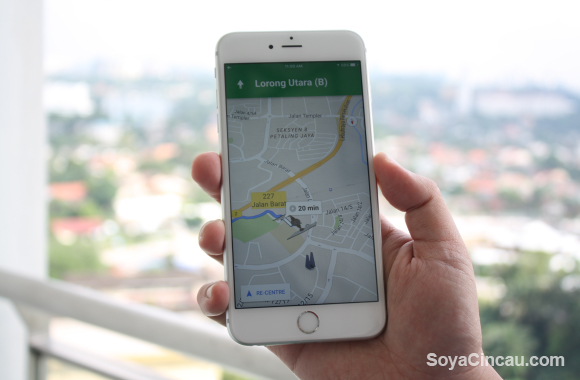
As the initial rollout began on Android, many countries were initially left out, including Malaysia and it wasn’t until the second-half of last month that availability was extended to our home soil as well. Now, it has finally been made available to iOS users as well with the latest update to the Google Maps app.
151215-mapsios5
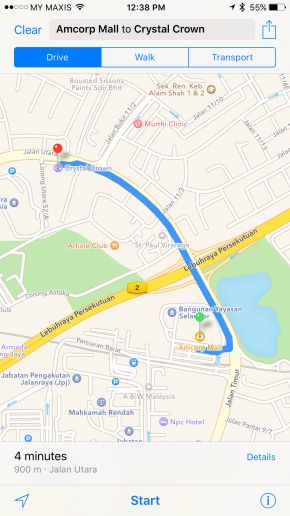
This is good news for iPhone and iPad users because the current iteration of the Apple Maps application isn’t as up to date as we’d like it to be, especially when it comes to Malaysian maps. For example, Apple Maps doesn’t even recognise that the Petaling Jaya one-way loop is now enforced. This has caused many an iOS user to have to resort to third party applications. With the addition of offline functionality on iOS devices, Google has also thrown its metaphorical hat into the ring. and with Google’s extensive background and significant resources, it will surely prove a viable competitor in the iOS navigation department.

151215-mapsios1
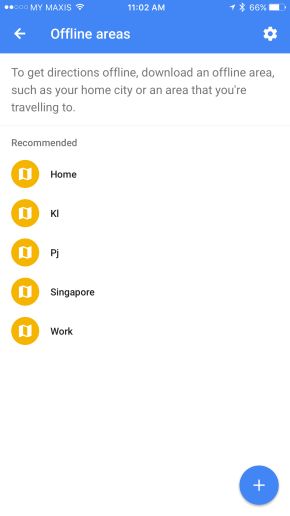
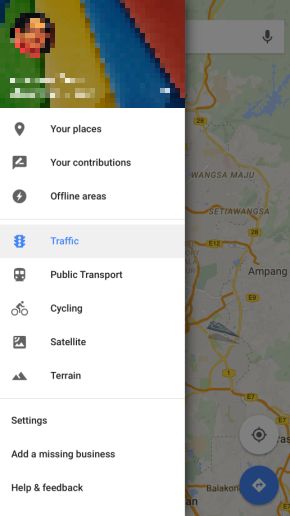
Usage of the application’s offline functionality is almost identical to that of its Android counterpart. Simply slide out your control panel in the Google Maps application, then select the “Offline areas” option.

151215-mapsios3
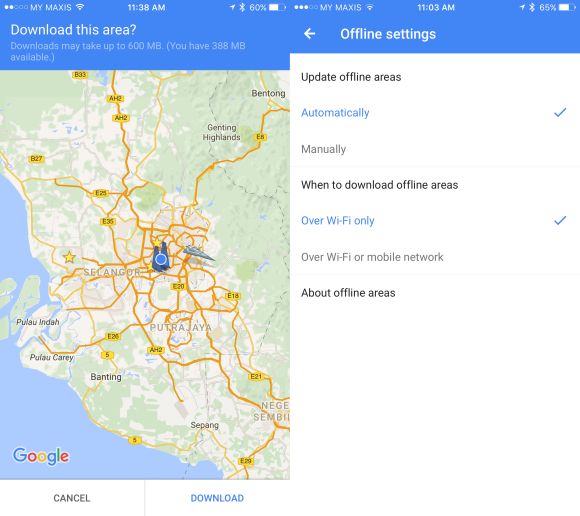
From there, the app will display a list of recommended areas for you to save based on your location as well as the locations which you frequently travel to. You can either download those areas or tap on the “+” button at the bottom to select your own custom area to save. If you do choose the “+” icon, a new window will pop out asking if you to specify the area to download. The size of the downloadable map will increase based on how large of an area you wish to download, up to a cap of 1.5GB. To download the whole Klang Valley area, you would need about 600MB of storage space.

151215-mapsios4

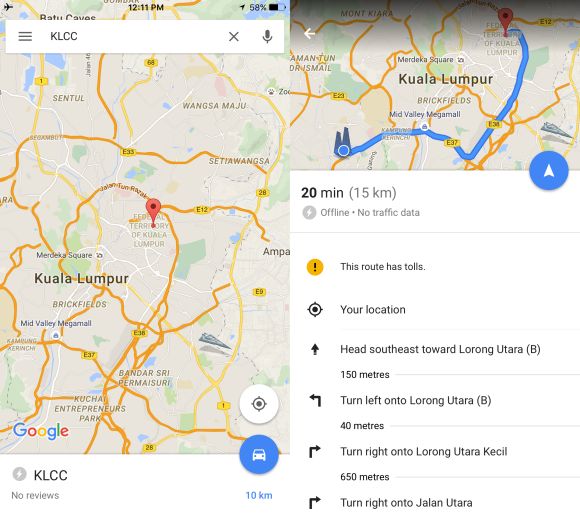
The downloaded maps will be stored for 30 days with the option to update it either automatically via WiFi or mobile network/WiFi, or manually. By default, the application will update maps over WiFi automatically. To navigate, simply search for the location in the application (as you normally would) and if it falls within your downloaded area, simply hit the little car icon and then hit the little arrow key and the turn-by-turn navigation will launch and start guiding you.
151215-mapsios2

Besides offline navigation, the application also supposedly brings the option to view petrol prices and when local businesses are supposed to be busy, but from our testing, it doesn’t appear to work in Malaysia. Then again, the ability to view petrol prices doesn’t really matter here since it is standardised across all stations.

In any case, this will surely put a smile on iOS users’ faces (ironic that it would be Google to do so) as they now have another choice for reliable offline navigation in Malaysia.

[SOURCE]

Tags: apple offline navigationGoogle Mapsgoogle maps offline navigationgoogle maps offline navigation applegoogle maps offline navigation apple malaysiagoogle maps offline navigation iosGoogle maps offline navigation malaysiagoogle maps offline navigation malaysia iOSios offline navigationios offline navigation malaysia
Rory Lee

Rory Lee

POPULAR

Google Maps offline navigation now on iOS

December 15, 2015

Malaysia to review EV policy amid concerns over strict rules affecting BYD CKD operations in Tanjung Malim

April 17, 2026

Zeekr 8X: Premium 900V PHEV SUV, up to triple-motor setup and 0–100km/h in 2.96s

April 20, 2026
Apple Tap To Pay on iPhone Malaysia

Apple’s Tap to Pay on iPhone is now in Malaysia

April 22, 2026

Malaysia’s EV policy and the BYD debate: Are affordable EVs at risk? | Let’s Talk About #140

April 19, 2026
vivo V70 FE 200MP camera phone in Malaysia - Best value alternative for phones under RM2,000

High-Resolution Meets High-Endurance: A Closer Look at the vivo V70 FE

April 10, 2026

Copyright © 2025 · SoyaCincau.com
Mind Blow Sdn Bhd (1076827-P)

  • ADVERTISE
  • DISCLAIMER

Copyright © 2026 · SoyaCincau.com – Mind Blow Sdn Bhd (1076827-P)

  • ADVERTISE
  • DISCLAIMER