
• 中文版
  • BM
  • News
  • Deals
  • Reviews
    • First Impressions
    • Hands-on
    • Comparisons
  • Tech
    • Mobile
    • Computers
    • Cameras
    • Wearables
    • Audio
    • Drones
  • Telco
    • Celcom
    • Digi
    • Maxis
    • Time
    • Tune Talk
    • U Mobile
    • Unifi
    • Yes
  • Cars
  • Contribute
  • Jobs
Menu
  • 中文版
  • BM
  • News
  • Deals
  • Reviews
    • First Impressions
    • Hands-on
    • Comparisons
  • Tech
    • Mobile
    • Computers
    • Cameras
    • Wearables
    • Audio
    • Drones
  • Telco
    • Celcom
    • Digi
    • Maxis
    • Time
    • Tune Talk
    • U Mobile
    • Unifi
    • Yes
  • Cars
  • Contribute
  • Jobs
Search
  • Tech
    • News
    • Mobile
    • Computers
    • Cameras
    • Wearables
    • Audio
    • Drones
  • Telco
    • Celcom
    • Digi
    • Maxis
    • Time
    • U Mobile
    • Unifi
    • Yes
  • Reviews
    • First Impressions
    • Hands-on
    • Comparisons
  • Buyer’s Guide
  • Opinions
  • Digital Life
  • Video
  • Deals
  • How-To
  • Cars
  • Bahasa Melayu
  • EV
  • Contribute
  • Advertise
Menu
  • Tech
    • News
    • Mobile
    • Computers
    • Cameras
    • Wearables
    • Audio
    • Drones
  • Telco
    • Celcom
    • Digi
    • Maxis
    • Time
    • U Mobile
    • Unifi
    • Yes
  • Reviews
    • First Impressions
    • Hands-on
    • Comparisons
  • Buyer’s Guide
  • Opinions
  • Digital Life
  • Video
  • Deals
  • How-To
  • Cars
  • Bahasa Melayu
  • EV
  • Contribute
  • Advertise
Search
Close
Home News

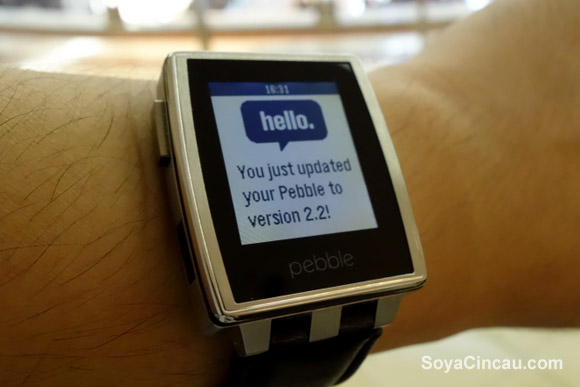
Pebble Smart Watch gets 2.2 Update. Offers menu customisation and more music controls

  • BY soyacincau
  • 5 June 2014
  • 4:24 pm
  • Comment
Share on FacebookShare on Twitter

140605-pebble-version-2-2

The Pebble Smart Watch software has just been updated to the latest version 2.2 which brings a couple of new features as well as stability fixes. The biggest change is the ability to customise the position of your smart watch apps. By default, it is often pushed to the bottom and the new update allows you to customise the menu launcher by simply pressing and holding the Centre button on the right.

For those who listen to music a lot, the new update also comes with volume controls built-in. While in the music app, just press and hold the centre button to toggle between track and volume controls. Another new addition for music is a track progress bar while the music is playing.

If you rely on Pebble for alarms, the new update has extended the vibration time from 60 seconds to 10 minutes. Not sure if this is gonna help as the vibration is hardly noticeable without audio alerts. To get these latest features, just open up your Pebble app on your smart phone, head to support and hit the update button.

Check out Pebble’s Vine hands-on demos after the break.

Customising Menu Launcher

New Audio Controls

[ SOURCE, VIA ]

Tags: PebblePebble 2.2Pebble MalaysiaPebble SteelPebble Steel MalaysiaPebble UpdatePebble WatchSmart Watch
soyacincau

soyacincau

POPULAR

JPJePlate: Is the Malaysian flag printed wrongly on EV plates?

December 12, 2025

Perodua QV-E Controversy: What were they thinking? | Let’s Talk About #134

December 8, 2025

Pebble Smart Watch gets 2.2 Update. Offers menu customisation and more music controls

June 5, 2014
Perodua Axia Elektrik by SCS

ICE-to-EV conversion in Malaysia: JPJ issues guidelines, looks complicated and expensive

December 9, 2025

Malaysia EV registrations tripled in November 2025, Tesla Model Y takes #1 spot

December 11, 2025
Leapmotor B10

Leapmotor B10 price in Malaysia to start at under RM100k?

December 10, 2025

Copyright © 2025 · SoyaCincau.com
Mind Blow Sdn Bhd (1076827-P)

  • ADVERTISE
  • DISCLAIMER

Copyright © 2025 · SoyaCincau.com – Mind Blow Sdn Bhd (1076827-P)

  • ADVERTISE
  • DISCLAIMER





