• 中文版
  • BM
  • News
  • Deals
  • Reviews
    • First Impressions
    • Hands-on
    • Comparisons
  • Tech
    • Mobile
    • Computers
    • Cameras
    • Wearables
    • Audio
    • Drones
  • Telco
    • Celcom
    • Digi
    • Maxis
    • Time
    • Tune Talk
    • U Mobile
    • Unifi
    • Yes
  • Cars
  • Contribute
  • Jobs
Menu
  • 中文版
  • BM
  • News
  • Deals
  • Reviews
    • First Impressions
    • Hands-on
    • Comparisons
  • Tech
    • Mobile
    • Computers
    • Cameras
    • Wearables
    • Audio
    • Drones
  • Telco
    • Celcom
    • Digi
    • Maxis
    • Time
    • Tune Talk
    • U Mobile
    • Unifi
    • Yes
  • Cars
  • Contribute
  • Jobs
Search
  • Tech
    • News
    • Mobile
    • Computers
    • Cameras
    • Wearables
    • Audio
    • Drones
  • Telco
    • Celcom
    • Digi
    • Maxis
    • Time
    • U Mobile
    • Unifi
    • Yes
  • Reviews
    • First Impressions
    • Hands-on
    • Comparisons
  • Buyer’s Guide
  • Opinions
  • Digital Life
  • Video
  • Deals
  • How-To
  • Cars
  • Bahasa Melayu
  • EV
  • Contribute
  • Advertise
Menu
  • Tech
    • News
    • Mobile
    • Computers
    • Cameras
    • Wearables
    • Audio
    • Drones
  • Telco
    • Celcom
    • Digi
    • Maxis
    • Time
    • U Mobile
    • Unifi
    • Yes
  • Reviews
    • First Impressions
    • Hands-on
    • Comparisons
  • Buyer’s Guide
  • Opinions
  • Digital Life
  • Video
  • Deals
  • How-To
  • Cars
  • Bahasa Melayu
  • EV
  • Contribute
  • Advertise
Search
Close
Home News

Siri lets you bypass Passcode to access iPhone Contacts

  • BY soyacincau
  • 5 May 2014
  • 8:55 pm
  • Comment
Share on FacebookShare on Twitter

140505-siri-ios-7.1.1-bypass-contacts-passcode

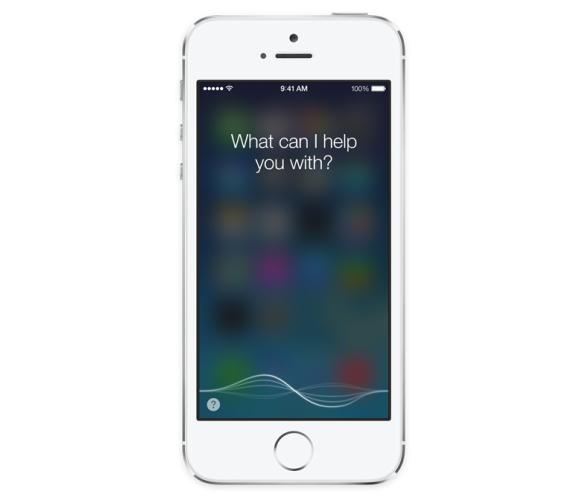
After releasing its iOS 7.1.1 update, a rather simple flaw has been discovered which affects iPhone and iPad users. The security bug allows anyone to access your device contacts even when your phone is locked. The culprit? Siri, your voice assistant which is a little too helpful in this case.

Someone has discovered that Siri would let strangers bypass the standard passcode and they could make a phone call, SMS or even send Emails. With the device being locked, all you need to do is ask Siri to Call or Message or Email then followed by typing in a random name or alphabet on the screen. Next it will reveal “Other” contacts option and by tapping that you will be able to see the entire contacts.

This however isn’t really a huge security concern as it doesn’t give access beyond that. So don’t worry about people prying into your apps, photos and other data. The best remedy for the time being is to disable Siri, especially if you don’t use it on a regular basis. Hopefully Apple is working on a new iOS update as we speak to address this.

Check out the video on how this is done after the break.

[ SOURCE, VIA ]

Tags: iOSiPadiPad AiriPad MiniiPhoneiPhone 5iPhone 5SPasscode ByPasssecuritySiri
soyacincau

soyacincau

POPULAR

Siri lets you bypass Passcode to access iPhone Contacts

May 5, 2014

Small Steps, Daily Rewards: Exploring the Maybank Tabung Daily Bonus Campaign

May 28, 2026

U Mobile ULTRA5G: Fast 5G That Actually Works Indoors

May 29, 2026
Honda e:N1 Sighting - KTMB HQ - Sept 2025

You can now buy Honda e:N1 for as low as RM107k

June 17, 2026

Why Pay More for a Flagship? Can the Xiaomi 17T Deliver the Same Experience for Less?

May 29, 2026

Sunway Tiny Toys to launch Proton Saga MC3 and e.MAS 5 die-cast models

June 16, 2026

Copyright © 2025 · SoyaCincau.com
Mind Blow Sdn Bhd (1076827-P)

  • ADVERTISE
  • DISCLAIMER

Copyright © 2026 · SoyaCincau.com – Mind Blow Sdn Bhd (1076827-P)

  • ADVERTISE
  • DISCLAIMER