
• 中文版
  • BM
  • News
  • Deals
  • Reviews
    • First Impressions
    • Hands-on
    • Comparisons
  • Tech
    • Mobile
    • Computers
    • Cameras
    • Wearables
    • Audio
    • Drones
  • Telco
    • Celcom
    • Digi
    • Maxis
    • Time
    • Tune Talk
    • U Mobile
    • Unifi
    • Yes
  • Cars
  • Contribute
  • Jobs
Menu
  • 中文版
  • BM
  • News
  • Deals
  • Reviews
    • First Impressions
    • Hands-on
    • Comparisons
  • Tech
    • Mobile
    • Computers
    • Cameras
    • Wearables
    • Audio
    • Drones
  • Telco
    • Celcom
    • Digi
    • Maxis
    • Time
    • Tune Talk
    • U Mobile
    • Unifi
    • Yes
  • Cars
  • Contribute
  • Jobs
Search
  • Tech
    • News
    • Mobile
    • Computers
    • Cameras
    • Wearables
    • Audio
    • Drones
  • Telco
    • Celcom
    • Digi
    • Maxis
    • Time
    • U Mobile
    • Unifi
    • Yes
  • Reviews
    • First Impressions
    • Hands-on
    • Comparisons
  • Buyer’s Guide
  • Opinions
  • Digital Life
  • Video
  • Deals
  • How-To
  • Cars
  • Bahasa Melayu
  • EV
  • Contribute
  • Advertise
Menu
  • Tech
    • News
    • Mobile
    • Computers
    • Cameras
    • Wearables
    • Audio
    • Drones
  • Telco
    • Celcom
    • Digi
    • Maxis
    • Time
    • U Mobile
    • Unifi
    • Yes
  • Reviews
    • First Impressions
    • Hands-on
    • Comparisons
  • Buyer’s Guide
  • Opinions
  • Digital Life
  • Video
  • Deals
  • How-To
  • Cars
  • Bahasa Melayu
  • EV
  • Contribute
  • Advertise
Search
Close
Home News

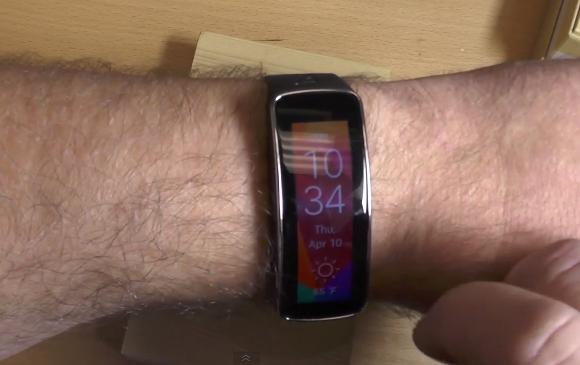
Samsung Gear Fit is able to display vertically for both left and right handed users

  • BY soyacincau
  • 11 April 2014
  • 11:37 am
  • Comment
Share on FacebookShare on Twitter

140411-samsung-gear-fit-vertical-rotation-setting

Yesterday, the Gear Fit was spotted displaying text in vertical orientation in Korea. This solves its usability issue when displaying information in landscape mode, making it awkward to read from your wrist.

Now it has been confirmed that the Gear Fit will be getting an update internationally and the folks at Android Central has managed to test this out. To change the orientation, you can do so under settings. You’ll also get the option to choose whether it is for left or right hand use so that it is usable in landscape mode.

Find out how this is done with a hands-on video after the break.

[ SOURCE ]

Tags: displayGear Fit Vertical DisplayOrientationSamsungSamsung Gear FitSamsung Gear Fit DisplaySamsung Gear Fit MalaysiaSports BandUpdate
soyacincau

soyacincau

POPULAR

Can a mid-range phone really stay fast for 6 years? A closer look at the OPPO Reno15 series

January 26, 2026
Perodua QV-E at Perodua Glenmarie

Less than 40 registered in 2025: What’s next for Perodua’s first EV? | Let’s Talk About #136

February 9, 2026

Samsung Gear Fit is able to display vertically for both left and right handed users

April 11, 2014

Zeekr 7X 2026 gets a price hike in Malaysia: Still cheaper than Tesla Model Y

February 6, 2026

SARA: One-off RM100 credit available today, applicable for frozen food

February 9, 2026

Top 5 OnePlus smartphones: Looking back at a once-beloved enthusiast brand

February 9, 2026

Copyright © 2025 · SoyaCincau.com
Mind Blow Sdn Bhd (1076827-P)

  • ADVERTISE
  • DISCLAIMER

Copyright © 2026 · SoyaCincau.com – Mind Blow Sdn Bhd (1076827-P)

  • ADVERTISE
  • DISCLAIMER





