
• 中文版
  • BM
  • News
  • Deals
  • Reviews
    • First Impressions
    • Hands-on
    • Comparisons
  • Tech
    • Mobile
    • Computers
    • Cameras
    • Wearables
    • Audio
    • Drones
  • Telco
    • Celcom
    • Digi
    • Maxis
    • Time
    • Tune Talk
    • U Mobile
    • Unifi
    • Yes
  • Cars
  • Contribute
  • Jobs
Menu
  • 中文版
  • BM
  • News
  • Deals
  • Reviews
    • First Impressions
    • Hands-on
    • Comparisons
  • Tech
    • Mobile
    • Computers
    • Cameras
    • Wearables
    • Audio
    • Drones
  • Telco
    • Celcom
    • Digi
    • Maxis
    • Time
    • Tune Talk
    • U Mobile
    • Unifi
    • Yes
  • Cars
  • Contribute
  • Jobs
Search
  • Tech
    • News
    • Mobile
    • Computers
    • Cameras
    • Wearables
    • Audio
    • Drones
  • Telco
    • Celcom
    • Digi
    • Maxis
    • Time
    • U Mobile
    • Unifi
    • Yes
  • Reviews
    • First Impressions
    • Hands-on
    • Comparisons
  • Buyer’s Guide
  • Opinions
  • Digital Life
  • Video
  • Deals
  • How-To
  • Cars
  • Bahasa Melayu
  • EV
  • Contribute
  • Advertise
Menu
  • Tech
    • News
    • Mobile
    • Computers
    • Cameras
    • Wearables
    • Audio
    • Drones
  • Telco
    • Celcom
    • Digi
    • Maxis
    • Time
    • U Mobile
    • Unifi
    • Yes
  • Reviews
    • First Impressions
    • Hands-on
    • Comparisons
  • Buyer’s Guide
  • Opinions
  • Digital Life
  • Video
  • Deals
  • How-To
  • Cars
  • Bahasa Melayu
  • EV
  • Contribute
  • Advertise
Search
Close
Home News

Samsung Galaxy Note II’s new Smart Rotation feature

  • BY soyacincau
  • 3 October 2012
  • 10:00 am
  • Comment
Share on FacebookShare on Twitter

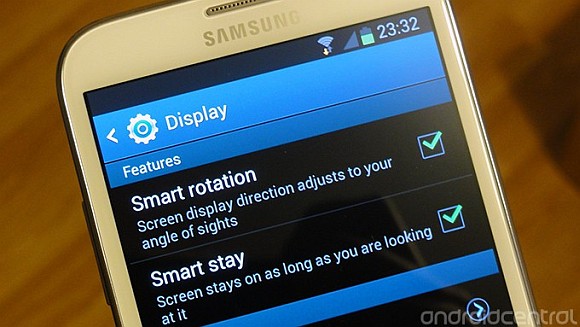
Samsung Galaxy Note II Smart Rotation

Samsung has introduced a couple of new features such as Smart Stay on the Galaxy S III that keeps the display awake while you’re starring at it. This eliminates the typical need to tap the screen repeatedly to prevent it from sleeping. Now on the Samsung Galaxy Note II, they have introduced Smart Rotation which is a smarter way of handling display orientation.

Usually most people would disable their auto display rotation each time they use their devices side ways or while lying down. To solve this common tech annoyance, Samsung has used their front camera to detect the user’s face orientation and matches the correct orientation properly.

By default, this feature is disabled but it can be enabled under Settings > Display as shown above. Of course, we don’t expect this feature to be perfect and it will only work on certain lighting conditions since it needs to see your eyes clearly in order for it to work. Nevertheless, it’s a cool solution which should be implemented on all devices.

[ SOURCE ]

Tags: SamsungSamsung Galaxy NoteSamsung Galaxy Note 2Samsung Galaxy Note IISamsung Galaxy Note II featuresSamsung Galaxy Note II MalaysiaSmart Rotation
soyacincau

soyacincau

POPULAR

Samsung Galaxy Note II’s new Smart Rotation feature

October 3, 2012

Oppo Find N6 launching on 17 March. Foldable flagship with Zero-Feel Crease, 200MP Hasselblad camera and Oppo AI Pen support

March 9, 2026

EV charger hogging is getting worse in Malaysia? | Let’s Talk About #137

March 9, 2026
MGS5 EV CKD Malaysia

MGS5 EV CKD now open for booking: More power, better range, lower price

March 10, 2026

Poco X8 Pro series launching on 17 March, powered by MediaTek Dimensity 8500 Ultra and 9500s

March 9, 2026
Proton X90 MC1 Teaser

Proton X90 MC1 i-GT to launch on 11 March: Wireless Apple CarPlay and Android Auto confirmed

March 9, 2026

Copyright © 2025 · SoyaCincau.com
Mind Blow Sdn Bhd (1076827-P)

  • ADVERTISE
  • DISCLAIMER

Copyright © 2026 · SoyaCincau.com – Mind Blow Sdn Bhd (1076827-P)

  • ADVERTISE
  • DISCLAIMER





