• 中文版
  • BM
  • News
  • Deals
  • Reviews
    • First Impressions
    • Hands-on
    • Comparisons
  • Tech
    • Mobile
    • Computers
    • Cameras
    • Wearables
    • Audio
    • Drones
  • Telco
    • Celcom
    • Digi
    • Maxis
    • Time
    • Tune Talk
    • U Mobile
    • Unifi
    • Yes
  • Cars
  • Contribute
  • Jobs
Menu
  • 中文版
  • BM
  • News
  • Deals
  • Reviews
    • First Impressions
    • Hands-on
    • Comparisons
  • Tech
    • Mobile
    • Computers
    • Cameras
    • Wearables
    • Audio
    • Drones
  • Telco
    • Celcom
    • Digi
    • Maxis
    • Time
    • Tune Talk
    • U Mobile
    • Unifi
    • Yes
  • Cars
  • Contribute
  • Jobs
Search
  • Tech
    • News
    • Mobile
    • Computers
    • Cameras
    • Wearables
    • Audio
    • Drones
  • Telco
    • Celcom
    • Digi
    • Maxis
    • Time
    • U Mobile
    • Unifi
    • Yes
  • Reviews
    • First Impressions
    • Hands-on
    • Comparisons
  • Buyer’s Guide
  • Opinions
  • Digital Life
  • Video
  • Deals
  • How-To
  • Cars
  • Bahasa Melayu
  • EV
  • Contribute
  • Advertise
Menu
  • Tech
    • News
    • Mobile
    • Computers
    • Cameras
    • Wearables
    • Audio
    • Drones
  • Telco
    • Celcom
    • Digi
    • Maxis
    • Time
    • U Mobile
    • Unifi
    • Yes
  • Reviews
    • First Impressions
    • Hands-on
    • Comparisons
  • Buyer’s Guide
  • Opinions
  • Digital Life
  • Video
  • Deals
  • How-To
  • Cars
  • Bahasa Melayu
  • EV
  • Contribute
  • Advertise
Search
Close
Home Digital Life

Android apps to run in Windows with BlueStacks

  • BY soyacincau
  • 26 May 2011
  • 10:40 am
  • Comment
Share on FacebookShare on Twitter

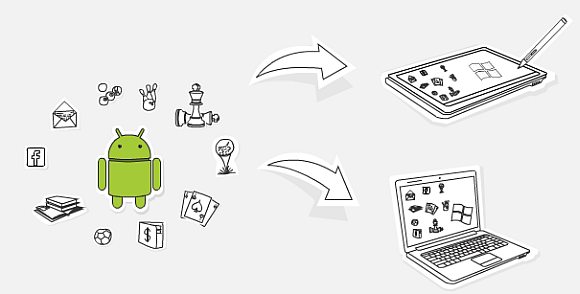
While the BlackBerry Playbook supports Android Apps, the little green droid is now making its way to Windows Platform. BlueStacks has announced that it is developing a program which lets you run Android apps in Windows environment seamlessly. At the present moment, BlueStacks is readily bundled on ViewSonic ViewPad 10 Pro tablet and they working with various PC vendors towards making it a standard for upcoming Windows tablet and all-in-one desktops. Strangely Windows Phone 7 is not in the picture.

With BlueStacks, you are able to run both Android and Windows simultaneously and it even supports multi-touch on touch screen computers and Windows tablets. If this is done right with acceptable performance, this will expand the choices of apps for Windows tablet devices. Currently, we are still not convinced why anyone would run mobile apps on desktop with non-touch screens. Looking at the future, this opens up opportunity for Android developers to develop mobile, tablet and desktop apps in a single environment.

It is not officially available right now but you can sign up for their alpha program on their FaceBook page here. Check out their official website for more info.

Tags: Android appsAndroid on WindowsBlueStacks
soyacincau

soyacincau

POPULAR

Android apps to run in Windows with BlueStacks

May 26, 2011

The Foldable Paradox: Why the “Best” Phone Depends Entirely on Your Routine

September 14, 2026

How Do You Want to Pay for Your iPhone 18 Pro? 3 Ways to Get More Value

September 18, 2026

BeONE Mobile officially launches as Maxis-powered MVNO, 150GB prepaid plan from RM25

September 28, 2026

Xiaomi 18 Pro series coming to Malaysia this year with Privacy Display, Snapdragon 8 Elite Gen 6

September 24, 2026

Maybank BTS World Tour Arirang debit card: Everything you need to know before applying

September 24, 2026

Copyright © 2026 · SoyaCincau.com
Mind Blow Sdn Bhd (1076827-P)

  • ADVERTISE
  • DISCLAIMER

Copyright © 2026 · SoyaCincau.com – Mind Blow Sdn Bhd (1076827-P)

  • ADVERTISE
  • DISCLAIMER