• 中文版
  • BM
  • News
  • Deals
  • Reviews
    • First Impressions
    • Hands-on
    • Comparisons
  • Tech
    • Mobile
    • Computers
    • Cameras
    • Wearables
    • Audio
    • Drones
  • Telco
    • Celcom
    • Digi
    • Maxis
    • Time
    • Tune Talk
    • U Mobile
    • Unifi
    • Yes
  • Cars
  • Contribute
  • Jobs
Menu
  • 中文版
  • BM
  • News
  • Deals
  • Reviews
    • First Impressions
    • Hands-on
    • Comparisons
  • Tech
    • Mobile
    • Computers
    • Cameras
    • Wearables
    • Audio
    • Drones
  • Telco
    • Celcom
    • Digi
    • Maxis
    • Time
    • Tune Talk
    • U Mobile
    • Unifi
    • Yes
  • Cars
  • Contribute
  • Jobs
Search
  • Tech
    • News
    • Mobile
    • Computers
    • Cameras
    • Wearables
    • Audio
    • Drones
  • Telco
    • Celcom
    • Digi
    • Maxis
    • Time
    • U Mobile
    • Unifi
    • Yes
  • Reviews
    • First Impressions
    • Hands-on
    • Comparisons
  • Buyer’s Guide
  • Opinions
  • Digital Life
  • Video
  • Deals
  • How-To
  • Cars
  • Bahasa Melayu
  • EV
  • Contribute
  • Advertise
Menu
  • Tech
    • News
    • Mobile
    • Computers
    • Cameras
    • Wearables
    • Audio
    • Drones
  • Telco
    • Celcom
    • Digi
    • Maxis
    • Time
    • U Mobile
    • Unifi
    • Yes
  • Reviews
    • First Impressions
    • Hands-on
    • Comparisons
  • Buyer’s Guide
  • Opinions
  • Digital Life
  • Video
  • Deals
  • How-To
  • Cars
  • Bahasa Melayu
  • EV
  • Contribute
  • Advertise
Search
Close
Home Digital Life

Samsung release TV remote app for its line of Android devices

  • BY ccsoya
  • 5 February 2011
  • 11:19 am
  • Comment
Share on FacebookShare on Twitter

Here’s a nifty little app for you Samsung fans out there. If you have a Samsung Android powered device and a fairly recent (read: models from produced from 2010 onwards) Samsung TV that supports the Samsung Internet@TV feature, then you can try out this Samsung TV Remote app.

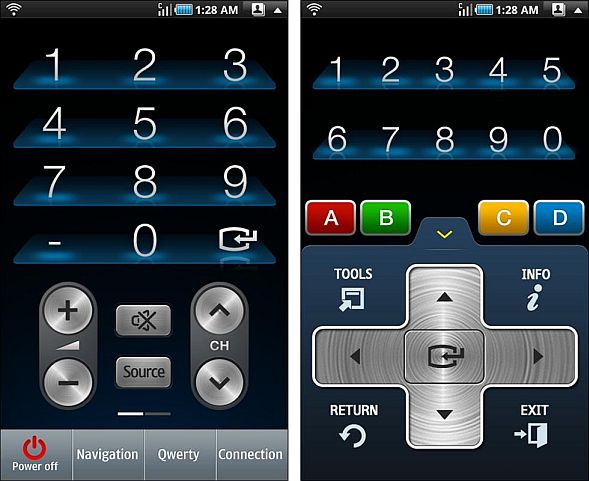
The Samsung TV Remote app turns your Samsung Android device into a WiFi remote allowing you to control a Samsung Internet@TV so long as both are connected to the same access point.

And since your TV is connected to the Internet you can use the Samsung TV Remote app to call up web pages, browse content on YouTube or Facebook as well. The app also makes it easy to access your favorite content with customisable hotkeys and a full multi-touch QWERTY keyboard, while the 4-way directional pad allows for easy scrolling through the TVs menus and content listings.

A list of compatible Samsung TVs is available after the jump. Find the app in the Android Market by searching for “Samsung TV Remote”.

Models supported
All SAMSUNG TVs working Internet@TV 2010 (Model code’C’)
e.g. U E 5 5 C 6 5 0 0

L N 4 6 C 6 5 0

LED 6500 SERIES Higher
(Model code starts with ‘U’)
LCD 650 SERIES Higher
(Model code starts with ‘L’)
PDP 6500 SERIES Higher
(Model code starts with ‘P’)


Tags: SamsungSamsung TV Remote app
ccsoya

ccsoya

POPULAR

Samsung release TV remote app for its line of Android devices

February 5, 2011

Malaysia to review EV policy amid concerns over strict rules affecting BYD CKD operations in Tanjung Malim

April 17, 2026
TQ Wuling Bingo EV Malaysia

TQ Wuling Bingo is now available for rental in Malaysia via GoEV

April 14, 2026

Malaysia’s EV charging network is still broken? Raya trip almost turns into a disaster | Let’s Talk About #139

April 15, 2026

Honor 600 series makes its debut in Malaysia on 22 April, featuring 200MP camera with AI Image to Video 2.0

April 13, 2026

Malaysia’s EV policy and the BYD debate: Are affordable EVs at risk? | Let’s Talk About #140

April 19, 2026

Copyright © 2025 · SoyaCincau.com
Mind Blow Sdn Bhd (1076827-P)

  • ADVERTISE
  • DISCLAIMER

Copyright © 2026 · SoyaCincau.com – Mind Blow Sdn Bhd (1076827-P)

  • ADVERTISE
  • DISCLAIMER