• 中文版
  • BM
  • News
  • Deals
  • Reviews
    • First Impressions
    • Hands-on
    • Comparisons
  • Tech
    • Mobile
    • Computers
    • Cameras
    • Wearables
    • Audio
    • Drones
  • Telco
    • Celcom
    • Digi
    • Maxis
    • Time
    • Tune Talk
    • U Mobile
    • Unifi
    • Yes
  • Cars
  • Contribute
  • Jobs
Menu
  • 中文版
  • BM
  • News
  • Deals
  • Reviews
    • First Impressions
    • Hands-on
    • Comparisons
  • Tech
    • Mobile
    • Computers
    • Cameras
    • Wearables
    • Audio
    • Drones
  • Telco
    • Celcom
    • Digi
    • Maxis
    • Time
    • Tune Talk
    • U Mobile
    • Unifi
    • Yes
  • Cars
  • Contribute
  • Jobs
Search
  • Tech
    • News
    • Mobile
    • Computers
    • Cameras
    • Wearables
    • Audio
    • Drones
  • Telco
    • Celcom
    • Digi
    • Maxis
    • Time
    • U Mobile
    • Unifi
    • Yes
  • Reviews
    • First Impressions
    • Hands-on
    • Comparisons
  • Buyer’s Guide
  • Opinions
  • Digital Life
  • Video
  • Deals
  • How-To
  • Cars
  • Bahasa Melayu
  • EV
  • Contribute
  • Advertise
Menu
  • Tech
    • News
    • Mobile
    • Computers
    • Cameras
    • Wearables
    • Audio
    • Drones
  • Telco
    • Celcom
    • Digi
    • Maxis
    • Time
    • U Mobile
    • Unifi
    • Yes
  • Reviews
    • First Impressions
    • Hands-on
    • Comparisons
  • Buyer’s Guide
  • Opinions
  • Digital Life
  • Video
  • Deals
  • How-To
  • Cars
  • Bahasa Melayu
  • EV
  • Contribute
  • Advertise
Search
Close
Home Digital Life

Send links to your Android phone with Google Chrome to Phone

  • BY ccsoya
  • 15 August 2010
  • 5:43 pm
  • Comment
Share on FacebookShare on Twitter

Even wanted to send browser links to your phone so that you can read it during lunch?

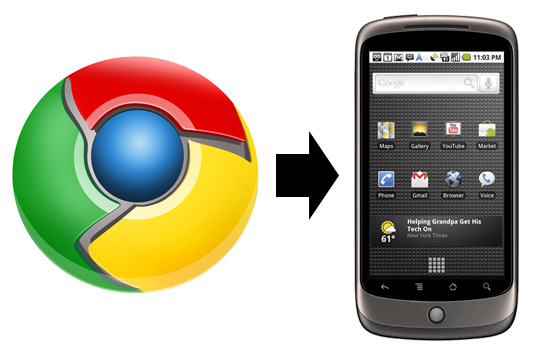
Well now you can with the new Chrome to Phone extension that adds a button to your Google Chrome browser that instantly sends web pages, maps, YouTube videos, phone numbers and even copied texts to your Android smartphone.

With Chrome to Phone you can send links from your browsing session straight to your Android device so you can continue browsing the same content on your phone. Chrome to Phone works with Google Maps as well, so once you’ve found the directions to where you want to go next, you can send the link directly to your Android device and it will automatically launch the Google Maps app ready for you to get going on your journey.

Same goes for links on YouTube as well as phone numbers on a web page. Let’s say you want to make a dinner reservation and the place you want to make the reservations have their contacts online, all you need to do is send the contact over to your Android device using Google Chrome to Phone and your phone will launch its dialer with the selected number already entered, ready for you to make the call. You can also select text on browsers and send them over to your phone. Doing so will automatically copy the text and launch your Android clipboard for later viewing.

Unfortunately, Google Chrome to Phone only works with devices running Android 2.2 (Froyo). For the many Malaysian Android fans out there, that means you can’t use Google Chrome to Phone at the moment because none of the Android devices widely available here have official Froyo updates (unless of course, if you have the Nexus One or Droid 2).

If you do have a Nexus One or Droid 2, you can get Chrome to Phone by installing the extension in your Google Chrome browser and the Android application on your phone from Android Market, and you’re ready to go.

Check out the intro video of Google Chrome to Phone after the jump for more.

[source]

Tags: AndroidChromecool android appscool app for AndroidgoogleGoogle Chrome to Phonemobile browsing
ccsoya

ccsoya

POPULAR

Send links to your Android phone with Google Chrome to Phone

August 15, 2010
vivo V70 FE 200MP camera phone in Malaysia - Best value alternative for phones under RM2,000

High-Resolution Meets High-Endurance: A Closer Look at the vivo V70 FE

April 10, 2026
Apple Tap To Pay on iPhone Malaysia

Apple’s Tap to Pay on iPhone is now in Malaysia

April 22, 2026

Zeekr 8X: Premium 900V PHEV SUV, up to triple-motor setup and 0–100km/h in 2.96s

April 20, 2026

Can you and your family enjoy a 100% electric drive without ever plugging in?

April 23, 2026

Huawei MatePad Mini: Compact tablet with 8.8″ OLED PaperMatte Display, now available for RM2,199

April 22, 2026

Copyright © 2025 · SoyaCincau.com
Mind Blow Sdn Bhd (1076827-P)

  • ADVERTISE
  • DISCLAIMER

Copyright © 2026 · SoyaCincau.com – Mind Blow Sdn Bhd (1076827-P)

  • ADVERTISE
  • DISCLAIMER