• 中文版
  • BM
  • News
  • Deals
  • Reviews
    • First Impressions
    • Hands-on
    • Comparisons
  • Tech
    • Mobile
    • Computers
    • Cameras
    • Wearables
    • Audio
    • Drones
  • Telco
    • Celcom
    • Digi
    • Maxis
    • Time
    • Tune Talk
    • U Mobile
    • Unifi
    • Yes
  • Cars
  • Contribute
  • Jobs
Menu
  • 中文版
  • BM
  • News
  • Deals
  • Reviews
    • First Impressions
    • Hands-on
    • Comparisons
  • Tech
    • Mobile
    • Computers
    • Cameras
    • Wearables
    • Audio
    • Drones
  • Telco
    • Celcom
    • Digi
    • Maxis
    • Time
    • Tune Talk
    • U Mobile
    • Unifi
    • Yes
  • Cars
  • Contribute
  • Jobs
Search
  • Tech
    • News
    • Mobile
    • Computers
    • Cameras
    • Wearables
    • Audio
    • Drones
  • Telco
    • Celcom
    • Digi
    • Maxis
    • Time
    • U Mobile
    • Unifi
    • Yes
  • Reviews
    • First Impressions
    • Hands-on
    • Comparisons
  • Buyer’s Guide
  • Opinions
  • Digital Life
  • Video
  • Deals
  • How-To
  • Cars
  • Bahasa Melayu
  • EV
  • Contribute
  • Advertise
Menu
  • Tech
    • News
    • Mobile
    • Computers
    • Cameras
    • Wearables
    • Audio
    • Drones
  • Telco
    • Celcom
    • Digi
    • Maxis
    • Time
    • U Mobile
    • Unifi
    • Yes
  • Reviews
    • First Impressions
    • Hands-on
    • Comparisons
  • Buyer’s Guide
  • Opinions
  • Digital Life
  • Video
  • Deals
  • How-To
  • Cars
  • Bahasa Melayu
  • EV
  • Contribute
  • Advertise
Search
Close
Home News

More cool Android apps from Google: Goggles Translation

  • BY ccsoya
  • 7 May 2010
  • 9:42 am
  • Comment
Share on FacebookShare on Twitter

We gotta say, Google makes the coolest apps for Android and now it adds a new feature to one of its coolest Android app – translation for Google Goggles.

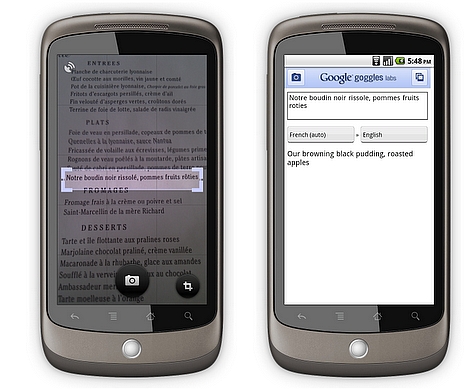
With Google Goggles, you can can now translate foreign languages in just a snap.

Here’s how it works:

  • Point your phone at a word or phrase. Use the region of interest button to draw a box around specific words
  • Press the shutter button
  • If Goggles recognizes the text, it will give you the option to translate
  • Press the translate button to select the source and destination languages.

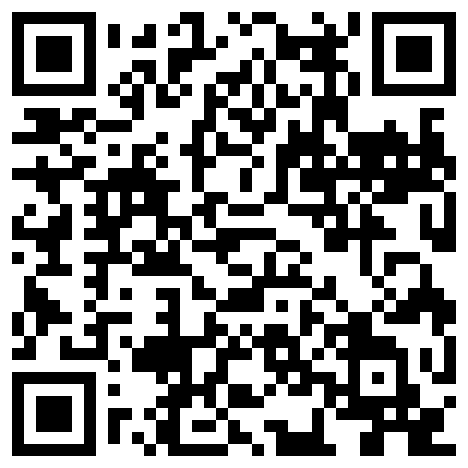
Head on over to after the jump to scan the QRCode to download Google Goggles on your Android phone.

Goggles can read English, French, Italian, German and Spanish and can translate to many more languages. Everything that Google makes is always in perpetual beta so you can expect more languages to be added in. Google wants to eventually allow Android users to use Goggles to read and translate non-Latin languages (such as Chinese, Hindi and Arabic) too.

In addition to the new translation feature, Google included additional improvements for barcode recognition, a larger corpus of artwork, recognition of many more products and logos, an improved user interface, and the ability to initiate visual searches using images in your phone’s photo gallery in its latest version of Goggles.

The latest version of Google Goggles (v1.1) is available for Android 1.6 and higher. Just scan the QR code below to download direct or head on over to the Android Market app on your Android phone and search for “Google Goggles”.
Click for larger picture

[source]

Tags: Androidcool android appscool apps for androidgogglesgooglegoogle goggle translate feature
ccsoya

ccsoya

POPULAR

U Mobile ULTRA5G: Fast 5G That Actually Works Indoors

May 29, 2026

More cool Android apps from Google: Goggles Translation

May 7, 2010

Why Pay More for a Flagship? Can the Xiaomi 17T Deliver the Same Experience for Less?

May 29, 2026

RM32 Per Line with 1TB Shared Data? Inside U Mobile’s New ULTRA Family Suite

May 7, 2026

Tesla prices to go up from July due to MITI’s CBU EV rules?

June 21, 2026

Tesla Malaysia: Full Self-Driving one-time purchase option no longer available from 1st July 2026

June 19, 2026

Copyright © 2025 · SoyaCincau.com
Mind Blow Sdn Bhd (1076827-P)

  • ADVERTISE
  • DISCLAIMER

Copyright © 2026 · SoyaCincau.com – Mind Blow Sdn Bhd (1076827-P)

  • ADVERTISE
  • DISCLAIMER