
• 中文版
  • BM
  • News
  • Deals
  • Reviews
    • First Impressions
    • Hands-on
    • Comparisons
  • Tech
    • Mobile
    • Computers
    • Cameras
    • Wearables
    • Audio
    • Drones
  • Telco
    • Celcom
    • Digi
    • Maxis
    • Time
    • Tune Talk
    • U Mobile
    • Unifi
    • Yes
  • Cars
  • Contribute
  • Jobs
Menu
  • 中文版
  • BM
  • News
  • Deals
  • Reviews
    • First Impressions
    • Hands-on
    • Comparisons
  • Tech
    • Mobile
    • Computers
    • Cameras
    • Wearables
    • Audio
    • Drones
  • Telco
    • Celcom
    • Digi
    • Maxis
    • Time
    • Tune Talk
    • U Mobile
    • Unifi
    • Yes
  • Cars
  • Contribute
  • Jobs
Search
  • Tech
    • News
    • Mobile
    • Computers
    • Cameras
    • Wearables
    • Audio
    • Drones
  • Telco
    • Celcom
    • Digi
    • Maxis
    • Time
    • U Mobile
    • Unifi
    • Yes
  • Reviews
    • First Impressions
    • Hands-on
    • Comparisons
  • Buyer’s Guide
  • Opinions
  • Digital Life
  • Video
  • Deals
  • How-To
  • Cars
  • Bahasa Melayu
  • EV
  • Contribute
  • Advertise
Menu
  • Tech
    • News
    • Mobile
    • Computers
    • Cameras
    • Wearables
    • Audio
    • Drones
  • Telco
    • Celcom
    • Digi
    • Maxis
    • Time
    • U Mobile
    • Unifi
    • Yes
  • Reviews
    • First Impressions
    • Hands-on
    • Comparisons
  • Buyer’s Guide
  • Opinions
  • Digital Life
  • Video
  • Deals
  • How-To
  • Cars
  • Bahasa Melayu
  • EV
  • Contribute
  • Advertise
Search
Close
Home News

P1 W1MAX DS300 Modem Unlocked with tweaking possibilities

  • BY oyasc
  • 11 March 2009
  • 12:04 am
  • Comment
Share on FacebookShare on Twitter

Update: New login password found! Read all about it here.
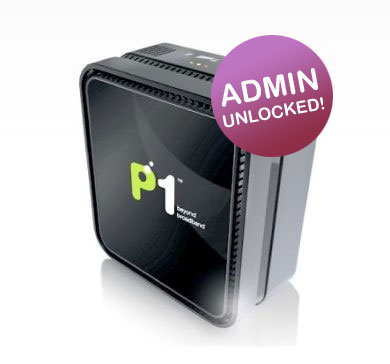
DS 300 unlocked

When P1 W1MAX was launched with its DS300 LAN based modem, it claims to be a pure Plug & Play device with no configuration needed. All the user has to do is simply connect the power & LAN cable and they are ready to surf (provided that their network settings are set as AUTO by default).

However this seems to be a barrier for gamers and network experts that require manual network tweaking to get the best performance for selected applications. Settings such as  Port Forwarding, DMZ and DHCP is simply not possible as the web admin access for the modem is not given out.

Fortunately, a lowyat.net user by the name of yong888 has obtained the username/password for the DS300 and it was very generous for him to share it on a public forum.
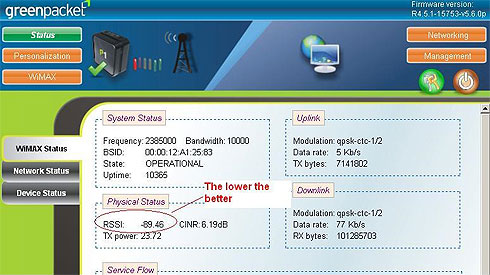
DS 300 Web Admin

To access the P1 W1MAX DS300 Web Admin, enter http://10.1.1.254 on your web browser. Login using the following:

Username: p1admin
Password: 769973

Password has been changed after firmware upgrade. Please read more here.

Here’s a trivia, the password is actually the company number for P1.COM SDN BHD (769973-T).

Once you’re in, you will have access to all the network status/settings you would need to configure your WiMAX connection according.

Editor’s Note: We do not encourage amendments to your default DS300 settings. Do not proceed unless you are fully aware of what you’re doing. Soyacincau is not responsible if your service is suspended or interrupted as a result of your own changes to the settings.

The options in the DS300 Web Admin are as follows:

  • Status
    • WiMAX Status
    • Network Status
    • Device Status
  • Personalization
    • Account
    • Date
  • WiMAX
    • Scanner
    • Authentication
  • Networking
    • Bridge/NAT Mode
    • Firewall
    • DHCP Server
    • NAT ALG
    • Port Forwarding
    • Port Trigger
    • DDNS
  • Management
    • TR-069
    • Log
    • Upgrade
    • Recovery
  • Logout
  • Reboot

For those who are still unable to find the best WiMAX Base Station direction, yong888 has mentioned that the lower RSSI value as shown above would indicate better reception. With this, you can try different placements and see which gives you better signal.

[ SOURCE ]

Tags: DS300 PasswordP1 W1MAX DDNSP1 W1MAX DMZP1 W1MAX DS300P1 W1MAX Port ForwardingP1 W1MAX SettingsP1 W1MAX TweakingP1admin passwordWiMAX Modem Password
oyasc

oyasc

POPULAR

P1 W1MAX DS300 Modem Unlocked with tweaking possibilities

March 11, 2009

TNG eWallet to disable auto-reload for debit cards from 13 May 2026

April 30, 2026
vivo V70 FE 200MP camera phone in Malaysia - Best value alternative for phones under RM2,000

High-Resolution Meets High-Endurance: A Closer Look at the vivo V70 FE

April 10, 2026

Zeekr 009 upgraded for 2026: 900V architecture, 912hp, swiveling seats and 10-80% charge in 10 minutes

April 26, 2026

EV charger hoggers beware: DBKL now issuing summonses in KL

April 29, 2026

Can you and your family enjoy a 100% electric drive without ever plugging in?

April 23, 2026

Copyright © 2025 · SoyaCincau.com
Mind Blow Sdn Bhd (1076827-P)

  • ADVERTISE
  • DISCLAIMER

Copyright © 2026 · SoyaCincau.com – Mind Blow Sdn Bhd (1076827-P)

  • ADVERTISE
  • DISCLAIMER





