• 中文版
  • BM
  • News
  • Deals
  • Reviews
    • First Impressions
    • Hands-on
    • Comparisons
  • Tech
    • Mobile
    • Computers
    • Cameras
    • Wearables
    • Audio
    • Drones
  • Telco
    • Celcom
    • Digi
    • Maxis
    • Time
    • Tune Talk
    • U Mobile
    • Unifi
    • Yes
  • Cars
  • Contribute
  • Jobs
Menu
  • 中文版
  • BM
  • News
  • Deals
  • Reviews
    • First Impressions
    • Hands-on
    • Comparisons
  • Tech
    • Mobile
    • Computers
    • Cameras
    • Wearables
    • Audio
    • Drones
  • Telco
    • Celcom
    • Digi
    • Maxis
    • Time
    • Tune Talk
    • U Mobile
    • Unifi
    • Yes
  • Cars
  • Contribute
  • Jobs
Search
  • Tech
    • News
    • Mobile
    • Computers
    • Cameras
    • Wearables
    • Audio
    • Drones
  • Telco
    • Celcom
    • Digi
    • Maxis
    • Time
    • U Mobile
    • Unifi
    • Yes
  • Reviews
    • First Impressions
    • Hands-on
    • Comparisons
  • Buyer’s Guide
  • Opinions
  • Digital Life
  • Video
  • Deals
  • How-To
  • Cars
  • Bahasa Melayu
  • EV
  • Contribute
  • Advertise
Menu
  • Tech
    • News
    • Mobile
    • Computers
    • Cameras
    • Wearables
    • Audio
    • Drones
  • Telco
    • Celcom
    • Digi
    • Maxis
    • Time
    • U Mobile
    • Unifi
    • Yes
  • Reviews
    • First Impressions
    • Hands-on
    • Comparisons
  • Buyer’s Guide
  • Opinions
  • Digital Life
  • Video
  • Deals
  • How-To
  • Cars
  • Bahasa Melayu
  • EV
  • Contribute
  • Advertise
Search
Close
Home Digital Life

Google Maps “Driving Mode” is rolling out worldwide

  • BY Rory Lee
  • 12 May 2016
  • 1:10 pm
  • Comment
Share on FacebookShare on Twitter

160512-google-maps-driving-mode-rollout-global

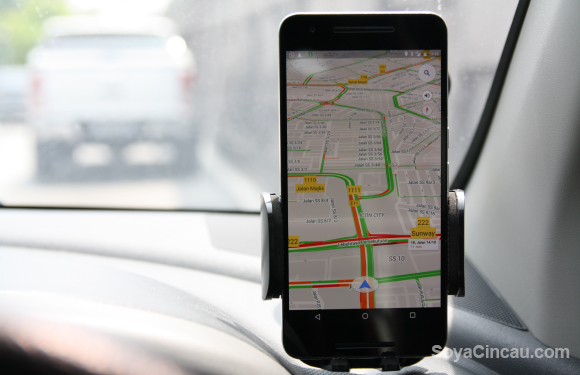
Awhile back we published an article about Google Maps‘ latest feature: Driving Mode. Back then I downloaded an APK to try the program out early, but now it’s finally rolling out, for real, globally.

Driving Mode is, in a way, Google’s method of telling you that they know exactly where you’re going all the time. I jest, of course, the true purpose of this is to help you get to where you’re going as fast as possible with as little effort as possible.

In a nutshell, once you “Start driving”, Google will guess where you’re going based on the time of day and your travel history, and suggest the fastest route to that destination.

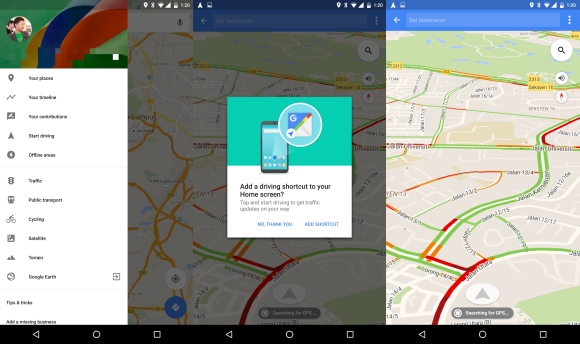
You can then just leave the timer to run down and Google Maps will kick in and navigate you to your desired destination. If you don’t want to, you can just hit the tiny “x” and just drive. Driving Mode will continue to show you which roads are congested with a colour scheme (green for good, orange for heavy, red for congested).
160512-google-maps-driving-mode-rollout-global-1

To access this, simply fire up the app and pull out the hamburger menu. Then, hit “Start driving” and you’re good to go. Maps will ask you if you want to add a Driving Mode shortcut to your home screen for added convenience.

I was honestly a little disappointed in Driving Mode because I expected more. I wanted a more passive navigation system, rather than have it set a route then kick into the regular Maps turn-by-turn navigation that often beeps at me for not sticking to their pre-planned route.

Instead, I would rather have them find out where I’m going, suggest a fast route and then as I’m driving along whatever route I chose, passively detect if there is congestion ahead. Should there be congestion ahead, I would have liked it if Maps prompted me and informed me of a faster route indicating how much time I would save and ask me if I would want to deviate instead.

Of course, this is probably just me getting wrapped up in my own selfish fantasies of what technology should do. Driving Mode, I’m sure, will please a whole bunch of people who are tired after a long day at work and want their navigation app to guide them home.

Though I can’t help but feel that it, in its current iteration, is a little more like a gimmick than a useful standalone feature. What do you guys think of Driving Mode? Let me know in the comments below!

[SOURCE]

Tags: AndroidappsDriving Mode MalaysiagoogleGoogle MapsGoogle Maps Driving Mode
Rory Lee

Rory Lee

POPULAR

Google Maps “Driving Mode” is rolling out worldwide

May 12, 2016

SoyaCincau x Dongfeng Pop Up EV Clinic: Track Edition 2026: Chase a podium or cruise with friends; we’re opening the grid to everyone

May 13, 2026
Rear view of the OPPO Find X9 Ultra in Tundra Umber standing vertically on a stone surface with a lush green bokeh background. The device features an eco-friendly vegan leather back with a classic stitching design , vertically oriented Hasselblad and OPPO logos , and a large circular Master Lens camera module with a bronze-toned knurled ring.

Clearing Every Expectation: How the OPPO Find X9 Ultra Redefines the Modern Flagship Experience

April 16, 2026
BYD Inokom Visit - May 2026

BYD is here to stay in Malaysia: CKD with Sime Motors set to happen soon?

May 18, 2026

Volvo EX30 owners affected by recall told not to charge above 70% following two fire incidents in Thailand

May 19, 2026

Sarawak’s Batang Lupar 1 Bridge: Malaysia’s longest river-crossing bridge opens today

May 21, 2026

Copyright © 2025 · SoyaCincau.com
Mind Blow Sdn Bhd (1076827-P)

  • ADVERTISE
  • DISCLAIMER

Copyright © 2026 · SoyaCincau.com – Mind Blow Sdn Bhd (1076827-P)

  • ADVERTISE
  • DISCLAIMER