• 中文版
  • BM
  • News
  • Deals
  • Reviews
    • First Impressions
    • Hands-on
    • Comparisons
  • Tech
    • Mobile
    • Computers
    • Cameras
    • Wearables
    • Audio
    • Drones
  • Telco
    • Celcom
    • Digi
    • Maxis
    • Time
    • Tune Talk
    • U Mobile
    • Unifi
    • Yes
  • Cars
  • Contribute
  • Jobs
Menu
  • 中文版
  • BM
  • News
  • Deals
  • Reviews
    • First Impressions
    • Hands-on
    • Comparisons
  • Tech
    • Mobile
    • Computers
    • Cameras
    • Wearables
    • Audio
    • Drones
  • Telco
    • Celcom
    • Digi
    • Maxis
    • Time
    • Tune Talk
    • U Mobile
    • Unifi
    • Yes
  • Cars
  • Contribute
  • Jobs
Search
  • Tech
    • News
    • Mobile
    • Computers
    • Cameras
    • Wearables
    • Audio
    • Drones
  • Telco
    • Celcom
    • Digi
    • Maxis
    • Time
    • U Mobile
    • Unifi
    • Yes
  • Reviews
    • First Impressions
    • Hands-on
    • Comparisons
  • Buyer’s Guide
  • Opinions
  • Digital Life
  • Video
  • Deals
  • How-To
  • Cars
  • Bahasa Melayu
  • EV
  • Contribute
  • Advertise
Menu
  • Tech
    • News
    • Mobile
    • Computers
    • Cameras
    • Wearables
    • Audio
    • Drones
  • Telco
    • Celcom
    • Digi
    • Maxis
    • Time
    • U Mobile
    • Unifi
    • Yes
  • Reviews
    • First Impressions
    • Hands-on
    • Comparisons
  • Buyer’s Guide
  • Opinions
  • Digital Life
  • Video
  • Deals
  • How-To
  • Cars
  • Bahasa Melayu
  • EV
  • Contribute
  • Advertise
Search
Close
Home Digital Life

WhatsApp now offers text formatting on their iPhone app

  • BY Rory Lee
  • 30 March 2016
  • 4:23 pm
  • Comment
Share on FacebookShare on Twitter

160330-whatsapp-text-formatting

Have you ever been annoyed at how darn difficult it is to place emphasis in WhatsApp conversations? Well, now it’s going to be much easier because if you’re on an iPhone, the text messaging service will let you use text formatting in your conversations.

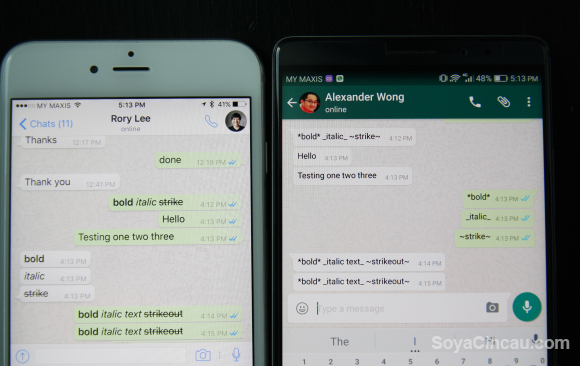
Unfortunately, this doesn’t apply to the Android version of WhatsApp.

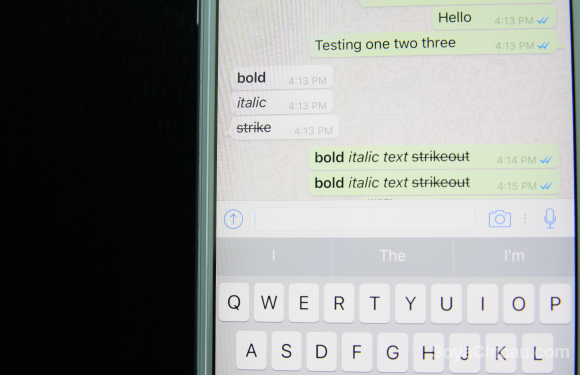
Right now, if you fire up your WhatsApp for iPhone app, it gives you limited text formatting options like bold, strikethrough and italics. This opens up plenty of opportunities to make conversations more colourful and even inject a little sarcasm into your chats.

Although you don’t have access to more complex text formatting like superscripts or subscripts, I’m sure simply having access to bold, strikethrough and italics is more than good enough for daily conversations. Here’s how you can do it:

160330-whatsapp-text-formatting-2

To bold your text, simply add and asterisk or “*”to the beginning and end of whatever text it is you want to bold. For example *oranges* will become oranges.

160330-whatsapp-text-formatting-4

If you want to strikethrough a particular text, simply add a tilde or “~” symbol to the start and end of whatever text it is you want to strikethrough. For example ~funky grapes~ becomes funky grapes.

160330-whatsapp-text-formatting-3

Finally, to get access to the italics text formatting, simply add an underscore or “_” to the front and back of a word or sentence. For example, _zwanky passion fruit_ becomes zwanky passion fruit.
160330-whatsapp-text-formatting-1-fixed

Be careful about using it when chatting with your friends using the Android version of WhatsApp because they will not see the text formatting since it isn’t supported. Instead, they’ll just see the symbols as-is, which means your text might come out looking a little silly.

[SOURCE]

Tags: AndroidAppleFacebookiPhoneiPhone 6iPhone 6 PlusiPhone 6SiPhone SEsmartphoneWhatsappWhatsApp for iPhone
Rory Lee

Rory Lee

POPULAR

WhatsApp now offers text formatting on their iPhone app

March 30, 2016

Malaysia now spending over RM4 billion monthly on fuel subsidies. It’s time to accelerate EV shift

March 29, 2026

The Xiaomi 17 Proves You Don’t Need a Giant Phone for Pro-Level Photos

February 28, 2026
Image source: Jakub Zerdzicki on Pexels

AEON Bank’s Personal Financing-i (PF-i): Flexible Funds to Help Ease Budget Constraints

December 24, 2025

Is Your Current Phone Generations Behind? Here’s a Simpler Way to Close the Gap

March 13, 2026
Tesla Model Y L Malaysia

Tesla Model Y L 3-row electric SUV to launch in Malaysia on 1 April: 681km range, supports V2L

March 30, 2026

Copyright © 2025 · SoyaCincau.com
Mind Blow Sdn Bhd (1076827-P)

  • ADVERTISE
  • DISCLAIMER

Copyright © 2026 · SoyaCincau.com – Mind Blow Sdn Bhd (1076827-P)

  • ADVERTISE
  • DISCLAIMER