• 中文版
  • BM
  • News
  • Deals
  • Reviews
    • First Impressions
    • Hands-on
    • Comparisons
  • Tech
    • Mobile
    • Computers
    • Cameras
    • Wearables
    • Audio
    • Drones
  • Telco
    • Celcom
    • Digi
    • Maxis
    • Time
    • Tune Talk
    • U Mobile
    • Unifi
    • Yes
  • Cars
  • Contribute
  • Jobs
Menu
  • 中文版
  • BM
  • News
  • Deals
  • Reviews
    • First Impressions
    • Hands-on
    • Comparisons
  • Tech
    • Mobile
    • Computers
    • Cameras
    • Wearables
    • Audio
    • Drones
  • Telco
    • Celcom
    • Digi
    • Maxis
    • Time
    • Tune Talk
    • U Mobile
    • Unifi
    • Yes
  • Cars
  • Contribute
  • Jobs
Search
  • Tech
    • News
    • Mobile
    • Computers
    • Cameras
    • Wearables
    • Audio
    • Drones
  • Telco
    • Celcom
    • Digi
    • Maxis
    • Time
    • U Mobile
    • Unifi
    • Yes
  • Reviews
    • First Impressions
    • Hands-on
    • Comparisons
  • Buyer’s Guide
  • Opinions
  • Digital Life
  • Video
  • Deals
  • How-To
  • Cars
  • Bahasa Melayu
  • EV
  • Contribute
  • Advertise
Menu
  • Tech
    • News
    • Mobile
    • Computers
    • Cameras
    • Wearables
    • Audio
    • Drones
  • Telco
    • Celcom
    • Digi
    • Maxis
    • Time
    • U Mobile
    • Unifi
    • Yes
  • Reviews
    • First Impressions
    • Hands-on
    • Comparisons
  • Buyer’s Guide
  • Opinions
  • Digital Life
  • Video
  • Deals
  • How-To
  • Cars
  • Bahasa Melayu
  • EV
  • Contribute
  • Advertise
Search
Close
Home Digital Life

Is your iPhone’s GPS acting up after iOS 8.4 update? Here are some solutions

  • BY Sirap Bandung
  • 3 July 2015
  • 12:34 pm
  • Comment
Share on FacebookShare on Twitter

ios 8 gps fix

Having issues with your GPS after your iPhone is updated to iOS 8.4? You’re not alone. The update generally made it a struggle for iOS 8.4 users to use turn-by-turn navigation and other functions of navigation software like Apple Maps, Google Maps and Waze.

But do not fret, we have some solutions to help you tackle the problem.

There are three ways you can attempt to fix the GPS issue, either by resetting your network settings, turning location services on or off and even backup and restore fresh using iTunes.

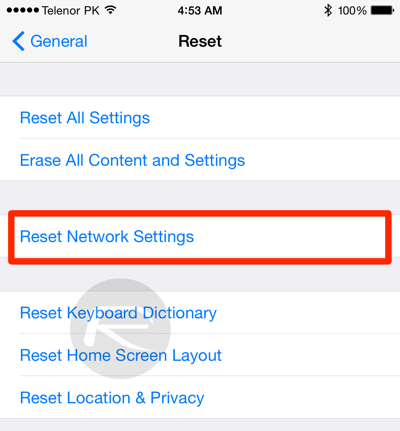
#1 Reset Network Settings
ios 8 gps fix-2

To reset your network settings, head on over to the Settings app and then head over to General > Reset > Reset Network Settings. This will reset all your network settings and wipe your WiFi password but it will help fix the problem.

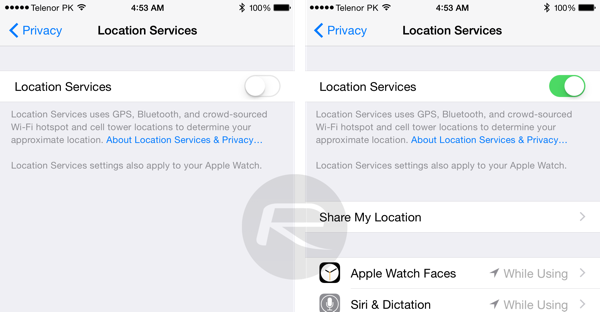
#2 Restart Location Services with Reboot
ios 8 gps fix-3

Another alternative is turning the location services of and off. It’s slightly trickier than the above solution but its well worth it.

First head on over to your Location Services in your settings in this order Settings > Privacy  > Location Services, and turn the switch off. Next restart your iPhone and turn the switch back on and the problem should be rectified.

#3 Complete Restore

The last one is the hardest to do and should be used as a last resort should all else fail. Make sure you have backed up everything using iTunes or iCloud before you do this, and restore fresh to iOS 8.4 using iTunes. It’s a long process but there is a chance it might fix the GPS issue. You can grab the iOS 8.4 update here.

The last alternative however, if you couldn’t fix it using any of the methods above is to wait for Apple to release a fix themselves, though it does mean you won’t be able to get around too much if you’re the sort that gets lost a lot. Good luck!


[VIA][SOURCE]

Tags: Applebug fixGPSiOS 8.4ios 8.4 gps bugiPhone
Sirap Bandung

Sirap Bandung

[email protected]

POPULAR

Nissan Finally Gives the Serena a Real Hybrid Powertrain in Malaysia. Estimated from RM160k to RM180k

January 16, 2026

Is your iPhone’s GPS acting up after iOS 8.4 update? Here are some solutions

July 3, 2015

Tired of cracked screens or short battery life? The REDMI Note 15 Series take a durability-first approach

January 15, 2026

Neta V now available for only RM40k, but with a limited 6-month warranty

January 31, 2026

Is your TNG eWallet suspended? Here’s what you should do

January 27, 2026
BYD Atto 3 Ultra

BYD Atto 3 Ultra now available for as low as RM106k

January 27, 2026

Copyright © 2025 · SoyaCincau.com
Mind Blow Sdn Bhd (1076827-P)

  • ADVERTISE
  • DISCLAIMER

Copyright © 2026 · SoyaCincau.com – Mind Blow Sdn Bhd (1076827-P)

  • ADVERTISE
  • DISCLAIMER