• 中文版
  • BM
  • News
  • Deals
  • Reviews
    • First Impressions
    • Hands-on
    • Comparisons
  • Tech
    • Mobile
    • Computers
    • Cameras
    • Wearables
    • Audio
    • Drones
  • Telco
    • Celcom
    • Digi
    • Maxis
    • Time
    • Tune Talk
    • U Mobile
    • Unifi
    • Yes
  • Cars
  • Contribute
  • Jobs
Menu
  • 中文版
  • BM
  • News
  • Deals
  • Reviews
    • First Impressions
    • Hands-on
    • Comparisons
  • Tech
    • Mobile
    • Computers
    • Cameras
    • Wearables
    • Audio
    • Drones
  • Telco
    • Celcom
    • Digi
    • Maxis
    • Time
    • Tune Talk
    • U Mobile
    • Unifi
    • Yes
  • Cars
  • Contribute
  • Jobs
Search
  • Tech
    • News
    • Mobile
    • Computers
    • Cameras
    • Wearables
    • Audio
    • Drones
  • Telco
    • Celcom
    • Digi
    • Maxis
    • Time
    • U Mobile
    • Unifi
    • Yes
  • Reviews
    • First Impressions
    • Hands-on
    • Comparisons
  • Buyer’s Guide
  • Opinions
  • Digital Life
  • Video
  • Deals
  • How-To
  • Cars
  • Bahasa Melayu
  • EV
  • Contribute
  • Advertise
Menu
  • Tech
    • News
    • Mobile
    • Computers
    • Cameras
    • Wearables
    • Audio
    • Drones
  • Telco
    • Celcom
    • Digi
    • Maxis
    • Time
    • U Mobile
    • Unifi
    • Yes
  • Reviews
    • First Impressions
    • Hands-on
    • Comparisons
  • Buyer’s Guide
  • Opinions
  • Digital Life
  • Video
  • Deals
  • How-To
  • Cars
  • Bahasa Melayu
  • EV
  • Contribute
  • Advertise
Search
Close
Home News

A single Message can crash your iPhone, iPad and your Apple Watch. Here’s how to prevent it temporarily

  • BY soyacincau
  • 27 May 2015
  • 11:18 pm
  • Comment
Share on FacebookShare on Twitter

150527-iphone-message

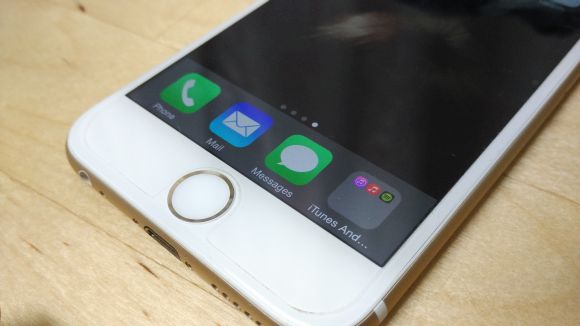
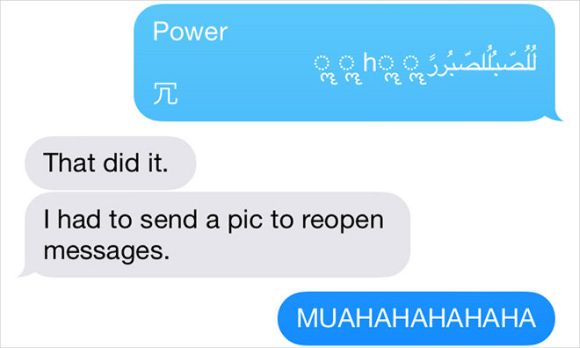
Apparently there’s a little iOS bug that could cause any iPhone, iPad and even the Apple Watch to crash or reboot. The cause? A specific line of unicode that looks like random mix of arabic and other characters. This is due to iOS difficulty of rendering them on the notification screen and pranksters are using this to annoy iOS users until an official fix is released.
150527-ios-unicode-bug

To prevent yourself from being a repeat victim, the folks at iMore had shared a few remedial steps which you can take right now. Since the bug is triggered automatically from the notification screen, the obvious fix is to disable message notifications from appearing.

For iPhone and iPad users, you can do this by heading over to Settings > Notifications > Messages, and disable “Show on Lock Screen”. The Apple Watch isn’t spared either, so you would need to do the same from the Apple Watch App under Notifications > Messages, and disable “Show Alerts”. Chances are, not many would be affected but who knows if you have that one friend who would take this opportunity to annoy you to the max.

If you do receive the troublesome line of unicode, you won’t be able to load the Messages app until you receive a fresh new message. To do this, you can get a friend to send you a clean message or send a photo to yourself from Photos.


[ SOURCE 2 ]

Tags: AppleApple WatchCrashiMessageiOS BugiPadiPhoneiPhone 6iPhone 6 PlusUnicode Bug
soyacincau

soyacincau

POPULAR

Nissan Finally Gives the Serena a Real Hybrid Powertrain in Malaysia. Estimated from RM160k to RM180k

January 16, 2026

Neta V now available for only RM40k, but with a limited 6-month warranty

January 31, 2026

A single Message can crash your iPhone, iPad and your Apple Watch. Here’s how to prevent it temporarily

May 27, 2015

Perodua QV-E only costs RM1.4k to maintain for 5 years, cheaper than Axia

January 30, 2026

Tired of cracked screens or short battery life? The REDMI Note 15 Series take a durability-first approach

January 15, 2026

Is your TNG eWallet suspended? Here’s what you should do

January 27, 2026

Copyright © 2025 · SoyaCincau.com
Mind Blow Sdn Bhd (1076827-P)

  • ADVERTISE
  • DISCLAIMER

Copyright © 2026 · SoyaCincau.com – Mind Blow Sdn Bhd (1076827-P)

  • ADVERTISE
  • DISCLAIMER