• 中文版
  • BM
  • News
  • Deals
  • Reviews
    • First Impressions
    • Hands-on
    • Comparisons
  • Tech
    • Mobile
    • Computers
    • Cameras
    • Wearables
    • Audio
    • Drones
  • Telco
    • Celcom
    • Digi
    • Maxis
    • Time
    • Tune Talk
    • U Mobile
    • Unifi
    • Yes
  • Cars
  • Contribute
  • Jobs
Menu
  • 中文版
  • BM
  • News
  • Deals
  • Reviews
    • First Impressions
    • Hands-on
    • Comparisons
  • Tech
    • Mobile
    • Computers
    • Cameras
    • Wearables
    • Audio
    • Drones
  • Telco
    • Celcom
    • Digi
    • Maxis
    • Time
    • Tune Talk
    • U Mobile
    • Unifi
    • Yes
  • Cars
  • Contribute
  • Jobs
Search
  • Tech
    • News
    • Mobile
    • Computers
    • Cameras
    • Wearables
    • Audio
    • Drones
  • Telco
    • Celcom
    • Digi
    • Maxis
    • Time
    • U Mobile
    • Unifi
    • Yes
  • Reviews
    • First Impressions
    • Hands-on
    • Comparisons
  • Buyer’s Guide
  • Opinions
  • Digital Life
  • Video
  • Deals
  • How-To
  • Cars
  • Bahasa Melayu
  • EV
  • Contribute
  • Advertise
Menu
  • Tech
    • News
    • Mobile
    • Computers
    • Cameras
    • Wearables
    • Audio
    • Drones
  • Telco
    • Celcom
    • Digi
    • Maxis
    • Time
    • U Mobile
    • Unifi
    • Yes
  • Reviews
    • First Impressions
    • Hands-on
    • Comparisons
  • Buyer’s Guide
  • Opinions
  • Digital Life
  • Video
  • Deals
  • How-To
  • Cars
  • Bahasa Melayu
  • EV
  • Contribute
  • Advertise
Search
Close
Home News

Sony Xperia Z3 Record Screen feature demo

  • BY soyacincau
  • 17 September 2014
  • 6:29 pm
  • Comment
Share on FacebookShare on Twitter

140917-sony-xperia-z3-screen-record-video-01

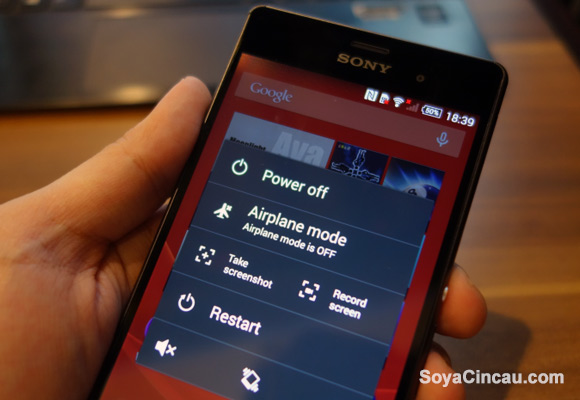
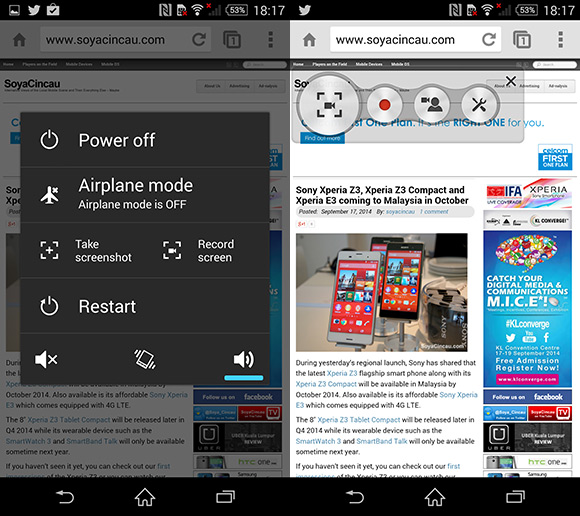
The new family of Sony Xperia Z3 may have the similar looking Android UI as its previous model but there’s a neat little feature that lets you make a screen capture video on the device itself. By long pressing the power button, you’ll get an extra “Record Screen” button next to the Take screenshot option, and this lets you record a video of whatever is showing on your device.

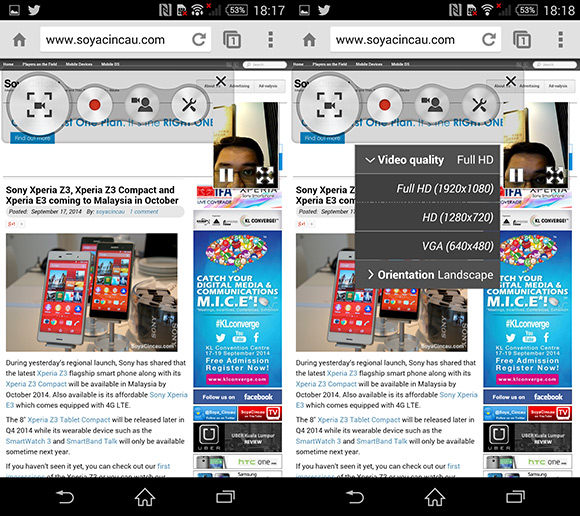
There are 3 video resolutions available – Full HD (1920×1080), HD (1280×720) and VGA (640×480). You also get the option to record in either landscape or portrait mode as well. Since this makes it possible to record step by step tutorial videos, the Record Screen feature also lets you enable picture-in-picture footages with a front facing camera which can be resized and moved around the screen.

Check out the screenshots and sample screen capture video after the break.
140917-sony-xperia-z3-screen-record-video-02

140917-sony-xperia-z3-screen-record-video-03

The screen recording feature was actually introduced earlier with Android 4.4 KitKat but it requires a SDK or 3rd party apps that requires rooting. It is good to know that Sony has made things easier by having this enabled natively out of the box.

The Sony Xperia Z3 will be available in Malaysia next month in October. In the mean time, do check out our first impressions of the device from IFA 2014.


Tags: smart phoneSonySony Xperia Z3Sony Xperia Z3 DemoSony Xperia Z3 MalaysiaSony Xperia Z3 Record ScreenSony Xperia Z3 TutorialVideo Screen CaptureXperia Z3 Screen Video Capture
soyacincau

soyacincau

POPULAR

Sony Xperia Z3 Record Screen feature demo

September 17, 2014

Xiaomi’s new Mijia Air Conditioner Eco 4-star now in Malaysia, available from under RM900

March 25, 2026

MCMC urges iPhone users to update iOS immediately following “Darksword” exploit

March 20, 2026

Is Your Current Phone Generations Behind? Here’s a Simpler Way to Close the Gap

March 13, 2026
OMOWAY Omo X - OMOWAY Global Tech Launch 2026

OMOWAY: The Tesla of 2-Wheelers Is Charting Its Course With OMO X and Mobility One Wheeled Robot

March 19, 2026

iPhone to support 5G SA for Yes 5G, U Mobile and Maxis via iOS 26.4

March 16, 2026

Copyright © 2025 · SoyaCincau.com
Mind Blow Sdn Bhd (1076827-P)

  • ADVERTISE
  • DISCLAIMER

Copyright © 2026 · SoyaCincau.com – Mind Blow Sdn Bhd (1076827-P)

  • ADVERTISE
  • DISCLAIMER