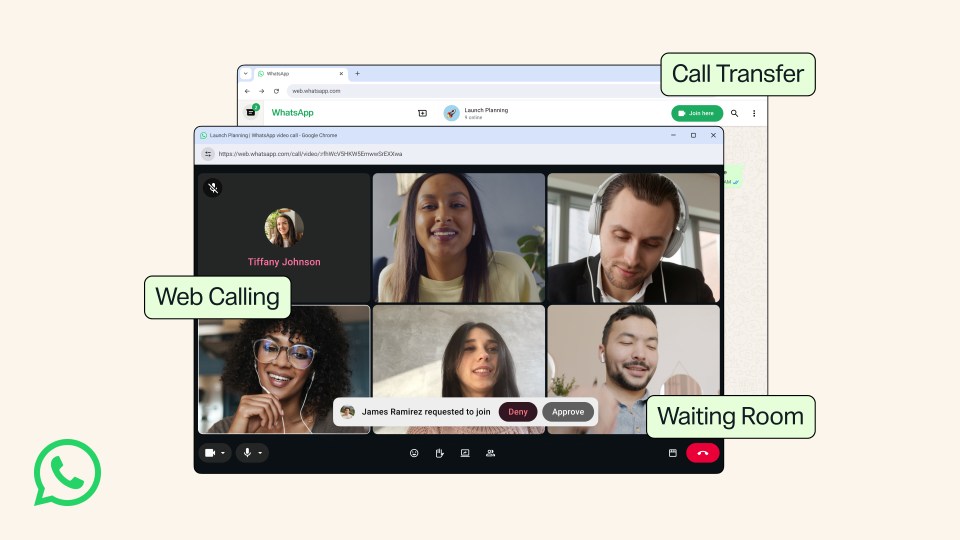
WhatsApp is rolling out a set of new calling features, which allows you to make and receive voice and video calls directly inside WhatsApp Web.
Make calls from WhatsApp Web without installing an app
You can now start or join both individual and group calls right inside your internet browser. This means you do not have to download the WhatsApp Desktop app, which is useful if you are using a shared computer or a work laptop that does not let you install new software.
The web version still gives you regular calling features found on the mobile app, such as screen sharing, call reactions, and a Calls tab to view your call history and favourite contacts. Calls made through your browser are completely free, end-to-end encrypted, and have no time limits.
Move ongoing calls between your devices
WhatsApp now lets you move a live call from one device to another without hanging up.
For example, if you start a group call on your phone while walking home, you can easily switch the call to WhatsApp Web or Desktop once you sit down at your desk.
Waiting rooms for group calls
People who host group calls now get a new waiting room feature to control who joins.
If you turn on the “Require approval to join” setting when creating a call link, people who click the link will stay in a virtual waiting room until you let them in.
Faster HD video and background noise removal
To make calls clearer, WhatsApp has added a feature called QuickHD. Instead of waiting for video quality to slowly get better during a call, QuickHD gives you clear high-definition video right from the first few seconds.
WhatsApp has also added a background noise removal feature. It blocks out loud sounds around you so people can hear your voice clearly in busy places. You can turn this setting on or off at any time during a call from the call settings menu.
These features are rolling out to users around the world and will be available to everyone soon.