• 中文版
  • BM
  • News
  • Deals
  • Reviews
    • First Impressions
    • Hands-on
    • Comparisons
  • Tech
    • Mobile
    • Computers
    • Cameras
    • Wearables
    • Audio
    • Drones
  • Telco
    • Celcom
    • Digi
    • Maxis
    • Time
    • Tune Talk
    • U Mobile
    • Unifi
    • Yes
  • Cars
  • Contribute
  • Jobs
Menu
  • 中文版
  • BM
  • News
  • Deals
  • Reviews
    • First Impressions
    • Hands-on
    • Comparisons
  • Tech
    • Mobile
    • Computers
    • Cameras
    • Wearables
    • Audio
    • Drones
  • Telco
    • Celcom
    • Digi
    • Maxis
    • Time
    • Tune Talk
    • U Mobile
    • Unifi
    • Yes
  • Cars
  • Contribute
  • Jobs
Search
  • Tech
    • News
    • Mobile
    • Computers
    • Cameras
    • Wearables
    • Audio
    • Drones
  • Telco
    • Celcom
    • Digi
    • Maxis
    • Time
    • U Mobile
    • Unifi
    • Yes
  • Reviews
    • First Impressions
    • Hands-on
    • Comparisons
  • Buyer’s Guide
  • Opinions
  • Digital Life
  • Video
  • Deals
  • How-To
  • Cars
  • Bahasa Melayu
  • EV
  • Contribute
  • Advertise
Menu
  • Tech
    • News
    • Mobile
    • Computers
    • Cameras
    • Wearables
    • Audio
    • Drones
  • Telco
    • Celcom
    • Digi
    • Maxis
    • Time
    • U Mobile
    • Unifi
    • Yes
  • Reviews
    • First Impressions
    • Hands-on
    • Comparisons
  • Buyer’s Guide
  • Opinions
  • Digital Life
  • Video
  • Deals
  • How-To
  • Cars
  • Bahasa Melayu
  • EV
  • Contribute
  • Advertise
Search
Close
Home Digital Life

Android Tip: How to change keyboard?

  • BY soyacincau
  • 18 July 2010
  • 11:00 am
  • Comment
Share on FacebookShare on Twitter

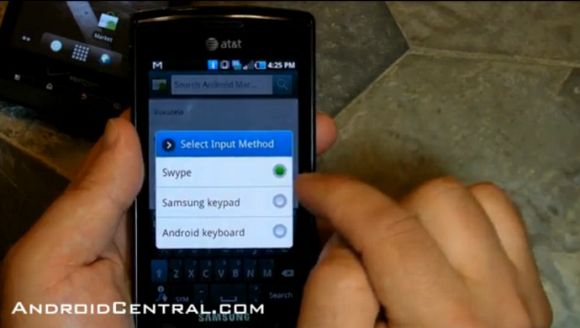
If you’re using an Android device, you probably have several keyboards installed. Swype & SwiftKey are 2 recommended keyboards to use for your device. However how do you switch between keyboards? If you’ve been going to settings to do that, there’s actually an easier way to do it.

AndroidCentral has posted a simple guide on changing keyboards on the fly.

Check out the video after the jump

[ SOURCE ]

Tags: AndroidAndroid KeyboardKeyboardTipVideo
soyacincau

soyacincau

POPULAR

Upgraded To a New Phone? Cool. But When Was the Last Time you Upgraded your Shaver?

November 10, 2025

Solar ATAP: The new solar programme for consumers will only start in 2026

December 2, 2025

5 Reasons Every Home Should Have a Smart Security System

November 11, 2025

Android Tip: How to change keyboard?

July 18, 2010
Perodua QV-E EV

Perodua QV-E is now official: Electric sportback with 201hp, 445km NEDC range, priced at RM80k not inclusive of battery subscription

December 1, 2025

GrabRewards is now GrabCoins: Now with even more ways to earn and save

November 17, 2025

Copyright © 2025 · SoyaCincau.com
Mind Blow Sdn Bhd (1076827-P)

  • ADVERTISE
  • DISCLAIMER

Copyright © 2025 · SoyaCincau.com – Mind Blow Sdn Bhd (1076827-P)

  • ADVERTISE
  • DISCLAIMER