• 中文版
  • BM
  • News
  • Deals
  • Reviews
    • First Impressions
    • Hands-on
    • Comparisons
  • Tech
    • Mobile
    • Computers
    • Cameras
    • Wearables
    • Audio
    • Drones
  • Telco
    • Celcom
    • Digi
    • Maxis
    • Time
    • Tune Talk
    • U Mobile
    • Unifi
    • Yes
  • Cars
  • Contribute
  • Jobs
Menu
  • 中文版
  • BM
  • News
  • Deals
  • Reviews
    • First Impressions
    • Hands-on
    • Comparisons
  • Tech
    • Mobile
    • Computers
    • Cameras
    • Wearables
    • Audio
    • Drones
  • Telco
    • Celcom
    • Digi
    • Maxis
    • Time
    • Tune Talk
    • U Mobile
    • Unifi
    • Yes
  • Cars
  • Contribute
  • Jobs
Search
  • Tech
    • News
    • Mobile
    • Computers
    • Cameras
    • Wearables
    • Audio
    • Drones
  • Telco
    • Celcom
    • Digi
    • Maxis
    • Time
    • U Mobile
    • Unifi
    • Yes
  • Reviews
    • First Impressions
    • Hands-on
    • Comparisons
  • Buyer’s Guide
  • Opinions
  • Digital Life
  • Video
  • Deals
  • How-To
  • Cars
  • Bahasa Melayu
  • EV
  • Contribute
  • Advertise
Menu
  • Tech
    • News
    • Mobile
    • Computers
    • Cameras
    • Wearables
    • Audio
    • Drones
  • Telco
    • Celcom
    • Digi
    • Maxis
    • Time
    • U Mobile
    • Unifi
    • Yes
  • Reviews
    • First Impressions
    • Hands-on
    • Comparisons
  • Buyer’s Guide
  • Opinions
  • Digital Life
  • Video
  • Deals
  • How-To
  • Cars
  • Bahasa Melayu
  • EV
  • Contribute
  • Advertise
Search
Close
Home Digital Life

Chrome Remote Desktop now lets you access desktop remotely from your mobile

  • BY soyacincau
  • 17 April 2014
  • 2:09 pm
  • Comment
Share on FacebookShare on Twitter

140417-chrome-remote-desktop-mobile-app

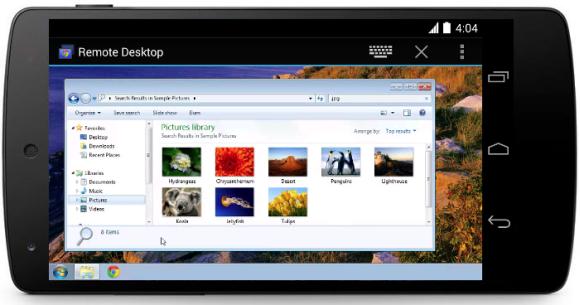
Cloud storage allows ease of sharing of files across desktop and mobile devices. But what if you left something behind on your desktop computer and you need to retrieve it? Now Google has released a Free Chrome Remote Desktop app for Android which lets you access your desktop anywhere from your smart phone or tablet.

To get started, you would need to install the Google Remote Desktop app on your computer. Then on your Android smart phone or tablet, you would then need to install the Remote Desktop Mobile app.

Setting up is pretty easy and you can secure your remote access with a pin number. This would work great if you have a high resolution tablet like the Galaxy NotePro 12.2. At the moment, the mobile app is only available on Android, while the iOS version is said to be on the way later this year.


[ SOURCE, VIA ]

Tags: AndroidChrome BrowserChrome Remote DesktopGoogle ChromeRDPRemote AccessRemote Desktop
soyacincau

soyacincau

POPULAR

Chrome Remote Desktop now lets you access desktop remotely from your mobile

April 17, 2014

Malaysia now spending over RM4 billion monthly on fuel subsidies. It’s time to accelerate EV shift

March 29, 2026

The Xiaomi 17 Proves You Don’t Need a Giant Phone for Pro-Level Photos

February 28, 2026
Image source: Jakub Zerdzicki on Pexels

AEON Bank’s Personal Financing-i (PF-i): Flexible Funds to Help Ease Budget Constraints

December 24, 2025

Is Your Current Phone Generations Behind? Here’s a Simpler Way to Close the Gap

March 13, 2026
Tesla Model Y L Malaysia

Tesla Model Y L 3-row electric SUV to launch in Malaysia on 1 April: 681km range, supports V2L

March 30, 2026

Copyright © 2025 · SoyaCincau.com
Mind Blow Sdn Bhd (1076827-P)

  • ADVERTISE
  • DISCLAIMER

Copyright © 2026 · SoyaCincau.com – Mind Blow Sdn Bhd (1076827-P)

  • ADVERTISE
  • DISCLAIMER