• 中文版
  • BM
  • News
  • Deals
  • Reviews
    • First Impressions
    • Hands-on
    • Comparisons
  • Tech
    • Mobile
    • Computers
    • Cameras
    • Wearables
    • Audio
    • Drones
  • Telco
    • Celcom
    • Digi
    • Maxis
    • Time
    • Tune Talk
    • U Mobile
    • Unifi
    • Yes
  • Cars
  • Contribute
  • Jobs
Menu
  • 中文版
  • BM
  • News
  • Deals
  • Reviews
    • First Impressions
    • Hands-on
    • Comparisons
  • Tech
    • Mobile
    • Computers
    • Cameras
    • Wearables
    • Audio
    • Drones
  • Telco
    • Celcom
    • Digi
    • Maxis
    • Time
    • Tune Talk
    • U Mobile
    • Unifi
    • Yes
  • Cars
  • Contribute
  • Jobs
Search
  • Tech
    • News
    • Mobile
    • Computers
    • Cameras
    • Wearables
    • Audio
    • Drones
  • Telco
    • Celcom
    • Digi
    • Maxis
    • Time
    • U Mobile
    • Unifi
    • Yes
  • Reviews
    • First Impressions
    • Hands-on
    • Comparisons
  • Buyer’s Guide
  • Opinions
  • Digital Life
  • Video
  • Deals
  • How-To
  • Cars
  • Bahasa Melayu
  • EV
  • Contribute
  • Advertise
Menu
  • Tech
    • News
    • Mobile
    • Computers
    • Cameras
    • Wearables
    • Audio
    • Drones
  • Telco
    • Celcom
    • Digi
    • Maxis
    • Time
    • U Mobile
    • Unifi
    • Yes
  • Reviews
    • First Impressions
    • Hands-on
    • Comparisons
  • Buyer’s Guide
  • Opinions
  • Digital Life
  • Video
  • Deals
  • How-To
  • Cars
  • Bahasa Melayu
  • EV
  • Contribute
  • Advertise
Search
Close
Home Digital Life Social Media

Made an embarrassing typo? WhatsApp now lets you edit your sent messages

  • BY Alexander Wong
  • 23 May 2023
  • 10:48 am
  • Comment
Share on FacebookShare on Twitter

After introducing Chat Lock, WhatsApp has announced that it has started to roll out its Message Editing feature to all users globally. This is a great feature to make quick changes to your sent text messages whether it is to correct a typo or to add a crucial context to your message.
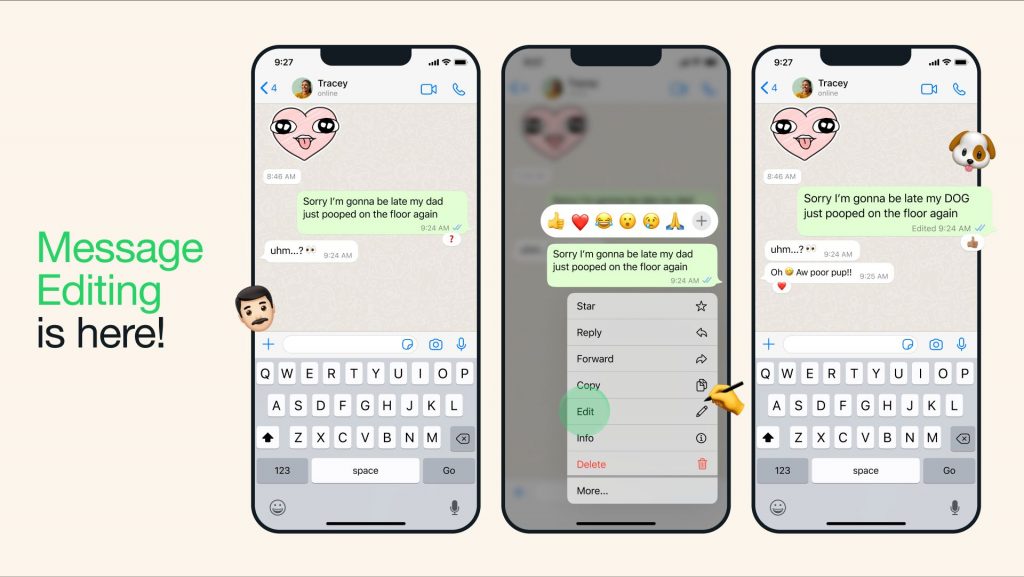
Once you’ve received the feature, you can edit your WhatsApp chat messages by long pressing on the chat bubble and then choosing “Edit”. If a message is edited, the message will carry an “Edited” label next to the time so that other users will know that your message has been updated.

Take note that the edit option is only available for up to 15 minutes after you’ve sent the message. However, the good news is that other users won’t be able to view the edit history after the changes have been made. WhatsApp also emphasised that all personal messages, media and calls including your edited messages are protected with end-to-end encryption.

WhatsApp has not shared its rollout timeline but they mentioned that the new Message Editing feature should be made available to everyone in the coming weeks. At the moment, WhatsApp Chat Lock isn’t available yet for everyone as only selected users in Malaysia have received the feature.


Tags: Edit WhatsApp MessagesMetaWhatsappWhatsApp Message Editing
Alexander Wong

Alexander Wong

POPULAR

Made an embarrassing typo? WhatsApp now lets you edit your sent messages

May 23, 2023

Malaysia now spending over RM4 billion monthly on fuel subsidies. It’s time to accelerate EV shift

March 29, 2026

The Xiaomi 17 Proves You Don’t Need a Giant Phone for Pro-Level Photos

February 28, 2026
Image source: Jakub Zerdzicki on Pexels

AEON Bank’s Personal Financing-i (PF-i): Flexible Funds to Help Ease Budget Constraints

December 24, 2025

Is Your Current Phone Generations Behind? Here’s a Simpler Way to Close the Gap

March 13, 2026
Tesla Model Y L Malaysia

Tesla Model Y L 3-row electric SUV to launch in Malaysia on 1 April: 681km range, supports V2L

March 30, 2026

Copyright © 2025 · SoyaCincau.com
Mind Blow Sdn Bhd (1076827-P)

  • ADVERTISE
  • DISCLAIMER

Copyright © 2026 · SoyaCincau.com – Mind Blow Sdn Bhd (1076827-P)

  • ADVERTISE
  • DISCLAIMER