• 中文版
  • BM
  • News
  • Deals
  • Reviews
    • First Impressions
    • Hands-on
    • Comparisons
  • Tech
    • Mobile
    • Computers
    • Cameras
    • Wearables
    • Audio
    • Drones
  • Telco
    • Celcom
    • Digi
    • Maxis
    • Time
    • Tune Talk
    • U Mobile
    • Unifi
    • Yes
  • Cars
  • Contribute
  • Jobs
Menu
  • 中文版
  • BM
  • News
  • Deals
  • Reviews
    • First Impressions
    • Hands-on
    • Comparisons
  • Tech
    • Mobile
    • Computers
    • Cameras
    • Wearables
    • Audio
    • Drones
  • Telco
    • Celcom
    • Digi
    • Maxis
    • Time
    • Tune Talk
    • U Mobile
    • Unifi
    • Yes
  • Cars
  • Contribute
  • Jobs
Search
  • Tech
    • News
    • Mobile
    • Computers
    • Cameras
    • Wearables
    • Audio
    • Drones
  • Telco
    • Celcom
    • Digi
    • Maxis
    • Time
    • U Mobile
    • Unifi
    • Yes
  • Reviews
    • First Impressions
    • Hands-on
    • Comparisons
  • Buyer’s Guide
  • Opinions
  • Digital Life
  • Video
  • Deals
  • How-To
  • Cars
  • Bahasa Melayu
  • EV
  • Contribute
  • Advertise
Menu
  • Tech
    • News
    • Mobile
    • Computers
    • Cameras
    • Wearables
    • Audio
    • Drones
  • Telco
    • Celcom
    • Digi
    • Maxis
    • Time
    • U Mobile
    • Unifi
    • Yes
  • Reviews
    • First Impressions
    • Hands-on
    • Comparisons
  • Buyer’s Guide
  • Opinions
  • Digital Life
  • Video
  • Deals
  • How-To
  • Cars
  • Bahasa Melayu
  • EV
  • Contribute
  • Advertise
Search
Close
Home News

Honeycomb Update Now Available for HTC Flyer in Malaysia

  • BY ccsoya
  • 2 February 2012
  • 8:40 pm
  • Comment
Share on FacebookShare on Twitter

Honeycomb is now available for HTC Flyers in Malaysia. As always the update servers are staggering the release to the manage the load so if you’re not getting a notification to update your Flyer don’t be concerned. Give it a couple of weeks and the update should be coming your way. Remember to also check the “Software Updates” status in the settings menu. If you’re lucky, you might be able to grab the update manually.

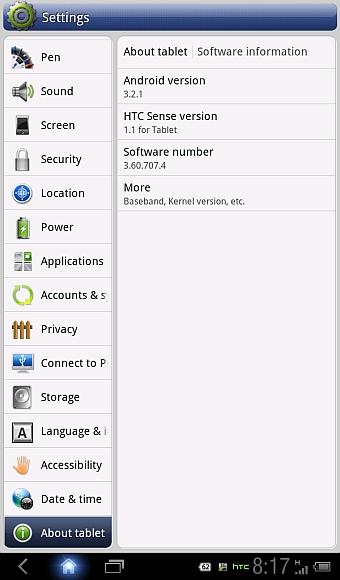
To access the “Software Updates” section. Go to, “Settings” > “About Tablet” > “Software Updates”.

The update file is 210MB, so using a WiFi connection would the smart thing to do if you’re updating your Flyer.

Truth be told, we haven’t gotten the update notification for our Flyer yet. If you have already updated yours let us know if you noticed any cool or interesting features worth mentioning. Thanks!

Also, thanks to @azharbinismail for the headsup and also the screen grab you see above.

Tags: AndroidAndroid 3.2Android HoneycombHTCHTC FlyerHTC Flyer HoneycombHTC Flyer Honeycomb updateHTC Flyer Honeycomb update MalaysiaHTC Flyer Malaysia
ccsoya

ccsoya

POPULAR

sooka’s Gilerrr Streaming Challenge Draws 273 Participants, Clinches Malaysia Book of Records Title

December 5, 2025

BOMBA investigating fire involving two EVs parked at home

December 19, 2025

U Mobile Unbeatable Phone Sale: Travel with FREE Global Roaming Across 60+ Destinations

December 10, 2025

Honeycomb Update Now Available for HTC Flyer in Malaysia

February 2, 2012

Perodua Traz: B-segment SUV with 1.5L engine and 471L boot, priced from RM76,100

December 17, 2025

JPJePlate: Is the Malaysian flag printed wrongly on EV plates?

December 12, 2025

Copyright © 2025 · SoyaCincau.com
Mind Blow Sdn Bhd (1076827-P)

  • ADVERTISE
  • DISCLAIMER

Copyright © 2025 · SoyaCincau.com – Mind Blow Sdn Bhd (1076827-P)

  • ADVERTISE
  • DISCLAIMER