• 中文版
  • BM
  • News
  • Deals
  • Reviews
    • First Impressions
    • Hands-on
    • Comparisons
  • Tech
    • Mobile
    • Computers
    • Cameras
    • Wearables
    • Audio
    • Drones
  • Telco
    • Celcom
    • Digi
    • Maxis
    • Time
    • Tune Talk
    • U Mobile
    • Unifi
    • Yes
  • Cars
  • Contribute
  • Jobs
Menu
  • 中文版
  • BM
  • News
  • Deals
  • Reviews
    • First Impressions
    • Hands-on
    • Comparisons
  • Tech
    • Mobile
    • Computers
    • Cameras
    • Wearables
    • Audio
    • Drones
  • Telco
    • Celcom
    • Digi
    • Maxis
    • Time
    • Tune Talk
    • U Mobile
    • Unifi
    • Yes
  • Cars
  • Contribute
  • Jobs
Search
  • Tech
    • News
    • Mobile
    • Computers
    • Cameras
    • Wearables
    • Audio
    • Drones
  • Telco
    • Celcom
    • Digi
    • Maxis
    • Time
    • U Mobile
    • Unifi
    • Yes
  • Reviews
    • First Impressions
    • Hands-on
    • Comparisons
  • Buyer’s Guide
  • Opinions
  • Digital Life
  • Video
  • Deals
  • How-To
  • Cars
  • Bahasa Melayu
  • EV
  • Contribute
  • Advertise
Menu
  • Tech
    • News
    • Mobile
    • Computers
    • Cameras
    • Wearables
    • Audio
    • Drones
  • Telco
    • Celcom
    • Digi
    • Maxis
    • Time
    • U Mobile
    • Unifi
    • Yes
  • Reviews
    • First Impressions
    • Hands-on
    • Comparisons
  • Buyer’s Guide
  • Opinions
  • Digital Life
  • Video
  • Deals
  • How-To
  • Cars
  • Bahasa Melayu
  • EV
  • Contribute
  • Advertise
Search
Close
Home Digital Life

iPhone and iPad users can now secure their Google Drive app with Face ID or Touch ID

  • BY Dzamira Dzafri
  • 8 May 2020
  • 11:16 am
  • Comment
Share on FacebookShare on Twitter

After an announcement of the feature last month, Google Drive’s Privacy Screen feature shows up on the iPhone and iPad. The feature allows you to add extra security to Drive by requesting for Face ID or Touch ID authentication whenever anyone tries to open the app on your device.
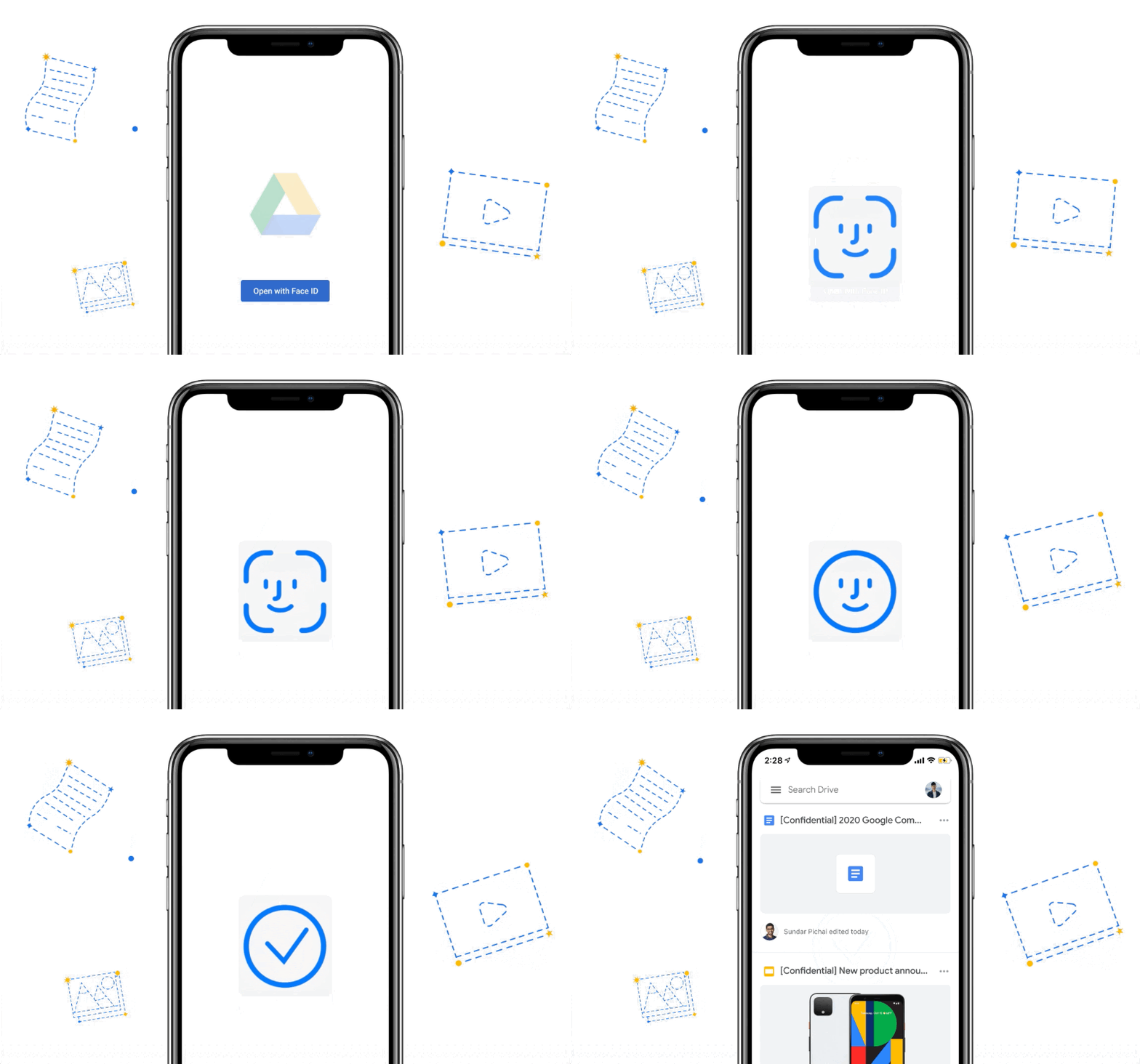
Here’s how to make sure you get the extra security for your Google Drive files right now:
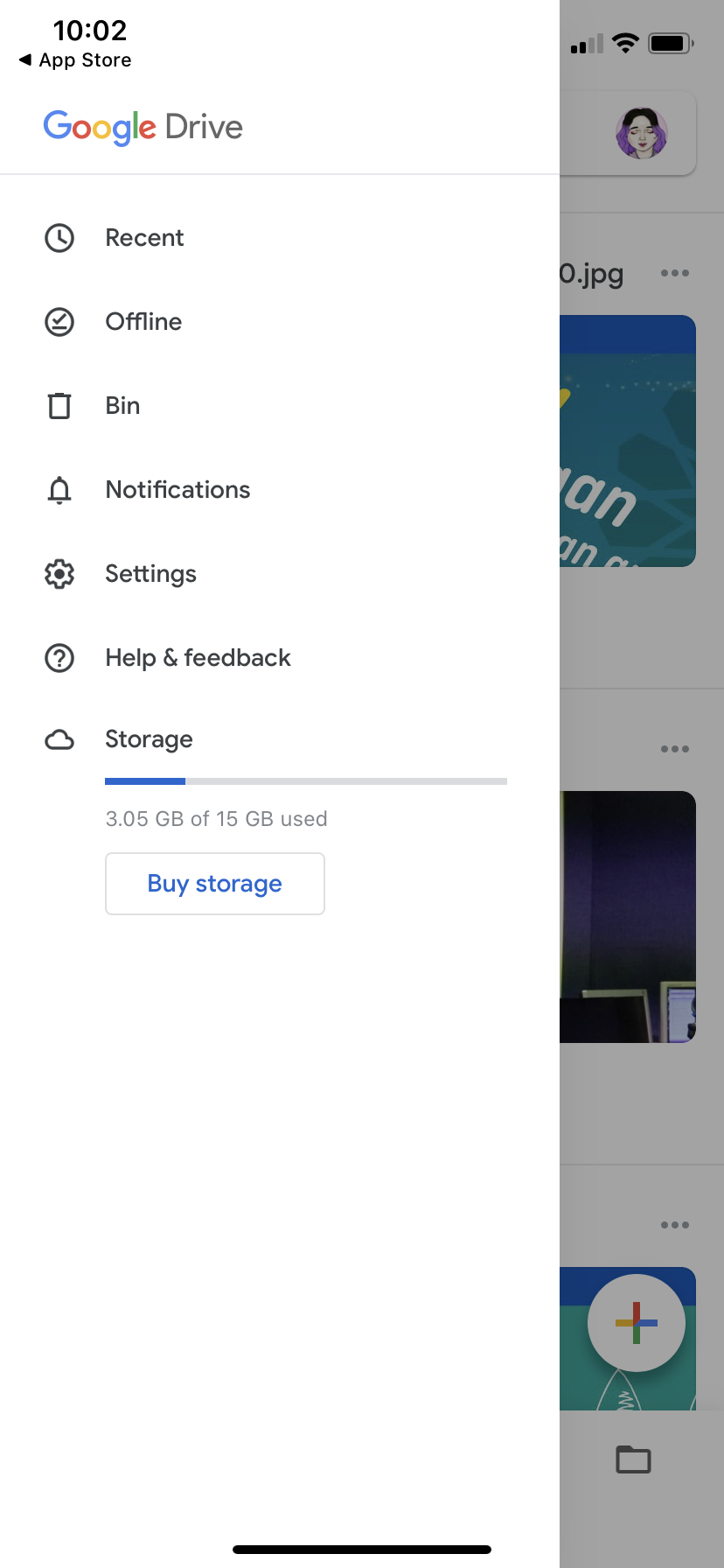
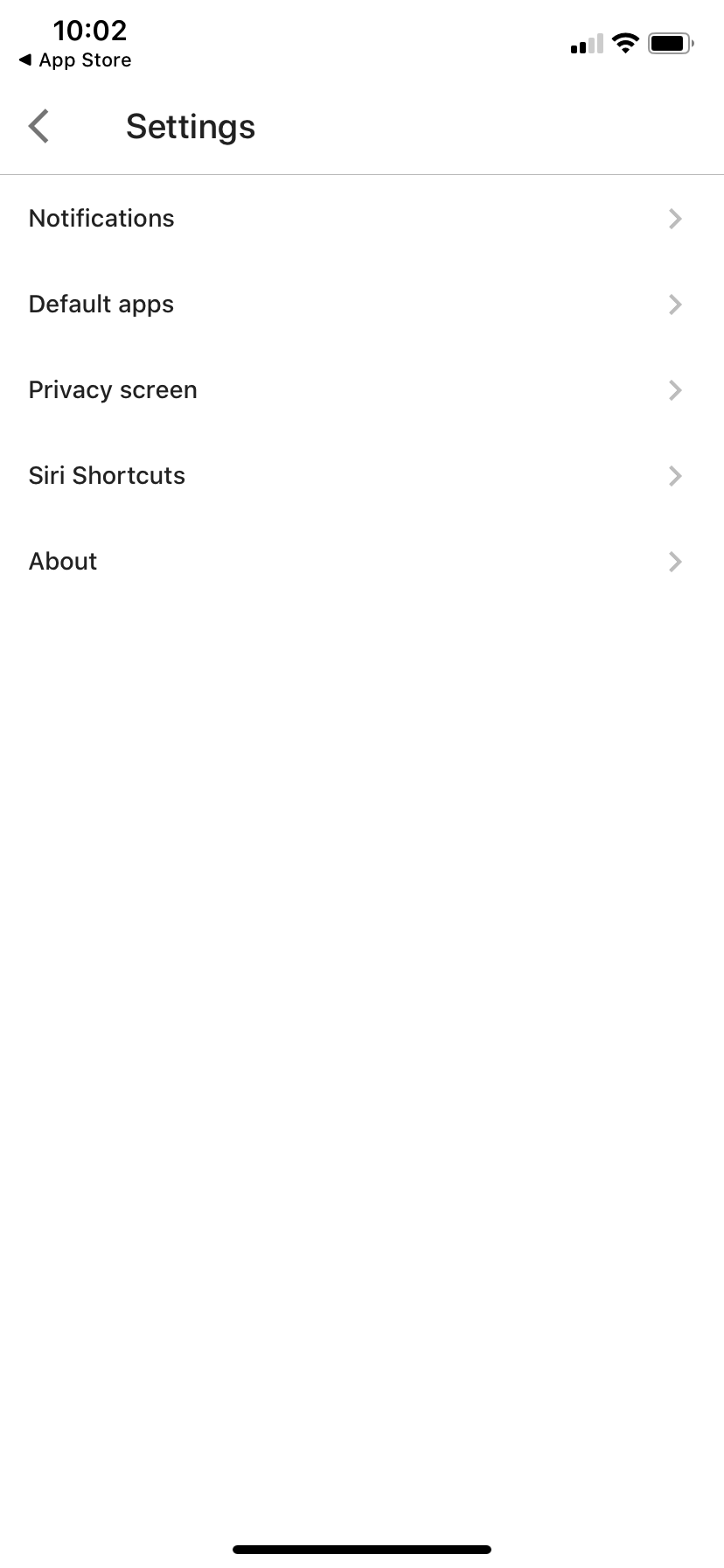
  • Check to see if you have the updated version of the Google Drive app on your iPhone or iPad
  • Fire up the Google Drive app and go to “Settings”
  • Go to “Privacy Screen”
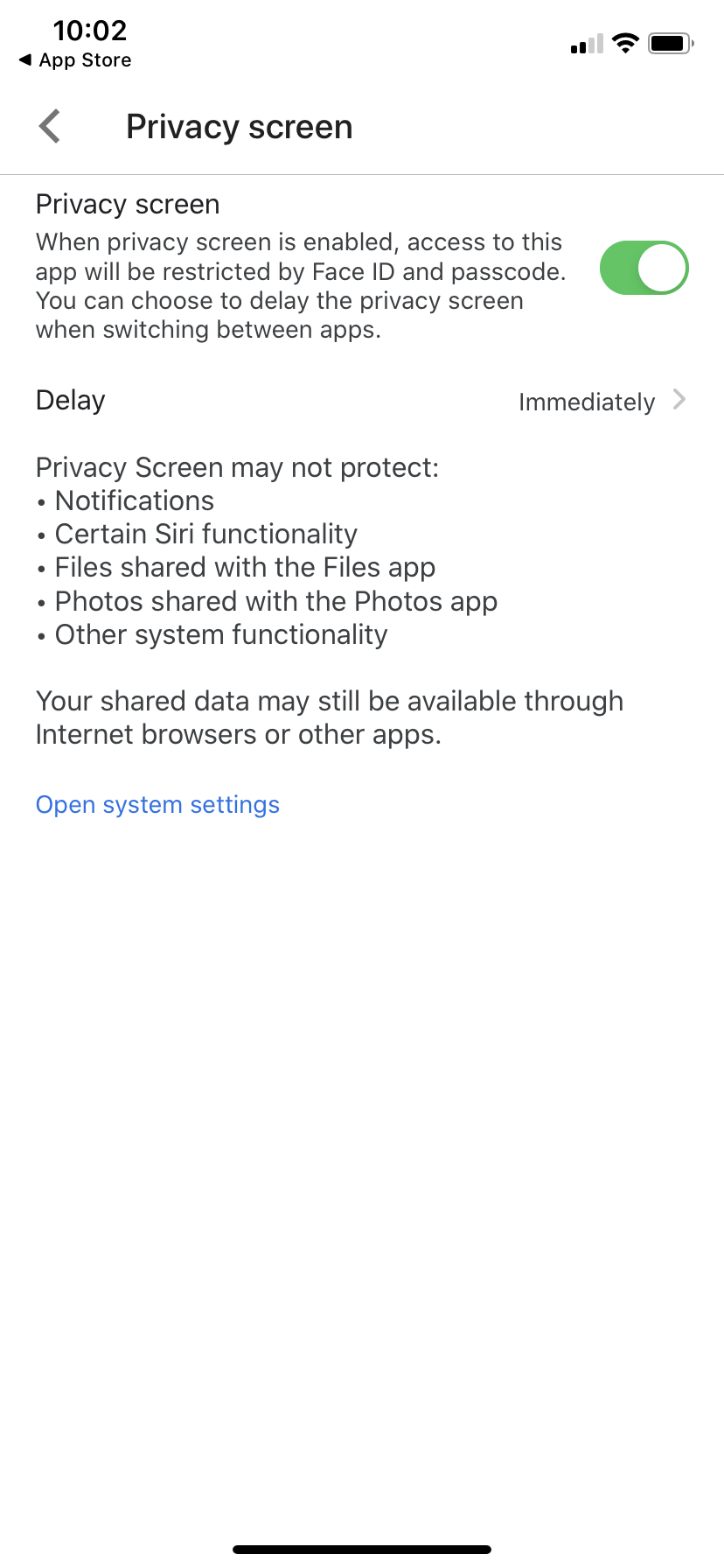
  • You’ll be able to enable the Privacy Screen option, where the description reads that “access to this app will be restricted by Face ID (if you have an iPhone or iPad that has Face ID), Touch ID (if you have a device that has Touch ID) or a passcode
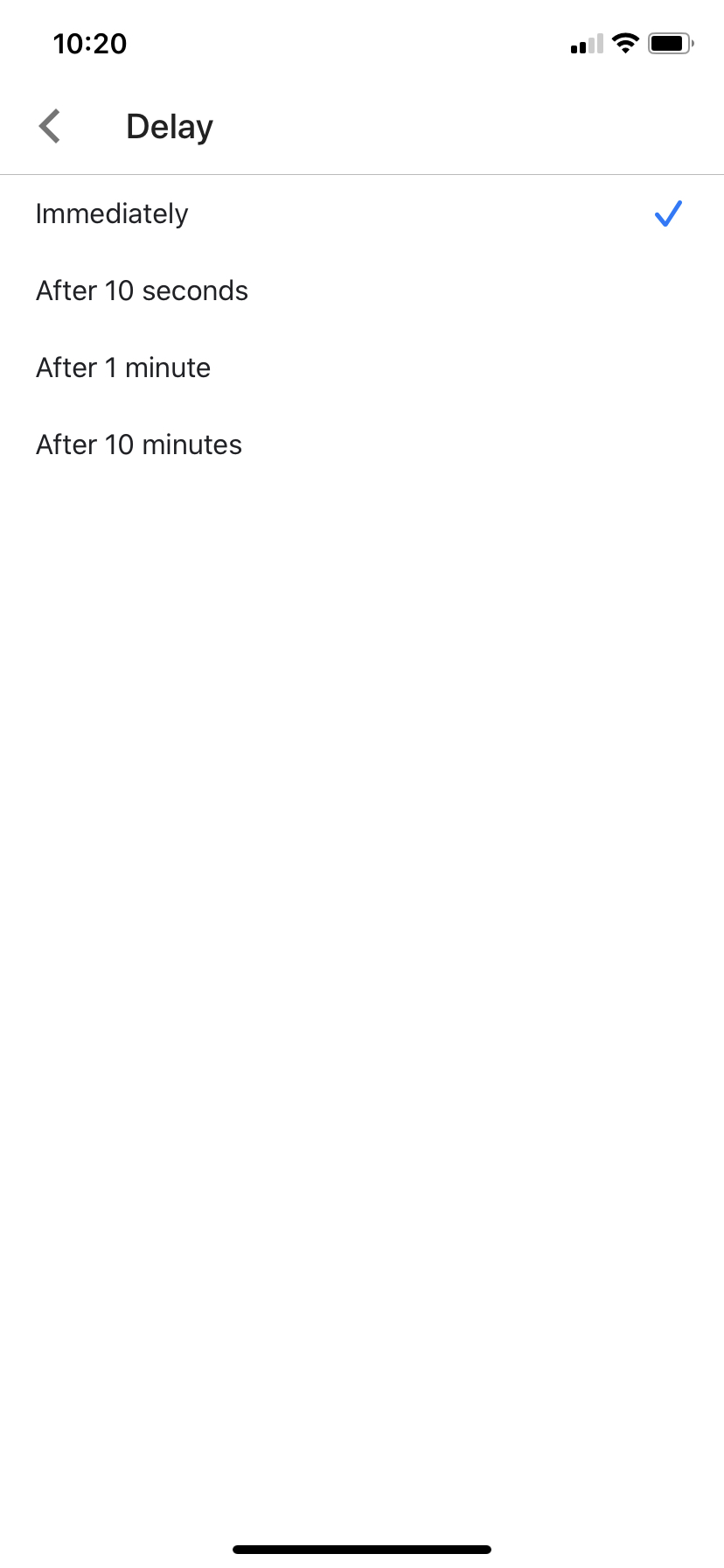
  • You can also go to “Delay” where you can choose to delay the the privacy screen when switching between different apps. This will make multi-tasking less of a hassle if you want
  • You can choose the timing of the “Delay”, between “Immediately”, “After 10 seconds”, “After 1 minute” or “After 10 minutes”

After enabling this option, Google Drive will automatically activate as soon as you switch to another app and come back. However, the app emphasises that the Privacy Screen feature might not protect all aspects of your files on Google Drive.

Privacy screen doesn’t protect notifications, certain Siri functionality, files shares in the Files app, photos shares in the Photos app and “other system functionality”. They also mention that “your shared data might still be available through Internet browsers and other apps”.

iPhones and iPads should already have privacy abilities like passcodes, Touch ID and Face ID but with this added measure, your important work documents or sensitive personal files will be kept further away from snooping eyes. Several years ago, Google Drive offered passcode protection, but the feature was pulled. There has also been a wide interest in securing Google Drive files, previously.

The added feature isn’t currently available for Android phones yet, despite Google’s own mobile platform supporting fingerprint and face scanning.

[ SOURCE ]

Related reading

iPhone users can protect their WhatsApp conversations using Face ID
Tags: Google DriveiOSiPadiPadOSiPhone
Dzamira Dzafri

Dzamira Dzafri

POPULAR

Upgraded To a New Phone? Cool. But When Was the Last Time you Upgraded your Shaver?

November 10, 2025

5 Reasons Every Home Should Have a Smart Security System

November 11, 2025

Solar ATAP: The new solar programme for consumers will only start in 2026

December 2, 2025

iPhone and iPad users can now secure their Google Drive app with Face ID or Touch ID

May 8, 2020
Perodua QV-E EV

Perodua QV-E is now official: Electric sportback with 201hp, 445km NEDC range, priced at RM80k not inclusive of battery subscription

December 1, 2025

GrabRewards is now GrabCoins: Now with even more ways to earn and save

November 17, 2025

Copyright © 2025 · SoyaCincau.com
Mind Blow Sdn Bhd (1076827-P)

  • ADVERTISE
  • DISCLAIMER

Copyright © 2025 · SoyaCincau.com – Mind Blow Sdn Bhd (1076827-P)

  • ADVERTISE
  • DISCLAIMER