• 中文版
  • BM
  • News
  • Deals
  • Reviews
    • First Impressions
    • Hands-on
    • Comparisons
  • Tech
    • Mobile
    • Computers
    • Cameras
    • Wearables
    • Audio
    • Drones
  • Telco
    • Celcom
    • Digi
    • Maxis
    • Time
    • Tune Talk
    • U Mobile
    • Unifi
    • Yes
  • Cars
  • Contribute
  • Jobs
Menu
  • 中文版
  • BM
  • News
  • Deals
  • Reviews
    • First Impressions
    • Hands-on
    • Comparisons
  • Tech
    • Mobile
    • Computers
    • Cameras
    • Wearables
    • Audio
    • Drones
  • Telco
    • Celcom
    • Digi
    • Maxis
    • Time
    • Tune Talk
    • U Mobile
    • Unifi
    • Yes
  • Cars
  • Contribute
  • Jobs
Search
  • Tech
    • News
    • Mobile
    • Computers
    • Cameras
    • Wearables
    • Audio
    • Drones
  • Telco
    • Celcom
    • Digi
    • Maxis
    • Time
    • U Mobile
    • Unifi
    • Yes
  • Reviews
    • First Impressions
    • Hands-on
    • Comparisons
  • Buyer’s Guide
  • Opinions
  • Digital Life
  • Video
  • Deals
  • How-To
  • Cars
  • Bahasa Melayu
  • EV
  • Contribute
  • Advertise
Menu
  • Tech
    • News
    • Mobile
    • Computers
    • Cameras
    • Wearables
    • Audio
    • Drones
  • Telco
    • Celcom
    • Digi
    • Maxis
    • Time
    • U Mobile
    • Unifi
    • Yes
  • Reviews
    • First Impressions
    • Hands-on
    • Comparisons
  • Buyer’s Guide
  • Opinions
  • Digital Life
  • Video
  • Deals
  • How-To
  • Cars
  • Bahasa Melayu
  • EV
  • Contribute
  • Advertise
Search
Close
Home Digital Life

Push mobile images to the big screen with QR Code

  • BY soyacincau
  • 19 November 2011
  • 1:01 pm
  • Comment
Share on FacebookShare on Twitter

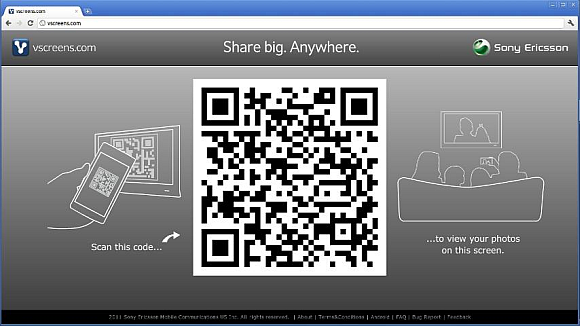
Sony Ericsson has introduced a nifty Android app called Vscreens which allows you to share your mobile phone images to a bigger screen easily. Usually if you need to share a photo onto a laptop, tablet or even TV, you would either bluetooth or connect using cables such as USB and HDMI. With Vscreens, all it takes is just a simple QR code.

How it works? Just install the Vscreen app on your Android device and point your laptop/ipad/tablet/TV web browser to Vscreens.com. The first thing you’ll see on the web browser is a big QR code which the mobile Vscreen app will be used to scan. This creates a link between the 2 devices and you can click on any photos on your phone to be pushed onto the big screen.

We tried it ourselves on a laptop computer and it works incredibly well. The only drawback is that it goes thru the Internet which means it will take sometime to load. It took us about 5-7 seconds to refresh to a new photo. Nevertheless, the easy set up without wires makes this a practical solution to share pictures. This Vscreen app is open to all Android devices.

To download, head over to the Android Market link.

[ SOURCE ]

Tags: android appMobile to TVQR codeScreen sharingSony EricssonTV outputVscreens
soyacincau

soyacincau

POPULAR

Upgraded To a New Phone? Cool. But When Was the Last Time you Upgraded your Shaver?

November 10, 2025

5 Reasons Every Home Should Have a Smart Security System

November 11, 2025

Solar ATAP: The new solar programme for consumers will only start in 2026

December 2, 2025

Push mobile images to the big screen with QR Code

November 19, 2011
Perodua QV-E EV

Perodua QV-E is now official: Electric sportback with 201hp, 445km NEDC range, priced at RM80k not inclusive of battery subscription

December 1, 2025

GrabRewards is now GrabCoins: Now with even more ways to earn and save

November 17, 2025

Copyright © 2025 · SoyaCincau.com
Mind Blow Sdn Bhd (1076827-P)

  • ADVERTISE
  • DISCLAIMER

Copyright © 2025 · SoyaCincau.com – Mind Blow Sdn Bhd (1076827-P)

  • ADVERTISE
  • DISCLAIMER