• 中文版
  • BM
  • News
  • Deals
  • Reviews
    • First Impressions
    • Hands-on
    • Comparisons
  • Tech
    • Mobile
    • Computers
    • Cameras
    • Wearables
    • Audio
    • Drones
  • Telco
    • Celcom
    • Digi
    • Maxis
    • Time
    • Tune Talk
    • U Mobile
    • Unifi
    • Yes
  • Cars
  • Contribute
  • Jobs
Menu
  • 中文版
  • BM
  • News
  • Deals
  • Reviews
    • First Impressions
    • Hands-on
    • Comparisons
  • Tech
    • Mobile
    • Computers
    • Cameras
    • Wearables
    • Audio
    • Drones
  • Telco
    • Celcom
    • Digi
    • Maxis
    • Time
    • Tune Talk
    • U Mobile
    • Unifi
    • Yes
  • Cars
  • Contribute
  • Jobs
Search
  • Tech
    • News
    • Mobile
    • Computers
    • Cameras
    • Wearables
    • Audio
    • Drones
  • Telco
    • Celcom
    • Digi
    • Maxis
    • Time
    • U Mobile
    • Unifi
    • Yes
  • Reviews
    • First Impressions
    • Hands-on
    • Comparisons
  • Buyer’s Guide
  • Opinions
  • Digital Life
  • Video
  • Deals
  • How-To
  • Cars
  • Bahasa Melayu
  • EV
  • Contribute
  • Advertise
Menu
  • Tech
    • News
    • Mobile
    • Computers
    • Cameras
    • Wearables
    • Audio
    • Drones
  • Telco
    • Celcom
    • Digi
    • Maxis
    • Time
    • U Mobile
    • Unifi
    • Yes
  • Reviews
    • First Impressions
    • Hands-on
    • Comparisons
  • Buyer’s Guide
  • Opinions
  • Digital Life
  • Video
  • Deals
  • How-To
  • Cars
  • Bahasa Melayu
  • EV
  • Contribute
  • Advertise
Search
Close
Home Digital Life

Video How-To: Opera Mini not working on iPhone?

  • BY soyacincau
  • 15 April 2010
  • 1:06 am
  • Comment
Share on FacebookShare on Twitter

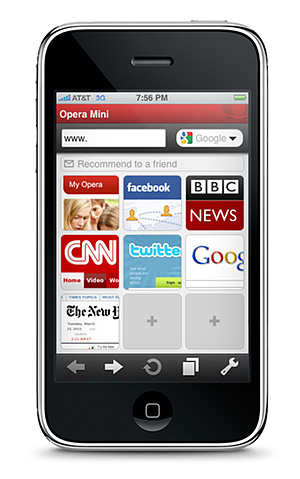
After Opera Mini was approved by Apple, many have rushed to download the app. Unfortunately things didn’t go well for some users. There are quite a number of people complained that they couldn’t pages to load with Opera Mini on their iPhones or iPods.

Before blaming Opera or even Apple for approving such a “useless” app, there’s actually some configuration that needs to be changed if you can’t browse load pages at all.

The solution is simple, go into the Opera Mini settings and change the Protocol to HTTP. The default setting of Socket doesn’t work for some people which we believe it could be telco related.

Check out the video below after the jump on how to change your settings on your Opera Mini.

Hope this helps.

Tags: Opera mini Failed to connect to the internetOpera Mini iPhoneOpera Mini iPhone Connection IssueOpera Mini iPhone doesn't workOpera Mini iPhone fail to loadOpera Mini iPhone HelpOpera Mini not loading
soyacincau

soyacincau

POPULAR

Video How-To: Opera Mini not working on iPhone?

April 15, 2010

KTM Komuter and ETS disrupted today: Here is what’s causing the train delays

July 23, 2026
Source: Photo by kovop58 / Adobe Stock

6 Places You Can Watch the FIFA World Cup 2026 Finals Live in Malaysia

July 17, 2026

How fast is ULTRA5G inside KL Malls? Here’s What Dedicated Indoor ULTRA5G Infrastructure Can Actually Do

July 16, 2026

U Mobile suffers nationwide network outage in the early hours of the morning

July 22, 2026

Touch ‘n Go rolls out Enhanced RFID lane at AKLEH, targets 10 lanes by year-end

July 21, 2026

Copyright © 2025 · SoyaCincau.com
Mind Blow Sdn Bhd (1076827-P)

  • ADVERTISE
  • DISCLAIMER

Copyright © 2026 · SoyaCincau.com – Mind Blow Sdn Bhd (1076827-P)

  • ADVERTISE
  • DISCLAIMER