• 中文版
  • BM
  • News
  • Deals
  • Reviews
    • First Impressions
    • Hands-on
    • Comparisons
  • Tech
    • Mobile
    • Computers
    • Cameras
    • Wearables
    • Audio
    • Drones
  • Telco
    • Celcom
    • Digi
    • Maxis
    • Time
    • Tune Talk
    • U Mobile
    • Unifi
    • Yes
  • Cars
  • Contribute
  • Jobs
Menu
  • 中文版
  • BM
  • News
  • Deals
  • Reviews
    • First Impressions
    • Hands-on
    • Comparisons
  • Tech
    • Mobile
    • Computers
    • Cameras
    • Wearables
    • Audio
    • Drones
  • Telco
    • Celcom
    • Digi
    • Maxis
    • Time
    • Tune Talk
    • U Mobile
    • Unifi
    • Yes
  • Cars
  • Contribute
  • Jobs
Search
  • Tech
    • News
    • Mobile
    • Computers
    • Cameras
    • Wearables
    • Audio
    • Drones
  • Telco
    • Celcom
    • Digi
    • Maxis
    • Time
    • U Mobile
    • Unifi
    • Yes
  • Reviews
    • First Impressions
    • Hands-on
    • Comparisons
  • Buyer’s Guide
  • Opinions
  • Digital Life
  • Video
  • Deals
  • How-To
  • Cars
  • Bahasa Melayu
  • EV
  • Contribute
  • Advertise
Menu
  • Tech
    • News
    • Mobile
    • Computers
    • Cameras
    • Wearables
    • Audio
    • Drones
  • Telco
    • Celcom
    • Digi
    • Maxis
    • Time
    • U Mobile
    • Unifi
    • Yes
  • Reviews
    • First Impressions
    • Hands-on
    • Comparisons
  • Buyer’s Guide
  • Opinions
  • Digital Life
  • Video
  • Deals
  • How-To
  • Cars
  • Bahasa Melayu
  • EV
  • Contribute
  • Advertise
Search
Close
Home Digital Life

SanDisk Memory Zone for Android

  • BY soyacincau
  • 28 September 2011
  • 10:02 am
  • Comment
Share on FacebookShare on Twitter

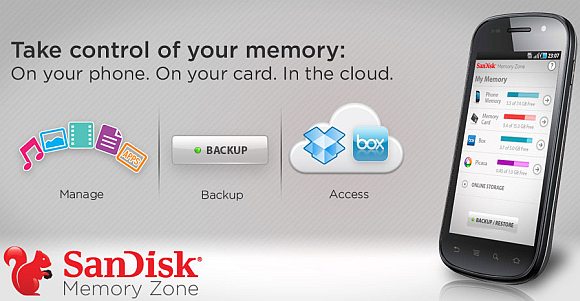
Data on a smart phone are as valuable as the ones on your computer. With precious photos and sensitive data on the move, managing data can be a hassle. Now SanDisk, a major manufacturer of microSD storage has introduced a data management app called Memory Zone for Android platform. It offers a variety of data management tools such as scheduled backup, data management to manage both internal/external memory and even uploads them to the cloud.

The interface seems to be pretty easy and simple to use, perfect for those who can’t navigate their way around File Managers. For cloud syncing, it works with your existing Dropbox and Box.net account. There’s also an encryption function to make selective files private from unauthorised users.

To download, head over to the Android Market.

Watch the demo video after the break.

[ SOURCE ]

Tags: AndroidAndroid Data BackupCloudCloud BackupMemory Zone for AndroidSanDiskSanDisk Memory Zone
soyacincau

soyacincau

POPULAR

SanDisk Memory Zone for Android

September 28, 2011

The Single-Stock Trap: Why True Tech Investing Means Moving Beyond a Few Famous Tickers

June 25, 2026

Astro X3 lets you stream instantly with no box or installation, from RM39.99/month

July 7, 2026
Perodua QV-E EV

Perodua QV-E already received 1,700 bookings? Really?

July 7, 2026

Samsung Galaxy Z Fold 8 launch on 22 July: Here’s how to claim eVouchers worth up to RM700

July 8, 2026
BYD Dolphin - ChargEV AEON Mall Shah Alam

Malaysia now targets to have 30,000 EV charge points by 2030 – half of Singapore’s 2030 target

July 8, 2026

Copyright © 2025 · SoyaCincau.com
Mind Blow Sdn Bhd (1076827-P)

  • ADVERTISE
  • DISCLAIMER

Copyright © 2026 · SoyaCincau.com – Mind Blow Sdn Bhd (1076827-P)

  • ADVERTISE
  • DISCLAIMER